

XML sitemaps are essential for large websites to ensure search engines efficiently crawl and index your content. Without a well-structured sitemap, critical pages might go unnoticed, affecting your site’s visibility.
Key points to know:
- File Limits: Each sitemap can include up to 50,000 URLs or 50MB uncompressed. Use sitemap index files for larger sites.
- Segmentation: Divide sitemaps by content type (e.g., products, blogs) or region (e.g.,
sitemap-en-us.xml) to improve organization and troubleshooting. - Metadata: Use accurate
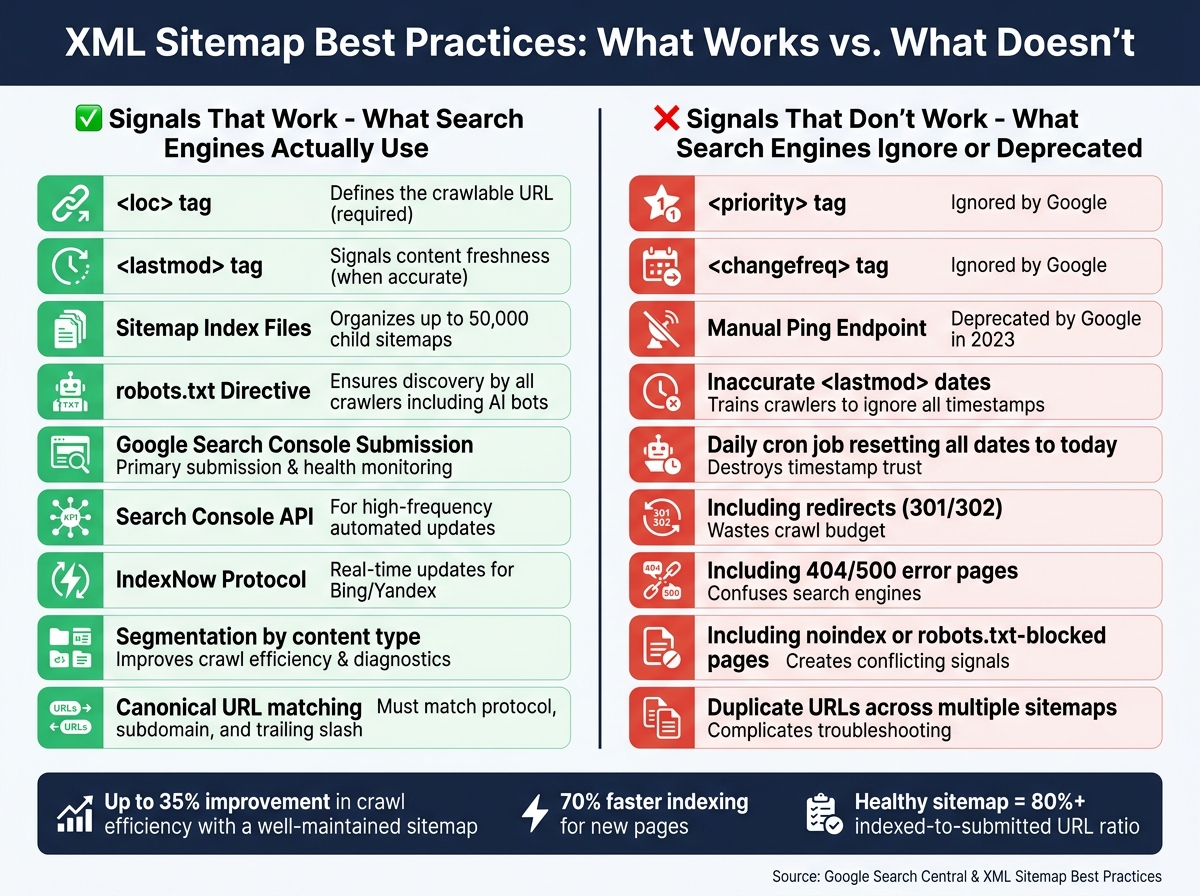
<lastmod>dates to signal updates. Avoid<priority>and<changefreq>– Google ignores them. - Exclusions: Leave out redirects, error pages, and non-canonical URLs to save crawl budget.
- Automation: Dynamic generation ensures sitemaps stay updated with your site changes.
For submission, include the sitemap URL in your robots.txt file and use Google Search Console for monitoring. A well-maintained sitemap can improve crawl efficiency by up to 35% and help new pages get indexed 70% faster.
SEO Demystified: Lesson 4 – How Search Engines Use Sitemaps
Core Technical Standards for XML Sitemaps
Understanding the basics is crucial before diving into the structure and strategy of XML sitemaps. Even a well-structured sitemap can create problems if it doesn’t meet Google’s technical requirements.
XML Sitemap Specifications
An XML sitemap should be a UTF-8 encoded file that lists up to 50,000 URLs or is no larger than 50 MB when uncompressed. Each file must use absolute URLs (like https://www.example.com/page.html) and start with a <urlset> tag, which includes the required namespace: http://www.sitemaps.org/schemas/sitemap/0.9. Each URL entry should be enclosed in a <url> tag and must include a <loc> tag. Keep in mind that <loc> values are capped at 2,048 characters. If special characters are part of a URL, they need to be properly escaped (e.g., replace & with &) to ensure the file is parsed correctly.
Here’s a quick rundown of the essential sitemap tags:
| Tag | Required | Notes |
|---|---|---|
<urlset> |
Yes | Wraps the entire file and must include the proper namespace |
<url> |
Yes | Encapsulates each URL entry |
<loc> |
Yes | Specifies the full URL; limited to 2,048 characters |
<lastmod> |
Optional | Shows the last modification date in W3C Datetime format |
<changefreq> |
Optional | Suggests how often the page is updated (ignored by Google) |
<priority> |
Optional | Indicates the URL’s importance (also ignored by Google) |
Google also supports additional sitemap extensions for images, videos, and news. These extensions allow you to include extra metadata, like video duration or publication dates for news articles. When creating a news sitemap, only include articles published within the last 48 hours and remove older URLs as soon as they’re no longer relevant.
Once the technical format is squared away, the focus shifts to selecting the right URLs for optimal indexing.
Which URLs to Include and Which to Leave Out
For large websites, carefully curating URLs is key to improving crawl efficiency. Always include canonical URLs that return an HTTP 200 status code. Avoid adding:
- Redirects (e.g., 301 or 302)
- Error pages (like 404 or 500)
- Pages blocked by
robots.txt - Pages tagged with "noindex"
Including non-indexable pages can confuse search engines and waste your crawl budget. Similarly, utility pages like login screens, admin panels, or checkout pages should be excluded since they aren’t meant to appear in search results. For duplicate or non-canonical pages, only include the preferred version.
How to Reference and Submit Sitemaps
To ensure search engines can find your sitemap, you can:
- Add a reference in your
robots.txtfile with a line like:Sitemap: https://example.com/sitemap.xml - Submit the sitemap directly through Google Search Console (GSC). This method is particularly helpful for larger sites or those that update frequently. GSC allows up to 500 sitemap index files per site.
For best results, host your sitemap in the root directory of your domain, ensuring it covers all the URLs on your site.
How to Structure Sitemaps for Large Websites
When your website grows beyond a few hundred pages, managing its sitemaps becomes increasingly complex. A single-file sitemap might suffice for smaller sites, but with tens of thousands of URLs, organization becomes key.
Sitemap Segmentation Strategies
The best way to handle large sitemaps is to divide them by content type or site section. Instead of cramming everything into one file, create separate sitemaps for categories like products, blog posts, or landing pages. This method makes it much easier to identify and resolve indexing issues in Google Search Console, as problems will be isolated to specific segments.
Naming these files descriptively is equally important. A name like sitemap-products-womens.xml clearly communicates its content, while something generic like sitemap-3.xml is unhelpful. Clear naming conventions save time when debugging coverage errors across large sites. This is particularly critical when performing mobile SEO audits to ensure parity between desktop and mobile indexing.
For websites targeting different regions or languages, consider segmenting by geography or locale. For example, sitemap-en-us.xml and sitemap-es-mx.xml simplify hreflang management and allow you to monitor regional indexing performance separately.
One golden rule: each URL should only appear in one sitemap. Duplicate entries confuse crawlers and make troubleshooting far more difficult. Using segmentation naturally leads to the need for sitemap index files for better organization.
Using Sitemap Index Files
If your site has more than 50,000 URLs or a single sitemap exceeds 50 MB (uncompressed), a sitemap index file is the solution. This file acts as a central hub, pointing search engines to all your individual sitemaps.
"If you have a sitemap that exceeds the size limits, you’ll need to split up your large sitemap into multiple sitemaps… you can use a sitemap index file as a way to submit many sitemaps at once." – Google Search Central
A single sitemap index file can reference up to 50,000 individual sitemaps, making it scalable for even the largest websites. Beyond sheer capacity, the real advantage lies in crawl efficiency. Search engines can focus on re-crawling only the sitemaps that have been updated, instead of processing the entire set every time. Adding a new section? Just create a new sitemap and add its reference to the index – no need to overhaul your existing structure.
Specialized Sitemaps for Specific Content Types
While standard XML sitemaps are great for discovering pages, they don’t convey rich metadata for images, videos, or time-sensitive news. That’s where specialized sitemaps come into play.
| Sitemap Type | Best For | Key Tags | Limits |
|---|---|---|---|
| Image | E-commerce, portfolios, visual content | <image:loc>, <image:caption> |
50,000 URLs / 50 MB |
| Video | Video-heavy platforms, media sites | <video:thumbnail_loc>, <video:duration> |
50,000 URLs / 50 MB |
| News | Google News-approved publishers | <news:publication>, <news:publication_date> |
1,000 URLs; last 48 hours only |
- Image Sitemaps: These are invaluable for sites where images are loaded via JavaScript, as crawlers might miss them in standard HTML. Use tags like
<image:loc>and<image:caption>to provide extra details. - Video Sitemaps: Ensure all required fields – thumbnail, title, description, and content URL – are included. Missing any of these can prevent your videos from appearing in rich search results.
- News Sitemaps: These are highly restrictive, limited to 1,000 URLs and only covering articles published in the last 48 hours. Automating the process to move older articles from the news sitemap to a standard one ensures compliance without manual effort.
How to Prioritize and Update URLs in XML Sitemaps
XML Sitemap Tags & Submission Methods: What Works in 2024
Once your sitemaps are well-organized and segmented, the next step is ensuring search engines focus their crawl budget on the pages that matter most. This boils down to signaling both importance and freshness effectively.
URL Prioritization for Large Sites
Many site owners mistakenly rely on <priority> and <changefreq> tags to guide search engines. However, Google doesn’t use either of these tags. Instead, focus on two key elements: accurate <lastmod> dates and internal linking. These are far more effective in communicating which pages deserve attention.
To prioritize key pages, think in terms of business value. For example, core category pages, top-selling products, and high-converting landing pages should take precedence. Placing these high-priority pages in a dedicated sitemap makes it easier to monitor their indexing in Google Search Console and quickly identify potential issues.
Here’s a quick breakdown of sitemap tags and their relevance:
| Tag | Used by Google | Strategic Value |
|---|---|---|
<loc> |
Yes | Defines the URL |
<lastmod> |
Yes (when accurate) | High – helps schedule crawls |
<changefreq> |
No | Low – ignored by modern engines |
<priority> |
No | Low – ignored by modern engines |
How to Use the <lastmod> Tag Correctly
One of the most effective ways to signal freshness is through the <lastmod> tag. However, it only works if the dates are accurate and reflect real updates. Google trusts <lastmod> values when they align with actual content changes.
"Google uses lastmod when it’s reliable. If your lastmod dates consistently match real content changes, Google will trust them. If they don’t, Google learns to ignore them." – John Mueller, Search Advocate, Google
To ensure your <lastmod> is reliable, link it directly to your CMS’s update timestamp. This way, it updates automatically whenever meaningful content changes occur, such as editing articles, adding new images, or revising product descriptions. Avoid triggering updates for superficial changes like CSS tweaks or template modifications – these can erode trust. Also, don’t use a daily cron job to set every URL to today’s date; this approach trains crawlers to disregard your timestamps entirely.
Use the W3C Datetime format for accurate timestamps. For standard pages, stick to YYYY-MM-DD. For time-sensitive content like news articles or flash sale pages, include the full timestamp with time zone: YYYY-MM-DDTHH:MM:SS+TZD.
Aligning Sitemap Signals with Technical SEO
A sitemap’s effectiveness doesn’t exist in a vacuum – it needs to align with other technical SEO elements like canonical tags, internal links, and robots.txt directives.
The golden rule? Every URL in your sitemap must match its canonical version exactly. This includes using the correct protocol (https://), consistent subdomain formatting (whether or not you use www), and uniform trailing slashes. Mismatches can create conflicting signals, leading to delays in indexing.
"A sitemap that matches your internal linking and canonical setup can help. A sitemap that contradicts them quietly creates confusion." – Kiril Ivanov, Managing Director & Performance Lead, TwoSquares
Internal linking also plays a key role in reinforcing sitemap signals. Think of your sitemap as the map for discovery and your internal links as the signal for authority. Together, they should communicate the same hierarchy. Pages linked from high-authority sections of your site are more likely to be crawled frequently, ensuring better visibility.
Automating and Maintaining XML Sitemaps
Dynamic Sitemap Generation
For large websites, manually managing sitemaps just isn’t practical. Every time you publish a new page or remove an old one, a static sitemap can become outdated. That’s where dynamic generation comes in – pulling URLs directly from your database or CMS ensures your sitemap always reflects your site’s current state.
For enterprise-level sites, a hybrid approach works well. Generate sitemaps on-demand for high-priority content like new products or breaking news, while scheduling regular updates (daily or hourly) for more stable sections, such as category pages. This method keeps your content fresh while balancing server performance. To further reduce database strain, cache the sitemap output for short periods.
If you’re on WordPress, the built-in sitemap feature (introduced in version 5.5) is a good starting point but has its limitations. For example, it doesn’t support the <lastmod> tag or advanced options for image and video sitemaps. Plugins like Yoast SEO (around $99/year) or Rank Math (around $69/year) provide more control, including specialized sitemaps and per-page settings. For custom platforms, a database-driven script is ideal – it can automatically include only canonical, indexable URLs with a 200 status code, while excluding redirects, noindex pages, and 404 errors.
Validation and Monitoring Practices
Once you’ve dynamically generated your sitemap, it’s crucial to validate and monitor it regularly. Before submitting, check the XML structure using a schema validator or an SEO tool like Screaming Frog (free for up to 500 URLs; $149/year for the paid version). This step helps catch syntax errors, broken links, or encoding issues. Even a small mistake, like an unescaped & instead of &, can render the entire sitemap invalid.
After submission, Google Search Console becomes your go-to tool for monitoring. Pay attention to the "Discovered URLs" versus "Indexed URLs" ratio in the Sitemaps report. A healthy sitemap usually has an indexed-to-submitted ratio above 80%. Additionally, the Page Indexing (Coverage) report can help you identify why certain URLs aren’t being indexed. For easier troubleshooting, keep individual child sitemaps to about 1,000 URLs, as Search Console only exports up to 1,000 rows at a time.
"A sitemap is a request, not a guarantee. Google will still evaluate each URL based on content quality, crawl budget, and overall site authority." – ElevaSEO
Once validated, make sure your sitemap remains up-to-date by revising and pinging it as needed.
When and How to Update and Ping Sitemaps
You should update your sitemap whenever major changes occur – like adding new pages, making substantial updates to existing content, or removing outdated pages. Avoid updating for minor edits, following the same principle behind the <lastmod> tag. Timely updates can improve how efficiently your site gets crawled.
As of 2023, Google no longer supports its manual sitemap ping endpoint. The best practice now is to submit your sitemap through Google Search Console and include its location in your robots.txt file. For example, you can add a line like this:
Sitemap: https://example.com/sitemap_index.xml. This ensures all crawlers, including AI bots, can easily find your sitemap.
For sites that update frequently, you can use the Search Console API to notify Google about changes programmatically. Bing and Yandex support the IndexNow protocol, which allows you to push real-time URL updates without waiting for their crawlers.
| Submission Method | Best For | Status |
|---|---|---|
| Google Search Console | Initial submission and health monitoring | Recommended |
robots.txt Directive |
Discovery by all crawlers, including AI bots | Essential |
| Search Console API | High-frequency content updates | Recommended for automation |
| IndexNow Protocol | Real-time updates for Bing/Yandex | Recommended |
| Manual Ping Endpoint | – | Deprecated by Google |
Conclusion: XML Sitemap Best Practices for Large Websites
Managing XML sitemaps for large websites boils down to a few key principles: structured architecture, clean URL management, accurate metadata, and reliable automation. When these elements are in place, sitemaps become a powerful tool for search engine discovery rather than just another maintenance task.
Hierarchy plays a critical role. For websites with extensive URL counts, using a sitemap index file segmented by content types – like products, blogs, or categories – makes diagnostics in Google Search Console much easier. This approach helps identify indexing issues without having to sift through millions of URLs. Plus, such an organized structure ensures search engines focus on high-value content.
"A sitemap should never be a dumping ground. It is a curated signal of what matters." – TwoSquares
Maintaining the quality of URLs is equally important. Redirects, noindex pages, and non-200 URLs should always be excluded to maintain trust with search engines. As Surfaceable points out, "If Google determines your lastmod dates are inaccurate, it stops trusting them across your whole sitemap."
Additionally, as search evolves, well-maintained sitemaps are becoming more relevant beyond traditional SEO. Modern search algorithms, including AI-driven engines and large language models, use sitemaps to evaluate authority and understand content structure. Keeping your sitemap accurate and well-organized is no longer just about good SEO – it’s essential for staying visible in the changing search landscape. For more in-depth technical SEO audits and personalized strategies, check out our technical SEO services.
FAQs
How many sitemaps does my site need?
When it comes to sitemaps, the number you need depends on the size and structure of your website. If your site has more than 50,000 URLs, it’s best to create multiple sitemaps and manage them using a sitemap index file. This helps search engines crawl your site more efficiently. For smaller websites with fewer than 50,000 URLs, a single sitemap will usually suffice. Make sure your sitemaps are clear, kept up-to-date, and properly linked to help search engines crawl and index your site effectively.
How can I keep <lastmod> accurate at scale?
To keep the <lastmod> tag accurate on large websites, make sure it always reflects the actual date and time when each URL was last modified. Stick to the ISO 8601 format for consistency across your site.
You can simplify this process by automating updates. Use tools or integrate with your CMS to dynamically adjust timestamps whenever content changes. Avoid using static or outdated dates, as they can send misleading signals to search engines about your content’s freshness.
Why are my sitemap URLs submitted but not indexed?
If your sitemap URLs are submitted but not indexed, it could mean that search engines consider them low-quality, duplicates, or irrelevant. Pages blocked by robots.txt files or tagged with noindex will also be excluded from indexing. To address this, make sure your URLs are distinct, accessible, and provide useful content. Use Google Search Console regularly to spot and resolve issues like low-value content or technical obstacles that might be preventing proper indexing.