
Robots.txt is a simple yet powerful file that controls how search engines crawl your site. Misusing it can block critical pages, harm SEO, or even make your site invisible to search engines. Here’s what you need to know:
- Purpose: Robots.txt guides search engine crawlers on what to access or avoid on your site.
- Key Directives:
- User-agent: Targets specific bots (e.g., Googlebot, Bingbot) or all bots (
*). - Disallow: Blocks specific URLs or directories.
- Allow: Grants access to exceptions within blocked areas.
- Sitemap: Points crawlers to your XML sitemap for easier URL discovery.
- User-agent: Targets specific bots (e.g., Googlebot, Bingbot) or all bots (
- Common Mistakes:
- Blocking essential resources like CSS or JavaScript.
- Using overly broad rules (e.g.,
Disallow: /) that block the entire site. - Assuming robots.txt controls indexing – it doesn’t; use
noindextags for that.
- Advanced Features:
- Wildcards (
*) and end-of-URL targeting ($) for precise control. - Case sensitivity and path structure can affect how rules are applied.
- Wildcards (
Pro Tip: Always test your robots.txt file using tools like Google Search Console to avoid accidental SEO issues. A well-optimized robots.txt file ensures efficient crawling, reduces server load, and prioritizes high-value content.
Robots.txt File: A Beginner’s Guide
Core Robots.txt Directives
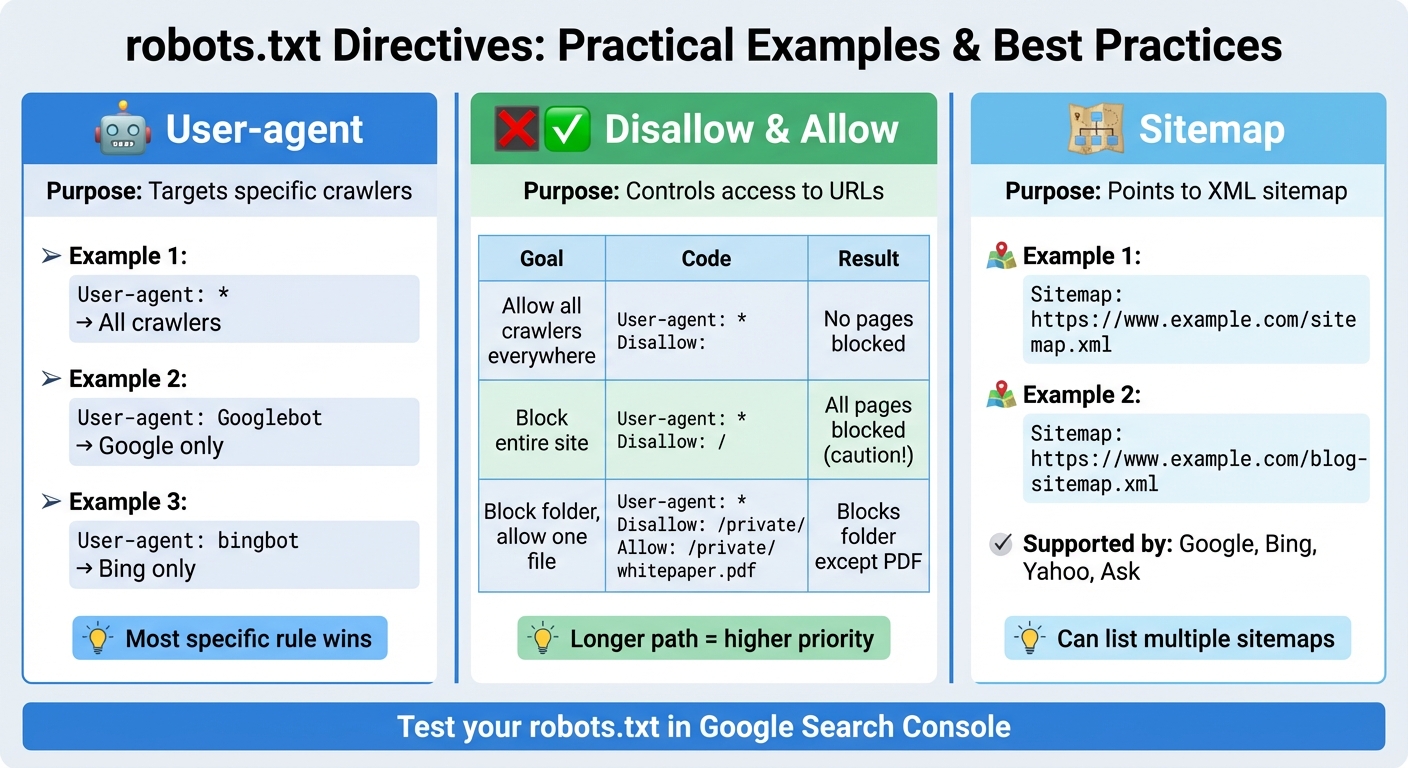
Robots.txt Directives Comparison: Disallow vs Allow vs Sitemap Examples
User-agent Directive
The User-agent directive tells search engine crawlers which rules to follow. You can specify rules for individual crawlers by naming them, like User-agent: Googlebot for Google’s main crawler or User-agent: bingbot for Bing. Alternatively, you can use User-agent: * to apply the rules universally to all crawlers.
Crawlers will always follow the most specific block that matches their name. For instance, if you have a block for Googlebot and a general block for all crawlers (*), Googlebot will prioritize its dedicated rules and disregard the general ones. This setup allows you to fine-tune how different search engines interact with your site.
Some commonly used user-agent names include Googlebot (Google’s general crawler), Googlebot-Image (for Google Images), bingbot (Bing), and baiduspider (Baidu). For most U.S.-based websites, starting with User-agent: * followed by your directives is often sufficient unless you need specific rules for individual crawlers.
This directive lays the groundwork for defining crawl permissions using the Disallow and Allow rules.
Disallow and Allow Directives
The Disallow directive tells crawlers which parts of your site they should avoid, while the Allow directive specifies exceptions to those restrictions. For example:
Disallow: /admin/blocks access to your admin folder.- Adding
Allow: /admin/public/permits access to a subfolder within the admin directory.
An empty Disallow: line grants full access, while Disallow: / blocks the entire site. Be cautious with the latter, as it prevents all crawling.
The Allow directive is especially useful when you want to block a broad section but still allow access to specific files or folders. For instance, if /private/ is disallowed but you want crawlers to access /private/whitepaper.pdf, you can add Allow: /private/whitepaper.pdf. Both Google and Bing follow the principle that the most specific rule takes precedence – so a longer, more detailed path will override a broader directive, no matter the order in your file.
| Example Goal | Robots.txt Snippet | Result |
|---|---|---|
| Allow all crawlers everywhere | User-agent: * Disallow: |
No pages blocked |
| Block entire site from all crawlers | User-agent: * Disallow: / |
All pages blocked (use with caution!) |
| Block a folder, allow one file | User-agent: * Disallow: /private/ Allow: /private/whitepaper.pdf |
Blocks folder, except the PDF |
Sitemap Directive
In addition to crawl permissions, the Sitemap directive helps search engines locate your XML sitemap. This directive is supported by major search engines like Google, Bing, Yahoo, and Ask, making it a standard best practice for websites in the U.S.
The format is simple: Sitemap: https://www.example.com/sitemap.xml. You can list this directive anywhere in your robots.txt file, and it doesn’t need to be tied to a specific User-agent block. If your site uses multiple sitemaps – such as separate ones for blogs, products, or images – you can list each on its own line. For example:
Sitemap: https://www.example.com/sitemap.xml Sitemap: https://www.example.com/blog-sitemap.xml Including the Sitemap directive ensures search engines can efficiently discover and crawl your site’s content. This is especially useful for large or complex websites, where streamlined crawling can significantly impact how quickly new pages appear in search results.
Advanced Syntax and Pattern Matching
Using Wildcards and Pattern Matching
The robots.txt file offers more than just basic URL blocking – it includes two pattern-matching operators that allow for precise control over which URLs crawlers can access. The asterisk (*) acts as a wildcard, matching any sequence of characters, including slashes. This makes it easy to block a group of similar URLs. For example:
Disallow: /search* This rule blocks URLs like /search, /search?q=shoes, and /search/results/page/2 in one sweep. On the other hand, the dollar sign ($) is used to target the end of a URL, ensuring that only exact matches are blocked. For instance:
Disallow: /thank-you$ This would block the URL /thank-you but leave /thank-you/page untouched. These operators, when combined with specific rules, provide a robust way to manage crawler access.
Rule Precedence and Conflicts
When multiple rules apply to the same URL, rule specificity determines the outcome. The most specific, longest match takes precedence, regardless of the order in which the rules appear. For example:
Disallow: /private/ Allow: /private/reports/ In this case, a URL like /private/reports/2025-summary will be allowed because the Allow directive is more specific than the broader Disallow rule.
Case Sensitivity and Path Structure
It’s important to remember that robots.txt treats URLs as case-sensitive. For example, /photo/ and /Photo/ are considered different paths. A rule like:
Disallow: /photo/ would not block /Photo/.
Additionally, trailing slashes in rules play a critical role. A directive such as:
Disallow: /shop/ blocks all URLs under /shop/, including subdirectories like /shop/tvs/4k/. However, a rule without the trailing slash – Disallow: /shop – might behave differently, potentially matching URLs like /shop?coupon=10 but not subdirectories. To block a specific file without affecting related paths, you can specify the exact file name:
Disallow: /about.html This ensures that /about.html is blocked while leaving /about/ and /about-us/ accessible.
Both Google and Bing support these pattern-matching operators, making them reliable tools for managing crawler behavior on U.S.-based websites.
Testing and Validating Robots.txt
Once you’ve set your directives, it’s important to verify that everything is working as intended. This ensures search engines can crawl your site efficiently.
File Placement and Formatting Guidelines
Your robots.txt file needs to be placed in your website’s root directory (e.g., yourwebsite.com/robots.txt). If you have subdomains, each one requires its own robots.txt file.
Keep in mind that the filename is case-sensitive and must always be written as robots.txt in lowercase. Save the file as plain-text in UTF-8 format without a BOM (Byte Order Mark), as this could lead to parsing issues. To make your rules easier to understand, you can include comments by starting lines with #.
Tools for Testing and Validation
Google Search Console offers a handy robots.txt tester to help you spot syntax errors and test whether your URL rules are functioning correctly. Beyond that, reviewing server logs and analytics can give you insight into how search engine crawlers are interacting with your site. These tools and methods help ensure you’re not accidentally blocking important pages or resources that should remain crawlable.
Robots.txt in Technical SEO Audits
Regular technical SEO audits should always include a review of your robots.txt file. This involves checking its location, verifying the syntax, and making sure it aligns with your crawl budget strategy. For example, professional services like SearchX (https://searchxpro.com) include robots.txt evaluations in their audits. They ensure that critical resources like CSS and JavaScript aren’t blocked, confirm that your sitemap is properly linked, and check for conflicting directives that might disrupt search engine access to key pages. By addressing these factors, you can make sure your robots.txt file supports your SEO goals rather than creating obstacles.
Common Robots.txt Mistakes to Avoid
Your robots.txt file might seem simple, but even small errors can block essential site areas and hurt your search rankings.
Blocking Important Resources
One major pitfall is accidentally blocking CSS, JavaScript, or image files that Google needs to properly render your website. For example, overly broad rules like Disallow: /wp-content/ or Disallow: /assets/ can prevent Googlebot from accessing critical resources. Without these, your pages might look broken – content could be hidden, layouts might not load correctly, and interactive features might stop working. Google specifically advises against blocking CSS and JavaScript because these files help crawlers understand your site’s structure and mobile usability.
Overblocking or Misconfigured Rules
A single misplaced character can block your entire site. For instance, Disallow: / (which blocks everything) is just one character away from Disallow: (which allows everything). Misusing wildcards can also lead to unintended consequences. Take this rule: Disallow: /search*. While intended to block internal search result pages, it might also block URLs like /search-results/ or /search-engine-optimization/. Similarly, a rule like Disallow: /*? can inadvertently block legitimate pages if not paired with specific Allow rules. These kinds of mistakes can make large parts of your site uncrawlable, leading to traffic losses.
Understanding the limitations and proper use of robots.txt is essential to avoid such costly errors.
Using Robots.txt for Indexing Control
It’s important to know that robots.txt only controls crawling – not indexing. To manage which pages show up in search results, you’ll need to use noindex tags or HTTP headers instead. Even if a page is blocked by robots.txt, Google might still index it if other websites link to it. In such cases, it may appear as a "URL-only" listing, showing just the URL without a title or description. For proper indexing control, use a <meta name="robots" content="noindex"> tag in your page’s HTML or an X-Robots-Tag: noindex HTTP header for non-HTML files like PDFs.
| Control Method | What It Does | Best For |
|---|---|---|
| Robots.txt | Controls crawling (whether bots can fetch URLs) | Managing crawl budget, blocking low-value directories |
| Meta Robots Tag | Controls indexing and link following at page level | Preventing specific pages from appearing in search results |
| X-Robots-Tag | Controls indexing via HTTP headers | Non-HTML files (e.g., PDFs, images) needing indexing control |
After making updates to your site, be sure to review your robots.txt file for outdated blocks. Tools like Google Search Console’s tester can help you catch and fix errors early.
If you’re unsure about your setup, consider reaching out to an SEO agency like SearchX for a detailed technical SEO audit to keep your robots.txt file in top shape.
Conclusion
Key Takeaways
Getting your robots.txt file right is a crucial step toward SEO success. This small but mighty text file lets you manage how search engines crawl your site, helping you balance server load and guide crawlers toward your most important content. By using specific User-agent directives, you ensure your rules target the correct search engines, while carefully crafted Disallow and Allow directives help you avoid unintentionally blocking critical pages or resources. Also, don’t overlook case sensitivity in URL paths – /Photo/ and /photo/ are treated as entirely different directories.
One essential point to remember: robots.txt controls crawling, not indexing. If you need to remove pages from search results, rely on meta robots tags or X-Robots-Tag headers instead. Avoid blocking CSS, JavaScript, or images in robots.txt – Google needs access to these resources to accurately render and evaluate your pages. While robots.txt pattern matching can give you precise control, it also demands thorough testing to avoid unexpected outcomes.
Keep your robots.txt file straightforward. Begin with simple rules to block low-priority areas like /wp-admin/ or internal search results, and always include a sitemap directive to help search engines find your content efficiently. A streamlined approach minimizes the risk of errors that could block key pages or even your entire site. These basic practices lay the groundwork for more advanced optimizations.
Next Steps for Optimizing Robots.txt
To take your robots.txt file to the next level, there are a few practical steps you can follow. Start by double-checking the file’s placement and running periodic audits. Use Google Search Console’s robots.txt tester to ensure everything is functioning as intended. Add comments using the # symbol to explain the purpose of each rule, which will make future updates much easier for your team. Precision and regular reviews are your best defenses against the common pitfalls we’ve outlined.
Whenever you make major changes to your site – like a migration, redesign, or platform switch – review your robots.txt file to ensure it aligns with your updated structure and goals. For more complex sites, working with technical SEO professionals can help you avoid costly mistakes and fine-tune your crawl strategy to support your business objectives. For instance, SearchX offers in-depth technical SEO audits that include robots.txt optimization as part of a broader strategy to improve crawling, indexing, and overall organic performance. As client Samuel Hall shared after implementing their SEO plan in 2025:
our traffic has already doubled – literally never met someone so knowledgeable about SEO.
FAQs
How do I use robots.txt to stop search engines from indexing specific pages?
To keep certain pages off search engine radars, you can use the robots.txt file to set specific rules. By adding a Disallow directive under the appropriate User-agent, you can block search engines from crawling particular pages or directories. Here’s an example:
User-agent: * Disallow: /private-page/ In this case, the directive tells all search engines (*) to avoid crawling the /private-page/ directory. However, it’s important to note that the robots.txt file only manages crawling – it doesn’t prevent indexing. For truly sensitive content, you should explore other measures like the noindex meta tag or password protection to maintain privacy.
What can go wrong if the Disallow directive in robots.txt is misconfigured?
Misusing the Disallow directive in your robots.txt file can wreak havoc on your website’s SEO. For instance, if you accidentally block essential pages like your homepage or key product pages, search engines won’t be able to index them. This can drastically hurt your site’s visibility in search results.
On the flip side, not restricting access to pages like internal admin panels or duplicate content can create unnecessary clutter in search engine indexes. This could weaken your overall SEO performance. To avoid these pitfalls, always review your robots.txt file carefully to ensure it supports your SEO strategy and objectives.
What is the Sitemap directive in robots.txt, and how does it help with SEO?
The Sitemap directive in a robots.txt file is a handy way to guide search engines straight to your XML sitemap. This simplifies the process of discovering and crawling your website’s content. By directly pointing crawlers to your sitemap, you provide them with a full list of your site’s URLs, including pages that might not be easy to find through normal crawling.
This can give your SEO a boost by helping search engines index your content more effectively, potentially improving your site’s visibility in search results. For large websites or those with intricate structures, the Sitemap directive is particularly valuable. It lowers the chances of important pages being missed during the crawling process.