Running a multi-location dental practice? Here’s the deal: To rank high on Google in 2026, each office needs its own SEO strategy. Google now prioritizes location-specific pages over corporate authority, meaning your homepage won’t cut it for searches like “emergency dentist near me.” Instead, every location must act as an independent lead generator.
Key takeaways:
- Avoid keyword cannibalization: Don’t create cookie-cutter pages swapping only city names – this splits ranking power and confuses Google.
- Focus on unique content: Each location page should have 200+ original words, staff bios, local testimonials, and city-specific FAQs.
- Use structured data: Add Local Business schema for each office to boost visibility in Google Maps and local search results.
- Track performance: Monitor clicks, calls, and bookings per location using tools like Google Search Console and call tracking software.
SEO for Dentists: The New Way to Rank Your Practice #1 on Google 🤯
What is Keyword Cannibalization in Multi-Location SEO?
How Keyword Cannibalization Affects Multi-Location Dental SEO Performance
In multi-location dental SEO, poorly targeted pages can harm the performance of individual locations. Keyword cannibalization happens when multiple pages on your website compete for the same search term, splitting the ranking power that could otherwise be concentrated on one strong, authoritative page. For multi-location dental practices, this often arises when templated location pages use nearly identical keywords – like "dental implants" or "emergency dentist" – with only the city name swapped out.
For example, if both your Dallas and Fort Worth pages target "dental implants [City]" with very similar content, Google splits the ranking signals between them. This means neither page performs as well as a single, unified page could. Next, we’ll explore how this issue affects your rankings and the signs to watch for.
"Location pages are supposed to expand your visibility, not divide it. Yet many multi-city and service-area businesses unknowingly sabotage their own rankings by targeting identical keywords across multiple URLs."
- Ross Cohen, CEO, GetPhound
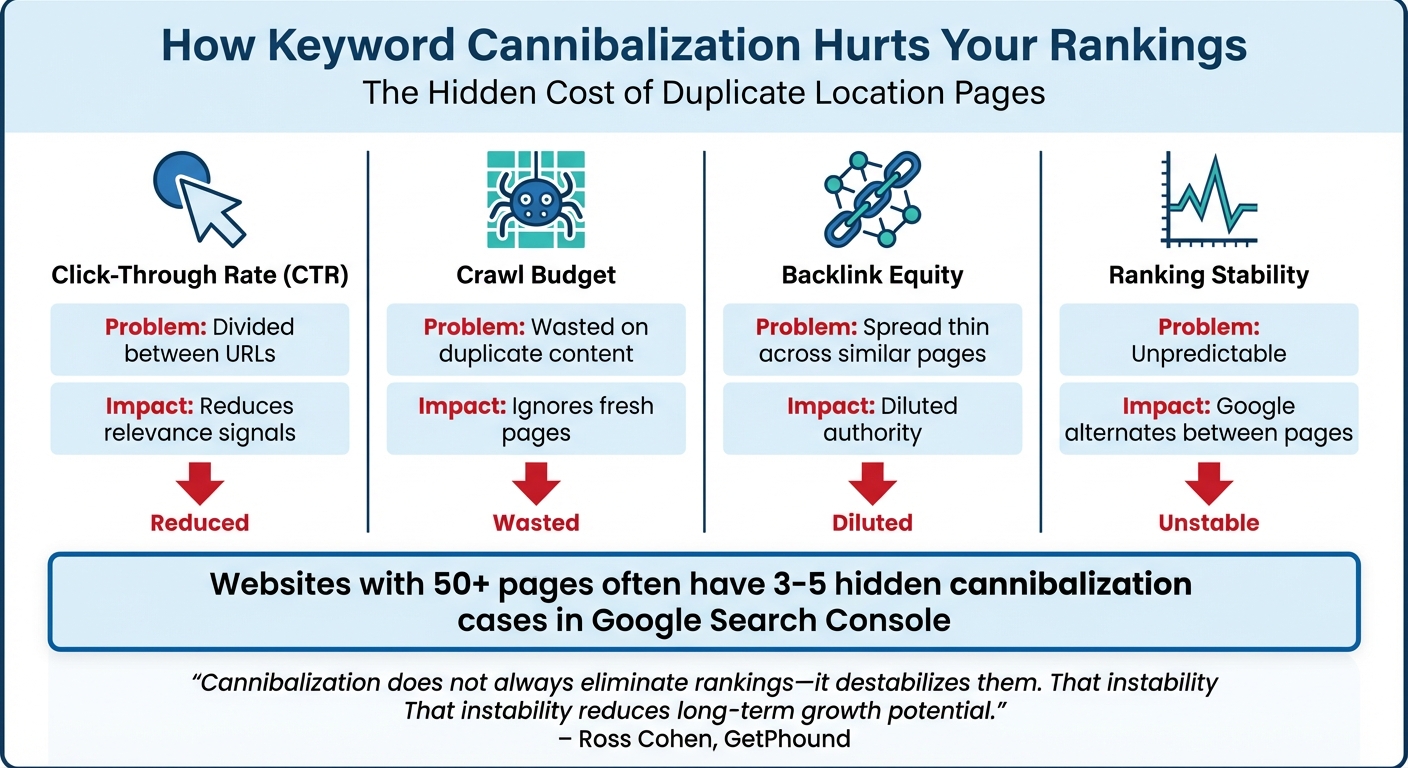
Data shows that websites with 50 or more pages often have hidden cannibalization issues, with at least 3–5 cases visible in Google Search Console. Multi-location dental practices face an even higher risk because they frequently rely on cookie-cutter templates. The problem becomes critical when clicks for high-volume queries are split unevenly – like 40/60 – between competing URLs. This prevents any single page from gaining the authority needed to rank at the top.
How Keyword Cannibalization Hurts Your Google Rankings
When multiple pages target the same keyword, Google struggles to determine which one is the most authoritative. This creates ranking instability – one page might rank one day, only to be replaced by another the next. Click-through rates (CTR) are divided among competing pages, making it harder for any single page to demonstrate relevance. Additionally, backlink equity gets diluted as external links are spread across similar pages, and Google’s crawl budget is wasted indexing duplicate content instead of focusing on fresh, valuable pages.
"Cannibalization does not always eliminate rankings – it destabilizes them. That instability reduces long-term growth potential."
- Ross Cohen, GetPhound
Here’s a real-world example: If your "dental implants Dallas" page ranks at position 5 and a similar page ranks at position 7, you’re losing traffic that could have been captured by one stronger page. Over time, this inconsistent visibility can erode patient trust, slow practice growth, and limit your ability to capture the 46% of Google searches with local intent.
| Metric | Effect of Cannibalization |
|---|---|
| Click-Through Rate (CTR) | Divided between URLs, reducing relevance signals |
| Crawl Budget | Wasted on duplicate content instead of fresh pages |
| Backlink Equity | Spread thin across similar pages |
| Ranking Stability | Unpredictable; Google alternates between pages |
How to Find Cannibalization Problems in Your Content
To address these ranking challenges, it’s critical to identify cannibalization issues using the right SEO tools. Google Search Console (GSC) is a great starting point. In the Performance report, filter by a specific query (like "Invisalign Phoenix") and check the "Pages" tab. If multiple URLs show significant impressions for the same query, cannibalization is likely. Pay special attention to cases where clicks are evenly split between pages, as these represent high-priority issues.
Another method is using Google’s site search operators. For example, searching:
site:yourdentalsite.com "dental implants" will show which pages Google has indexed for that term. If multiple location pages appear for the same service keyword, it’s a sign of cannibalization. Additionally, tracking ranking volatility – where two URLs frequently swap positions for the same keyword – can indicate Google is unsure which page is most relevant.
Lastly, create a keyword mapping spreadsheet to assign a primary keyword to each location page. For instance, a page might target "Dentist Austin" as its main keyword, with secondary modifiers like "Invisalign Downtown Austin" or "Emergency Dentist South Austin." This process often highlights unintentional overlaps, especially between informational and transactional pages, allowing you to consolidate ranking signals more effectively.
How to Build Location-Specific Pages That Scale
Once you’ve resolved any issues with keyword cannibalization, the next step is creating distinct location pages for each dental office. These pages should avoid competing with one another while showcasing unique, localized content. This strategy is essential for improving visibility across multiple locations.
Each page should feature at least 200 words of unique content to steer clear of Google’s thin content filters. Include details like staff bios, patient testimonials specific to the area, and references to local landmarks or attractions. For example, your Austin location page could mention its proximity to the University of Texas and feature Dr. Sarah Chen, while the Round Rock page might highlight family-focused services near the Dell Diamond stadium and introduce a different set of team members.
"Duplicate location pages (same content, different city names) trigger Google’s thin content filter and suppress rankings."
Incorporate an embedded map, accurate NAP (Name, Address, Phone) data, and Local Business schema markup to enhance location relevance for Google. Verified Google Business Profiles are 70% more likely to attract in-person visits, and businesses with completed profiles receive 7x more clicks compared to those with incomplete information. These elements work together to make each dental office a standalone driver of traffic and revenue.
Create Separate Pages for Each Dental Office
Start by identifying what makes each office unique. Beyond including basic NAP details, address questions like: Who works here? What services are offered? Why is this location convenient for dental care?
Highlight staff photos and bios to establish trust and build Google’s E-E-A-T (Expertise, Experience, Authoritativeness, and Trustworthiness) signals. Adding location-specific testimonials that mention the city or neighborhood by name can further strengthen local relevance.
Each page should also have a custom FAQ section tailored to "near me" searches for that area. For instance, the Phoenix location might answer, "Do you accept Blue Cross Blue Shield of Arizona?" while the Scottsdale location addresses parking options downtown. This approach captures diverse search intents using advanced keyword research techniques without keyword overlap.
Include actionable elements like booking links specific to the location, visible reviews from that office’s Google Business Profile, and mobile-friendly buttons for calling or directions. Since 76% of people who search for a local business on their smartphone visit a physical location within 24 hours, making it easy for potential patients to act is crucial.
| Element | Unique Required? | SEO Purpose |
|---|---|---|
| H1 Heading | Yes (Include City) | Primary keyword signal for local searches |
| Location Description | Yes (200+ words) | Avoids thin content; establishes relevance |
| Staff Bios | Yes | E-E-A-T signal; builds local trust |
| NAP Schema | Yes | Machine-readable data for search engines |
| Embedded Map | Yes | Improves proximity signals and user experience |
| Local FAQs | Yes | Captures long-tail searches |
Best Practices for Multi-Location URL Structure
Your URL structure is the backbone of how Google interprets your site’s hierarchy. For multi-location dental practices, subfolders are often the best choice as they allow link equity to flow across the root domain. A clear and simple path like yourdentalsite.com/locations/san-francisco communicates the page’s purpose effectively.
Always use hyphens to separate words in URLs – search engines treat hyphens as spaces, while underscores can confuse crawlers. Keep URLs under 256 characters and use only lowercase letters to avoid errors or duplicate content issues. Place the city name (your primary keyword) early in the path to boost visibility, and skip unnecessary words like "and" or "the" unless they’re contextually important.
For businesses with 30+ locations, subdomains (e.g., chicago.yourdentalsite.com) can help manage distinct content and web presences. However, keep in mind that backlinks to subdomains only benefit that specific subdomain, not the entire domain. For example, Mint Dentistry used subdomains to manage over 60 locations, with their Woodland Hills site ranking well for terms like "dental implants the woodlands".
To track performance, add UTM parameters to URLs in each Google Business Profile. This lets you measure which location pages are driving conversions, not just traffic.
Use Internal Links to Connect Location Pages
A robust internal linking strategy complements a clear URL structure. Use a hub-and-spoke hierarchy: link your homepage to a central "Locations Hub" page, which then connects to individual office pages.
Add breadcrumb navigation on every location page (e.g., Home > Locations > Dallas) to visually and technically reinforce this hierarchy.
At the bottom of each location page, link to nearby or adjacent locations, like Dallas linking to Fort Worth, Plano, and Arlington. These links improve crawlability and pass internal authority without causing cannibalization, as each page targets distinct city names.
When creating blog posts or other supporting content, use specific anchor text like "dental implants in Raleigh" instead of generic phrases. Place these links within the first 100 words of articles to maximize their impact. Also, ensure location-specific social media pages link back to their respective location pages rather than the homepage.
"Internally, your site should use clear breadcrumbs and links from the homepage to a locations hub page and then down to individual locations. Linking between nearby locations near the bottom of each page also helps pass internal authority and improve crawlability."
How to Set Up Local Business Schema for Multiple Locations
Local Business schema is a type of structured data – essentially code that helps search engines understand your business information, such as your name, address, and phone number (NAP). For dental practices with multiple locations, this schema acts as a roadmap, showing search engines how your branches are connected while clearly distinguishing each one.
Even better, it boosts your chances of showing up in the Google Maps Local Pack (3-Pack), which can lead to 93% more user actions like calls, website clicks, and requests for directions. For example, a dental clinic in Mumbai implemented LocalBusiness schema and climbed 4 positions in Google Maps rankings within 8 weeks.
"Schema isn’t just a ‘nice-to-have,’ it’s your brand’s digital DNA."
- Eleni Tarantou, Uberall
As AI-powered search continues to evolve, schema becomes even more vital. Large Language Models and AI assistants rely on this structured data to verify businesses and provide accurate recommendations.
What is Local Business Schema and Why Use It?
Local Business schema is written in JSON-LD format and added to the <head> section of each location page. It provides search engines with machine-readable details about your business, such as your location, operating hours, and contact information. While this data is invisible to users, it’s critical for search engines to process quickly. It can even feed into Google’s Knowledge Panel and improve your visibility in "near me" searches.
For dental practices, using specific schema subtypes like @type: "Dentist" or @type: "MedicalClinic" gives Google more context about your services. This helps match your business with relevant searches like "dentist near me" or "emergency dental clinic open now."
It’s important to note that schema complements your Google Business Profile (GBP). Google relies on GBP as the primary source for the Knowledge Panel and Maps, so your schema should align with and reinforce that information.
| Schema Property | Purpose for Dental Practices |
|---|---|
@type: Dentist |
Tells search engines you’re in the dental care niche |
geo |
Provides precise coordinates for Google Maps |
openingHours |
Powers "Open Now" or "Closes Soon" labels in search results |
parentOrganization |
Links individual locations to the main dental group or brand |
areaServed |
Defines the geographic area your clinic serves |
The @id property is especially crucial for multi-location practices. This unique identifier – usually the location page URL with #business appended – ensures Google treats each branch as a separate entity. It also allows other schema types, like reviews or FAQs, to connect back to the correct location.
Step-by-Step Guide to Adding Schema for Each Location
Here’s how to set up schema for your dental practice locations:
- Audit Your Details: Start by reviewing your Google Business Profile for each location. Every detail in your schema – down to abbreviations like "St." versus "Street" – must match your GBP exactly to avoid conflicts.
- Create a Template: Build a JSON-LD template using the
Dentistschema type. Customize it for each branch with unique addresses, latitude/longitude coordinates, and hours of operation. Include the@idproperty with a unique URL for each location, such ashttps://yourdentalsite.com/locations/dallas#business. - Link to Your GBP and Maintain Brand Unity: Use the
hasMapproperty to link directly to each location’s Google Business Profile. Add theparentOrganizationproperty to connect all branches to the main brand, ensuring consistency while allowing each location to rank individually. - Specify Operating Hours: Use
OpeningHoursSpecificationto define regular hours. For holidays or special schedules, includevalidFromandvalidThroughdates to keep "Open Now" statuses accurate. - Deploy and Validate: Add the schema code to the
<head>section of each location’s webpage. Use tools like SchemaValidator.org or Google’s Rich Results Test to confirm accuracy. Monitor Google Search Console for any errors or warnings.
When implemented correctly, schema enhances your local SEO efforts, ensuring each location communicates its distinct details effectively.
Schema Markup Mistakes to Avoid
Schema is only effective if done correctly. Here are common mistakes to steer clear of:
- NAP Inconsistency: Ensure your schema matches your Google Business Profile exactly. Even small differences, like "123 Main Street" versus "123 Main St.", can hurt your rankings.
- Using Generic Schema Types: Avoid the generic
LocalBusinesstype when more specific options exist. For dental practices, always use@type: "Dentist"or@type: "MedicalClinic". - Duplicate Markup: Don’t mix
OrganizationandLocalBusinessschema on the same page. SinceLocalBusinessis a subtype ofOrganization, this redundancy can confuse search engines. - Outdated Information: Keep your schema up to date. If you move or change operating hours, update your schema immediately.
- Inaccurate Aggregate Ratings: Only include
aggregateRatingdata if the reviews are hosted on your own website. Using third-party ratings may violate Google’s policies.
"LocalBusiness schema on your website supports and reinforces GBP data, helping Google confirm entity consistency across your web presence. Schema amplifies GBP; it does not replace it."
- SchemaValidator.org
Finally, avoid marking up content that isn’t visible on the page. If your schema lists services or amenities that aren’t mentioned in the visible text, Google may flag it as hidden data and ignore the entire schema block. Always ensure your structured data aligns with what users can actually see.
Creating Location-Specific Content That Works
Once your schema is ready, the next step is crafting unique, meaningful content for each location page. This isn’t the time for cookie-cutter templates – Google values authenticity and depth, and so do your potential patients.
Each location page should include at least 200 original words. Use this space to showcase what makes each location special. For example, include bios of the dentists and hygienists who work there. Skip the generic team page and focus on the people patients will actually meet. Add 10 or more real photos of the office – think waiting areas, treatment rooms, and the team in action. Stock images won’t cut it here. Southern Ontario Dental Group nailed this approach by treating each location page like its own mini-website. They included unique photography, detailed staff profiles, and even FAQs tailored to local concerns, which helped them climb above competitors who relied on bland, templated pages.
It’s also important to highlight service differences between locations. For instance, if one office specializes in orthodontics and another focuses on family dentistry, make that clear. Use neighborhood-specific references to connect with local patients. Mention landmarks, nearby schools, or commuter routes. A Toronto-based law firm found success by targeting hyperlocal keywords, like specific intersections and court procedures, to outshine national competitors.
"Google doesn’t rank businesses. It ranks locations." – The SEO Engine
Keep your content fresh and relevant with local FAQs. Address specific concerns like, "Do you accept Delta Dental in [Neighborhood]?" or "Is there parking near the [Landmark] office?". Sharing details about community involvement – like sponsorships, local events, or charity work – can also boost trust and earn backlinks from local organizations. With 76% of local mobile searches leading to a visit within 24 hours, your content should give patients a reason to choose your office over the one just a few miles away.
Avoid reusing generic language across pages – this can dilute your keyword strength and hurt rankings.
How to Use Local Keywords for Each Location
Local keywords are your secret weapon for dominating neighborhood searches. These should include neighborhood names, zip codes, and high-intent phrases. By 2026, hyperlocal targeting will be a key differentiator for top-ranking practices.
Focus on high-intent commercial phrases that combine services, location, and urgency. For example, instead of "dental implants", try "dental implants [City] cost" or "emergency dentist open now [City]". These terms attract patients ready to book, not just browse. Since 46% of Google searches have local intent, specificity increases your chances of landing in the Local Pack, which captures 44% of clicks on local search pages.
Incorporate insurance-specific keywords like "dentist accepting [Insurance Name] in [City]." These attract patients who are more likely to convert. Question-based phrases also work well, especially as AI tools prioritize clear answers. Use subheadings like, "What should I do for a toothache in [Neighborhood]?" to capture these searches.
| Keyword Category | Example Phrase | Search Intent |
|---|---|---|
| Emergency | "Emergency dentist open now [City]" | Immediate booking |
| Service-Specific | "Dental implants [City] cost" | Research to purchase |
| Insurance-Based | "Dentist accepting Delta Dental [City]" | Qualified patient |
| Hyperlocal | "Best dentist in [Neighborhood Name]" | Local discovery |
| Urgency | "Dentist near me open Saturday" | Immediate need |
Create dedicated service pages for high-value treatments like implants, Invisalign, or emergency care. Avoid lumping all services into one page. Use patient-friendly language that focuses on outcomes – like "how to relieve a toothache" – instead of technical jargon. Also, ensure NAP consistency (Name, Address, Phone) across your website, Google Business Profile, and directories. This avoids confusing Google’s algorithms.
"Traditional SEO built around page-one rankings is losing ground fast. If your practice isn’t cited inside AI-generated answers, you’re losing new patients to competitors who are." – Vijay Jacob, Founder, AEO Engine
Pairing optimized keywords with local engagement can solidify your presence in the community and boost your search visibility.
Add Local Events and Community Information
Mentioning local events and community activities isn’t just a nice touch – it’s a trust signal for both Google and potential patients. AI tools like ChatGPT and Google AI Overviews, which now handle over 40% of informational searches, prioritize content that proves your business is active and rooted in the neighborhood.
Incorporate local landmarks naturally in your content. For instance, "Our office is two blocks from [Landmark], with easy access from [Major Street]." This helps Google connect your page to "near me" searches and strengthens proximity signals. If you sponsor local sports teams or participate in events, share these on your location page and Google Business Profile. These activities can earn valuable backlinks from local sites and improve engagement metrics.
Use localized FAQs to address specific neighborhood concerns. Instead of generic questions, try: "What insurance plans do you accept in [Neighborhood]?" or "Is there parking near the [Landmark] office?" These FAQs capture long-tail voice searches and increase the likelihood of being cited in AI-generated answers. Practices that combine Google Business Profile optimization with AI-focused strategies have reported three times more new patient calls in 60 days compared to traditional SEO methods.
Patient testimonials that mention local details can also boost trust. For example, "This office is so convenient to my kids’ school in [Neighborhood]." These reinforce your geographic relevance without resorting to keyword stuffing.
"Local SEO works best when the basics are fixed in the right order… When accuracy, clarity, and trust are fixed first, dental practices are more likely to appear in local results, AI answers, and nearby patient searches in 2026." – Tyson Downs, Founder, Titan Web Agency
Keep Your Brand Voice Consistent Across Locations
Managing content for multiple locations doesn’t mean losing your brand identity. The key is to maintain consistency while tailoring each page to its specific audience.
Start with a core brand framework that defines your mission, values, and tone. Whether your practice is family-focused, high-end, or geared toward emergencies, this should be clear across all pages. Then, layer in location-specific details like staff bios, local landmarks, and community involvement. This ensures each page feels personal, not templated.
Avoid simply swapping out city names in identical paragraphs. Google’s thin content filters will flag this, and duplicate pages can hurt your rankings. Instead, use a content structure that allows for unique text in every section. For example, your intro might always mention patient care, but the specifics – like "serving families in [Neighborhood] since 2015" – should vary by location.
Use internal linking to connect nearby offices. For example, link your Dallas page to your Fort Worth and Plano pages with anchor text like "Invisalign in Fort Worth" or "Emergency dentist in Plano". This improves crawlability and reinforces your multi-location presence.
Keep your visual identity consistent across all pages. Use the same logo and color scheme, but feature real photos of each office and team. This balance of consistent branding and local authenticity reassures both Google and patients that your practice is established and trustworthy.
Next, we explore
How to Track SEO Performance for Each Location
Managing SEO performance across multiple dental offices requires a tailored approach. Start by setting up individual tracking for each location page in Google Search Console and Google Analytics. This allows you to pinpoint which offices are thriving and which may need extra attention.
Track key actions like phone clicks, direction requests, form submissions, and appointment bookings for each location. Tyson Downs, Founder of Titan Web Agency, emphasizes:
"Measuring success through calls, direction requests, and bookings is more reliable than rankings alone" – Tyson Downs, Founder, Titan Web Agency
A well-executed local SEO campaign typically results in 5–15% month-over-month growth in organic traffic within the first year.
To distinguish traffic sources, add UTM parameters to the website URLs in each Google Business Profile (GBP). This helps separate GBP traffic from general organic traffic in GA4. For call tracking, tools like CallRail or CallTrackingMetrics are useful for linking phone inquiries to specific location pages.
Next, focus on metrics that highlight both technical performance and user behavior.
SEO Metrics to Track for Each Location
To get a complete picture, monitor metrics that reflect both the technical health of your website and how patients interact with it. Start with Core Web Vitals – metrics like Largest Contentful Paint (LCP), Interaction to Next Paint (INP), and Cumulative Layout Shift (CLS) – to ensure your location pages are fast and user-friendly. Use Google Search Console to track impressions, clicks, and average positions for local search terms like "dentist in [Neighborhood]" or "emergency dental care [City]".
| Metric Category | Key Data Points | Recommended Tool |
|---|---|---|
| Conversions | Phone clicks, form completions, bookings | GA4, CallRail |
| Technical | Core Web Vitals, indexing errors, page speed | GSC, PageSpeed Insights |
| GBP Performance | Views, direction requests, call clicks | GBP Insights |
| Rankings | Position for "Service + City" terms | Search Console |
Set benchmarks for success. For example, aim for 500+ website sessions per month per location and strive for top 10 rankings for high-intent local keywords like "dental implants [City] cost". Monitor your Google Business Profile regularly – growth in direction requests and call clicks indicates strong visibility. Additionally, track AI citations to see which queries trigger AI-generated answers featuring your practice and identify any content gaps.
Once your metrics are in place, leverage tools to analyze and act on the data.
Tools for Monitoring Location-Specific SEO
To dig deeper into each location’s performance, rely on tools designed for local SEO. Google Search Console and Google Analytics are essential for capturing traffic data and user behavior on individual location pages. For a more comprehensive view, platforms like Moz Local, BrightLocal, or Ahrefs can help manage and analyze SEO efforts across multiple offices.
Incorporate call tracking software to differentiate between organic search leads and other sources. This ensures patient inquiries are tied to specific location pages rather than being grouped together. For more detailed user behavior insights, use Microsoft Clarity (a free tool) to view heatmaps and session recordings. This reveals how visitors interact with your site and where they may lose interest.
Set aside 30–45 minutes each week to review technical health, monitor your top-performing keywords, and check for new Google reviews for each location. Regular monitoring helps you catch issues like indexing errors or ranking drops before they affect patient inquiries. Additionally, keep an eye on AI search performance to understand which queries highlight your practice and where there’s room for improvement.
How to Adjust Your Strategy Based on Data
Use the data you collect to refine your approach. Identify underperforming locations and investigate whether the issues stem from technical problems, weak content, or inconsistent NAP (Name, Address, Phone) details. Comparing metrics across locations helps you spot trends and prioritize fixes. Address foundational issues first – correct GBP categories and resolve NAP inconsistencies – before adding new strategies.
Run monthly updates on "striking distance" keywords (those ranking in positions 6–15). Refresh content and improve internal linking to push these terms into higher rankings. If call tracking reveals missed calls or scheduling gaps, the problem might be operational rather than SEO-related.
Proactively add Q&A sections to each location’s Google Business Profile with answers to common patient questions about insurance, hours, and services. This not only improves your visibility but also helps you control the narrative. When one location page performs exceptionally well, analyze its strengths – whether it’s unique photos, detailed staff bios, or mentions of local events – and apply those elements to other locations while keeping each page distinct.
Using AI and GEO-Targeting to Improve Search Visibility in 2026
Search engines have evolved far beyond simple keyword matching. Today, AI-powered algorithms interpret user intent, predict follow-up questions, and deliver results tailored to location, device, and browsing history. For multi-location dental practices, this means focusing on more than just traditional search rankings. Your practice information must be structured in a way that AI can easily process and trust. Clear schema markup and location-specific pages remain essential, but content must also be conversational and well-organized. With about 60% of U.S. adults – and 74% of those under 30 – turning to AI tools for search, adapting your strategy is no longer optional. Let’s explore how AI and GEO-targeting can amplify your multi-location SEO efforts.
How AI Affects Local Search Rankings
AI-driven search algorithms prioritize entity-structured content, making it easier for AI systems to understand and use your information. Instead of just matching keywords, these systems evaluate signals like your services, location details, and credibility to generate conversational responses. This approach, often called Generative Engine Optimization (GEO), emphasizes structured, machine-readable content.
Here’s the shift: traditional SEO relied on long-form keyword-rich articles to climb Google rankings. AI optimization, on the other hand, demands structured data and consistency across all platforms. For dental practices with multiple locations, this means using schema markup like Dentist, Service, and GeoCoordinates to ensure AI assistants can connect each office with its specific neighborhood. Predictive SEO tools can also help identify search trends, enabling you to anticipate when patient demand will be highest. These AI-driven strategies ensure each location carries distinct signals that enhance overall visibility.
GEO-Targeting Strategies for Better Visibility
To boost visibility across locations using local SEO strategies, use a subfolder URL structure such as yourdentalpractice.com/locations/austin. This setup consolidates domain authority, benefiting all location pages simultaneously. Each page should feature unique, neighborhood-specific content – like references to local landmarks, team member bios, or community events – to avoid duplicate content penalties.
It’s also crucial to maintain separate, verified Google Business Profiles (GBPs) for each location. GBP signals influence about 36% of local pack rankings, while customer reviews contribute roughly 17%. On your location pages, include natural questions as headers (e.g., "Do you accept Delta Dental insurance in Round Rock?") with concise, direct answers below. This format makes it easier for AI to extract and cite your information in conversational responses. In bilingual markets, target separate keywords for each language – for example, "dentist" and "dentiste" – to capture different audiences without overlapping.
"The real value of multi location SEO isn’t ranking in more places – it’s that every location you add makes every other location harder to outrank. You’re not climbing a ladder. You’re building a moat." – The SEO Engine
Beyond these strategies, optimizing for voice search is key to staying competitive in 2026.
Preparing for Voice Search and AI Assistants
Voice search queries are often conversational, such as "Where’s the nearest dentist open now?" To rank for these, use natural language, FAQ schema, and accurate GeoCoordinates on your location pages. In densely populated urban areas, precise coordinates can make or break your visibility.
Focus on structured Q&A content that establishes your practice as an authority. AI models like ChatGPT, Gemini, and Claude prefer citing reliable sources. Track which queries showcase your practice in AI-generated answers and identify areas where your content falls short. This approach, often referred to as LLM SEO, ensures your practice appears in AI-powered search results and voice assistant responses when patients are ready to book an appointment. By refining your strategy, you can position your multi-location dental practice as the go-to choice in your community.
Conclusion
Expanding SEO efforts across multiple dental practice locations calls for a well-structured plan to avoid internal competition across your service areas. The key is to dedicate a unique page to each location with at least 200 original words. These pages should include details like staff bios, nearby landmarks, and testimonials specific to that location. Use a subfolder URL structure (e.g., /locations/city-name/) and focus on distinct keywords tailored to each area.
Maintaining consistent Name, Address, and Phone (NAP) details across directories is crucial. When NAP information is inconsistent, search engines get confused, which can hurt rankings for your branches. Each office should also have a verified Google Business Profile (GBP) that links directly to its location page – not the homepage. Since complete GBP profiles get 7x more clicks than incomplete ones and the local pack attracts 44% of all clicks on local search pages, this approach can significantly boost visibility. A consistent NAP setup also creates a solid foundation for additional improvements, including AI-based optimizations.
To further optimize for AI, use brief, question-focused subheadings with direct answers and implement local business schema on every location page. This helps your practice show up in AI-driven search results and voice assistant recommendations when potential patients are ready to schedule an appointment.
"Multi-location SEO isn’t about hacks or shortcuts. It’s about building a clear, consistent system that scales." – MWI
Strengthen your topical authority by publishing specialized dental content that links back to individual location pages. Additionally, aim to secure 5–10 new reviews per month for each location to stay competitive. These efforts require ongoing monitoring to ensure they translate into measurable outcomes.
Use tracking tools to monitor your performance, focusing on conversion metrics like online bookings, call clicks, and direction requests. By following this systematic approach, you can build a scalable SEO framework that enhances every location’s visibility while avoiding internal competition.
FAQs
How do I pick which location page should rank for a service?
To determine which location page should rank for a specific service, focus on creating dedicated pages packed with location-specific content that speaks directly to what patients are searching for. Incorporate keywords that combine the service and location naturally into your content. Use a clear structure with headers (H1, H2, H3) to organize the information effectively.
Additionally, align your content with the needs of the local audience. This helps search engines recognize the most relevant page for each service and location, boosting your rankings for local search queries.
Should each office have its own service pages too?
Creating dedicated service pages for every office is a key part of a solid multi-location SEO strategy. These pages allow you to target local keywords, provide location-specific contact details, and showcase what makes each office unique.
To make these pages effective, focus on unique, location-specific content for each one. This approach helps avoid issues like keyword cannibalization or duplicate content, which can hurt your rankings. Additionally, using proper schema markup ensures better visibility in local search results, giving your pages an edge in attracting nearby customers.
What’s the fastest way to fix cannibalization sitewide?
The fastest way to fix sitewide keyword cannibalization is by making sure every location page focuses on its own distinct keywords and search intents. This prevents your pages from competing with each other. Start by auditing your site to find any overlapping keywords. Once identified, tweak the content, meta tags, or keywords to make each page stand out. These updates help search engines better grasp your site’s structure, boosting rankings and eliminating keyword conflicts across your locations.