In 2025, SEO success hinges on how well your website engages users. Search engines now prioritize metrics like time spent on-site, pages visited, and interaction quality to rank content. Here’s a breakdown of the 7 key engagement metrics that matter most for SEO:
- Session Duration: Tracks how long visitors stay on your site. Longer sessions indicate useful, engaging content.
- Pages per Session: Measures how many pages users explore. Higher numbers suggest better internal linking and content flow.
- Bounce Rate: Percentage of users leaving after viewing one page. A high rate often signals irrelevant or unhelpful content.
- Click-Through Rate (CTR): The percentage of users clicking your link in search results. Higher CTR reflects well-optimized titles and meta descriptions.
- Engagement Time: Focuses on active user interaction (scrolling, clicking). Longer engagement means your content is meeting user needs.
- Scroll Depth: Tracks how far users scroll on a page. It helps identify where interest drops off.
- Interaction to Next Paint (INP): Measures how quickly your site responds to user actions, ensuring a smooth experience.
Quick Comparison
| Metric | Definition | SEO Impact | Benchmark |
|---|---|---|---|
| Session Duration | Time spent on-site per visit | Signals content relevance | Varies by industry |
| Pages per Session | Number of pages viewed in one visit | Reflects engagement and navigation | 2.0–4.0 pages |
| Bounce Rate | Percentage of single-page sessions | Indicates content or UX issues | 30–80% depending on page |
| CTR | Clicks ÷ impressions in search results | Shows snippet effectiveness | Higher is better |
| Engagement Time | Active interaction time (scrolls, clicks) | Highlights user satisfaction | 10+ seconds (GA4 standard) |
| Scroll Depth | Percentage of page scrolled | Reveals content consumption | Varies by content length |
| INP | Response time to user actions | Key for user experience (Core Web Vitals) | <200 ms is ideal |
Focusing on these metrics helps improve rankings, reduce bounce rates, and increase conversions. Use tools like Google Analytics 4 (GA4) and Search Console to track performance and adjust your strategy.
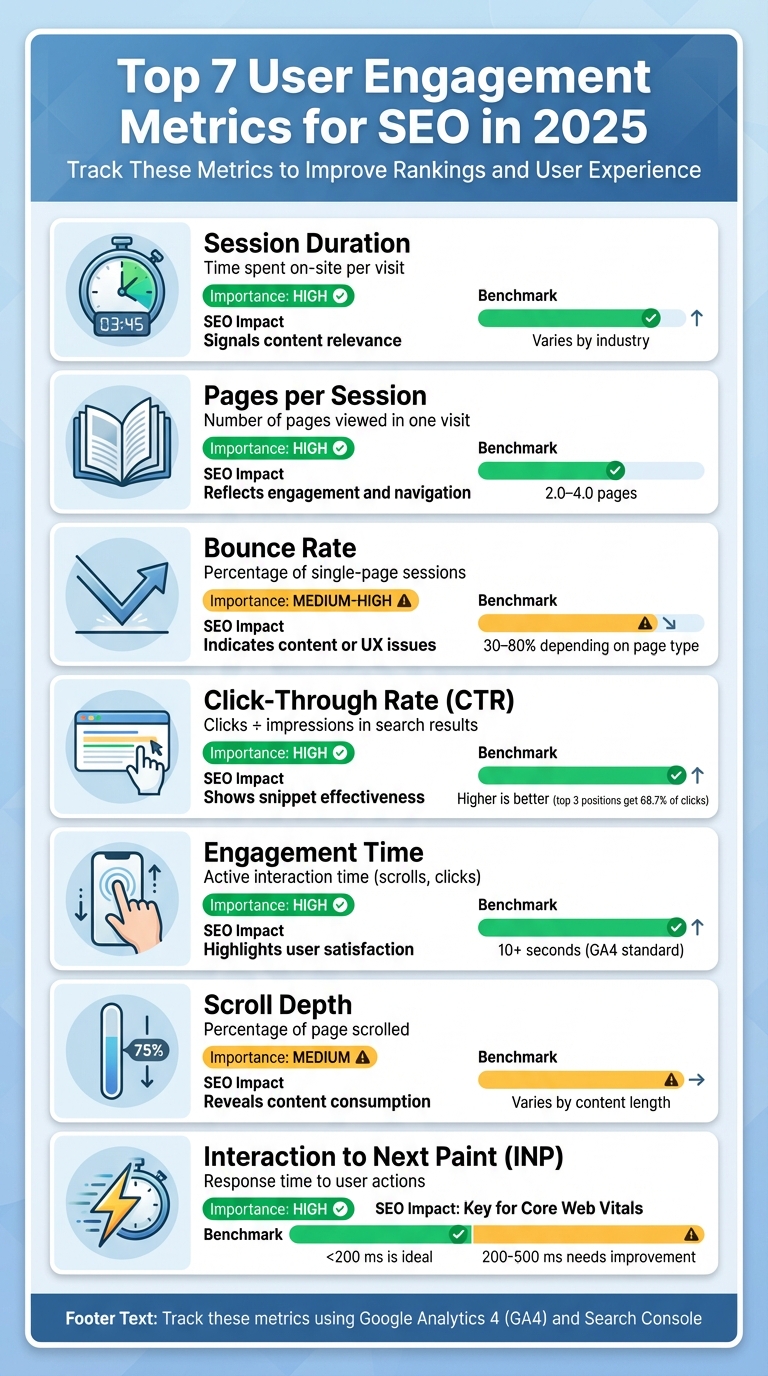
7 Essential User Engagement Metrics for SEO: Definitions, Impact, and Benchmarks
1. Session Duration
Definition and Relevance to SEO
Session duration is a key metric for understanding how users interact with your site. It measures the total time a visitor spends on your site during a single visit, starting with their first interaction and ending with their last, as tracked in Google Analytics. However, there’s a catch: if someone visits only one page and takes no further action, their session may be recorded as 0 seconds, which can skew your averages.
By 2025, session duration has become a critical metric for SEO. Why? Because Google’s algorithms now emphasize user satisfaction signals more than just keyword rankings. If visitors are spending more time on your site, it sends a clear message to search engines: your content is useful and aligns with what users are searching for. This makes session duration a key indicator of both interest and engagement.
Impact on User Behavior and Engagement
Longer session durations are a strong sign that your content resonates with visitors. Whether they’re reading articles, watching videos, or navigating through multiple pages, extended time on site reflects meaningful engagement. On the flip side, very short sessions – especially those under 10 seconds – can point to issues like irrelevant content, poor user experience, or a mismatch between the promise of your search snippet and the reality of your page.
In Google Analytics 4 (GA4), an “engaged session” is defined as one that lasts at least 10 seconds, includes a key event, or involves two or more page views. This gives you a clearer picture of how users are interacting with your site.
SEO Implications and Benefits
Improving session duration starts with delivering high-quality content, ensuring fast loading times, and creating a seamless user experience. A site that loads in under 2.5 seconds and meets Core Web Vitals benchmarks is far more likely to retain visitors. In fact, if your site takes longer than 3 seconds to load, over half of your visitors may leave.
To encourage longer visits, focus on aligning your content with search intent. Provide clear, in-depth answers to users’ questions, and use internal links to guide them to related articles or resources. Break up dense text with headings, bullet points, and visuals to make your content easier to read and more engaging.
Use GA4 to analyze session duration by traffic source and landing page. This will help you identify which content keeps visitors engaged and which areas need improvement. While session duration is just one piece of the puzzle, it plays a vital role in boosting overall user engagement and signaling value to search engines.
2. Pages per Session
What It Means and Why It Matters for SEO
Pages per session is a metric that reflects how many pages a user views during a single visit to your site. It’s calculated by dividing total page views by the number of sessions. For example, if your site gets 10,000 views across 3,000 sessions, the result is about 3.33 pages per session. In Google Analytics 4 (GA4), you can filter this data specifically for organic traffic to get a clearer picture of your SEO performance.
This metric is important because it shows how engaged users are with your content. A higher pages-per-session value often signals that your site has a well-structured layout and engaging content. As Google prioritizes user satisfaction in its algorithms, a strong pages-per-session metric can indicate that your site is doing a good job of keeping visitors interested.
How It Relates to User Behavior
For most U.S. websites, an ideal pages-per-session range is between 2.0 and 4.0 pages, though this can vary depending on the industry. If your site’s pages-per-session number is closer to 1.0 or 1.5, it could mean users are leaving after viewing just one page. This might point to issues like weak internal linking, mismatched search intent, or even technical problems. On the other hand, a value of 3.0 or higher generally suggests that your site encourages users to explore further through effective navigation, related content, and compelling recommendations.
To fully understand this metric, compare it with session duration and bounce rate. For example, if someone views several pages but spends only a few seconds on each, they might just be clicking around without real interest. Conversely, a user who spends significant time on just one page might find everything they need in a single, detailed guide. Both scenarios provide valuable insights, even if the pages-per-session value differs.
How to Improve and Use It for SEO
To increase pages per session, focus on enhancing your site’s structure and user experience. Here are some practical tips:
- Add clear internal links to guide users to related content.
- Use intuitive navigation menus to make exploration easy.
- Include related content modules to encourage deeper browsing.
- Ensure fast page loading times and optimize for technical performance, including Core Web Vitals and Interaction to Next Paint (INP).
Tracking your progress is just as important. Use GA4 to monitor performance by landing page and traffic source, then adjust your strategy based on what you learn.
If you’re looking for expert guidance, consider working with SearchX to refine your technical SEO, content strategy, and user experience. These improvements can help boost your pages per session and strengthen your site’s overall organic visibility.
3. Bounce Rate
Definition and Relevance to SEO
Bounce rate refers to the percentage of sessions where users view only one page and don’t trigger any key events. In Google Analytics 4 (GA4), this is now specifically defined as sessions lasting under 10 seconds, with fewer than two pageviews and no key interactions.
From an SEO perspective, a high bounce rate can suggest that a page isn’t aligning with user expectations or lacks a clear path forward. When users quickly return to search results – often called "pogo-sticking" – it can send negative engagement signals to search engines, potentially affecting the page’s relevance. Alongside metrics like session duration and pages per session, bounce rate offers valuable insight into user behavior and content performance.
Impact on User Behavior and Engagement
Bounce rate acts as a window into how users initially respond to your content. It measures how often visitors leave after viewing just one page. Typical benchmarks vary by page type: blog or news pages often see bounce rates between 60–80%, informational pages fall between 40–60%, lead-generation or service landing pages range from 30–50%, and e-commerce product pages tend to hover around 25–45%.
A high bounce rate can be a red flag for pages where users are expected to explore further – like browsing products, comparing options, or completing actions such as signing up or requesting quotes. However, for pages designed to provide a quick, standalone answer (e.g., store hours, a calculator, or a brief explainer), a high bounce rate might simply mean the page delivered exactly what the visitor needed without requiring further clicks.
SEO Implications and Benefits
When a high bounce rate is paired with short dwell times, it often indicates that a page isn’t meeting user intent. To get a fuller picture, bounce rate should be analyzed alongside other metrics like dwell time, pages per session, and engagement rate. Generally, lower bounce rates combined with longer engagement times contribute to better search rankings and higher conversions.
Several factors can lead to high bounce rates, including slow-loading pages, cluttered designs, intrusive pop-ups, irrelevant or thin content, poor mobile usability, and misleading titles or meta descriptions. To address these issues, consider:
- Improving Core Web Vitals for faster load times.
- Optimizing for mobile devices to enhance the user experience.
- Crafting accurate titles and meta descriptions that align with page content.
- Using clear headings and visual elements like bullet points to improve readability.
- Placing calls-to-action (CTAs) and internal links where users naturally pause.
These adjustments can help reduce bounce rates, increase engagement, and improve overall SEO outcomes.
For tailored solutions – whether technical fixes or content updates – reach out to SearchX.
Next, we’ll dive into Click-Through Rate (CTR) from SERPs to explore more about user interaction patterns.
4. Click-Through Rate (CTR) from SERPs
Definition and Relevance to SEO
Click-Through Rate (CTR) from Search Engine Results Pages (SERPs) measures how often users click on your site’s link after seeing it in search results. The formula is simple: (clicks ÷ impressions) × 100. For instance, if your page appears 1,000 times in search results and gets 50 clicks, your CTR would be 5%.
CTR is a direct indicator of how well your title and meta description resonate with user expectations. Google evaluates user clicks and behavior to determine if your content satisfies search intent. The data is striking: the top organic result gets 19 times more clicks than the top paid result, while the top three organic positions collectively account for over 68.7% of all clicks. This highlights the importance of crafting snippets that not only attract attention but also match user needs.
Impact on User Behavior and Engagement
CTR is a clear reflection of how compelling your SERP snippet – your title and meta description – appears to users. If users click your link and quickly return to the search results (a behavior called pogo-sticking), it signals that your content didn’t meet their expectations. This behavior aligns closely with issues seen in bounce rate metrics.
The rise of AI-driven features in search has also reshaped CTR dynamics. Keywords that trigger AI Overviews have seen CTR drop by 15.49%, with non-branded terms experiencing nearly a 20% decline. However, being cited in an AI Overview can sometimes drive more traffic than a standard organic result, making traditional CTR benchmarks less reliable unless adjusted for AI Overview visibility.
SEO Implications and Benefits
Understanding CTR and user behavior can guide you in optimizing your snippets. Your title and meta description should accurately reflect your on-page content. For example, if your meta description promises a comparison of five options, deliver that comparison upfront instead of hiding it beneath lengthy introductions. This alignment reduces pogo-sticking and signals to Google that your content satisfies user intent.
To avoid truncation, keep titles between 50–60 characters and meta descriptions within 150–160 characters. Use clear, solution-oriented language. For instance, replace vague phrasing like "Learn the secrets to faster websites" with something specific like "Improve page speed: 5 proven techniques to cut load time by 50%". Regularly monitor your CTR in Google Search Console and compare it with GA4 engagement metrics (like sessions lasting 10 seconds or more, or multiple pageviews) to ensure your clicks lead to meaningful engagement.
For better SERP performance, consider working with SearchX. Their tailored strategies can help align your meta content with user intent, combining keyword research with optimized SERP presentation for maximum impact.
5. Engagement Time (Active Interaction Time)
Definition and Relevance to SEO
While metrics like CTR focus on how users arrive at your site, engagement time sheds light on what they do once they’re there. This metric captures active user behaviors – like scrolling, clicking, or playing videos – rather than simply measuring idle time. In Google Analytics 4 (GA4), an engaged session is defined as one that lasts at least 10 seconds, includes two or more page views, or involves a key event. Unlike older “time on page” metrics, which often included periods of inactivity, engagement time offers a sharper view of how users are truly interacting with your content.
Engagement time acts as a strong indicator of how well your content is meeting user expectations. If users stay actively involved after clicking through from search results, it’s a sign that your page resonates with their intent and delivers a satisfying experience.
Impact on User Behavior and Engagement
When engagement time is high, it often signals that visitors are exploring your site more deeply and are closer to taking meaningful actions. These users are more likely to scroll through content, click on internal links, watch videos, use filters, or even add items to their cart. In short, longer interactions often lead to more conversions – whether it’s a download, a sign-up, or a purchase. On the flip side, low engagement time combined with quick exits can point to issues like mismatched content or poor user experience, which prevent visitors from fully interacting with your page.
Unlike basic session duration, engagement time focuses on active behaviors, providing a more accurate measure of how users are engaging with your site.
SEO Implications and Benefits
Boosting engagement time can significantly improve your SEO performance. Pages that keep users actively engaged send positive signals to Google, such as reduced pogo-sticking (when users quickly return to search results), longer dwell times, and higher interaction rates. Over time, these factors can lead to better organic visibility and higher click-through rates by consistently meeting searcher intent.
To track and improve engagement time in GA4, segment your data by traffic source and page type. For example, compare performance across key pages like product listings, service descriptions, or content hubs. This allows you to establish benchmarks based on the intent of each type of content – whether it’s an informational blog post or a high-conversion product page. From there, you can identify areas for improvement, boosting both engagement and conversion rates while minimizing quick exits.
To enhance engagement time, focus on practical strategies like optimizing Core Web Vitals, using clear and structured headings, and incorporating interactive features such as calculators or comparison tables. These changes not only improve user interactions but also strengthen your site’s SEO performance, aligning with proven tactics from sources like SearchX.
6. Scroll Depth
Definition and Relevance to SEO
Scroll depth measures how far users scroll down a page, typically expressed as percentages or specific checkpoints within the content. Using Google Analytics 4 (GA4), you can create custom events via Google Tag Manager to track when visitors reach these thresholds, offering insights into how much of your content they engage with. Tools like scrollmaps and heatmaps provide additional visualizations of where users drop off.
Unlike bounce rate, which can sometimes misrepresent user behavior by treating single-page visits as negative, scroll depth gives a clearer picture of content consumption. For instance, if a user scrolls through 75% of a page but doesn’t navigate to another, it still indicates meaningful engagement. This makes scroll depth a valuable complement to other metrics like session duration and engagement time, especially as Google’s algorithms increasingly prioritize user satisfaction and content quality.
Impact on User Behavior and Engagement
Scroll depth sheds light on how users interact with your content, pinpointing areas where interest may wane. For example, if 80% of visitors reach the halfway mark of your page but only 25% make it to the 75% mark, it signals a potential issue – whether it’s a lack of relevance, overly dense text, or a missing hook to keep them engaged.
Armed with this data, you can tweak your content layout to better align with user behavior. Consider moving critical calls-to-action higher up, breaking up large text blocks with visuals or subheadings, or adding internal links mid-page to encourage further exploration. These adjustments ensure that key information and conversion opportunities are placed where users are most likely to see them.
SEO Implications and Benefits
While scroll depth isn’t a direct ranking factor, it plays a crucial role in the bigger picture of user engagement, which search engines use to gauge whether a page meets user intent. Pages where users consistently scroll through significant portions of the content, interact with elements, and avoid quickly bouncing back to search results send strong signals of satisfaction. Over time, this behavior can contribute to improved organic performance.
To make the most of scroll depth for SEO, use GA4 reports to link scroll events with traffic sources, engaged sessions, and conversions. Segmenting data by device can also uncover specific issues – if mobile users scroll less than desktop users, it could point to layout challenges or slow loading speeds. For deeper insights, services like SearchX provide technical SEO audits and behavior analysis to turn scroll data into improved rankings, leads, and revenue streams.
7. Interaction to Next Paint (INP)
What Is INP and Why Does It Matter for SEO?
Interaction to Next Paint (INP) is one of Google’s Core Web Vitals metrics, introduced to measure how quickly a page visually responds to user actions like clicks, taps, or key presses during an entire visit. Unlike First Input Delay (FID), which only tracks the initial interaction delay, INP provides a more thorough view by recording the worst interaction latency throughout the session. This makes INP a key indicator of a site’s responsiveness.
As of 2024, INP has officially replaced FID as part of Google’s Core Web Vitals used to evaluate page experience. A good INP score is under 200 milliseconds, ensuring interactions feel fast and seamless. Sites that achieve good scores on at least 75% of visits for all Core Web Vitals metrics – including INP, Largest Contentful Paint (LCP), and Cumulative Layout Shift (CLS) – are more likely to benefit from Google’s page experience ranking signals.
How INP Affects User Experience and Engagement
When INP exceeds 500 milliseconds, users notice a lag when interacting with elements like buttons, menus, or forms. This delay can make the page feel unresponsive, leading to frustration and actions like abandoning forms, carts, or even the site itself. Research from Job Boardly highlights that poor INP can reduce user engagement by 11.7%.
On the other hand, when interactions respond in less than 200 milliseconds, they feel instantaneous. This encourages users to click more, scroll further, and complete tasks, contributing to positive engagement signals like longer session durations and more pages viewed per visit. The difference between a laggy 500 ms response and a quick 150 ms response could be the deciding factor between a completed purchase and an abandoned cart.
Why INP Matters for SEO
Although INP itself isn’t a direct ranking factor, it plays a critical role in the overall page experience signals that search engines use to evaluate how well a page meets user needs. Pages with smooth and responsive interactions tend to indicate higher user satisfaction, which can improve organic rankings over time. Optimizing INP also supports other engagement metrics like session duration and task completion rates.
Common causes of poor INP include heavy JavaScript, inefficient event listeners, and third-party scripts. To improve INP, consider strategies like breaking up long tasks, using code splitting, deferring non-essential scripts, and optimizing event handlers.
For U.S. businesses, improving INP isn’t just about SEO – it directly impacts revenue. Faster, more responsive interactions can boost conversion rates and reduce cart abandonment, making INP optimization a critical business metric. Agencies such as SearchX specialize in technical SEO audits that incorporate INP improvements into broader Core Web Vitals strategies, helping businesses turn better responsiveness into higher rankings, more traffic, and increased revenue. Up next, explore how INP compares to other engagement metrics in the following table.
SEO Metrics Explained: Which Ones To Track [A Complete Guide]
Metric Comparison Table
This table breaks down seven key engagement metrics, explaining their role in SEO and providing recommended benchmarks. Together, these metrics – ranging from session duration to Interaction to Next Paint (INP) – show how user engagement aligns with better SEO performance.
| Metric | Definition | Importance Level | SEO Impact | Benchmark |
|---|---|---|---|---|
| Session Duration | The average time a user spends on your site during a single visit | High | Longer sessions indicate relevant content and user satisfaction, which can boost organic visibility. | Varies |
| Pages per Session | The average number of pages a user visits in one session | High | Higher numbers reflect effective internal linking and deeper user engagement, which can strengthen rankings. | Varies |
| Bounce Rate | The percentage of visitors who leave after viewing just one page | Medium–High | High bounce rates may point to relevance or user experience issues, potentially impacting rankings indirectly. | Varies |
| Click-Through Rate (CTR) from SERPs | The ratio of users who click on your link compared to total impressions in search results | High | A higher CTR signals to search engines that your content matches user intent, which can help maintain or improve rankings. | Varies |
| Engagement Time (Active Interaction Time) | The time users actively interact with your page (e.g., scrolling, clicking, typing) | High | Longer interaction times suggest users find value in your content, improving visibility. | 10+ seconds (engaged session in GA4) |
| Scroll Depth | The percentage of a page users scroll through | Medium | Greater scroll depth indicates an effective content structure and relevance, contributing to stronger engagement signals. | Varies |
| Interaction to Next Paint (INP) | The time it takes for a page to visually respond to user actions like clicks or taps | High | Poor INP (e.g., over 500 ms) can harm user experience and rankings, as it’s a key Core Web Vital. | Under 200 ms is good; 200–500 ms needs improvement |
Use this table as a guide to identify areas for improvement based on your site’s current performance. Start with Core Web Vital metrics like INP to meet technical standards, then focus on optimizing CTR and reducing bounce rates to enhance user engagement. Metrics like session duration and pages per session provide insight into content quality, while scroll depth and engagement time highlight how users interact with your pages.
For expert guidance, SearchX offers technical SEO audits designed to turn your engagement data into better rankings.
To monitor these metrics effectively, leverage tools like GA4, Search Console, and PageSpeed Insights. Setting up custom GA4 events for scroll depth and engagement time can give you a deeper understanding of user behavior across your site.
Conclusion
Each of the metrics discussed plays an essential role in shaping SEO success. By keeping an eye on engagement metrics like session duration, pages per session, bounce rate, CTR from SERPs, engagement time, scroll depth, and INP, you can better understand how well your content resonates with users after they land on your site. For example, longer sessions and more in-depth page visits are strong indicators of relevance – something search engines increasingly value when ranking competitive content. Meanwhile, ensuring metrics like INP stay below 200 ms helps avoid performance issues that could harm visibility.
These metrics don’t just highlight user behavior – they also shine a light on potential problems. For instance, a high bounce rate might point to title tags that overpromise, while poor INP scores could suggest technical flaws that hinder engagement. Regularly reviewing these metrics in tools like GA4 and Search Console allows you to catch performance dips early and implement targeted fixes to improve user experience and content alignment.
This ongoing process creates a feedback loop that drives smarter SEO decisions. As Aayaam Verma puts it:
"Lorenz & team take a measurement-forward approach to SEO and optimizing for both search engines and gen AI platforms. Important as a business owner since you can see not only why something worked or didn’t, but how to address it moving forward." – Aayaam Verma
For U.S. businesses without in-house analytics expertise, SearchX offers technical SEO audits and custom dashboards that connect engagement metrics to broader business goals. Whether you’re managing SEO internally or seeking external support, turning engagement data into actionable insights can amplify your SEO results over time.
FAQs
What are some effective ways to increase session duration on my website?
Improving how long visitors stay on your site can do wonders for user engagement and even give your SEO a lift. Here are some practical ways to make that happen:
- Create engaging content: Focus on producing content that’s not only informative but also enjoyable to read. Well-organized, interesting material keeps users hooked.
- Speed up your site: Nobody likes waiting around for a page to load. A fast-loading website reduces frustration and keeps visitors from bouncing away.
- Utilize internal links: Smartly placed links to other pages on your site encourage users to explore more of your content, keeping them around longer.
- Incorporate multimedia: Spice things up with videos, images, or interactive features to make your pages more lively and captivating.
These strategies can help you build a site that people want to stick around on, improving both their experience and your site’s performance.
How can I lower my website’s bounce rate?
Reducing a high bounce rate starts with improving the overall user experience and ensuring your content keeps visitors interested. First, focus on page speed – nobody likes waiting around for a slow website. Aim for a loading time of less than 3 seconds to keep users from clicking away.
Your content should be relevant and directly address what your audience is looking for. Make sure your landing pages align with user intent, offering exactly what they expect to find. On top of that, clear navigation and attention-grabbing calls-to-action (CTAs) can encourage visitors to explore other areas of your site.
Don’t forget about mobile users! With so much traffic coming from smartphones and tablets, a mobile-friendly design is essential. A smooth, easy-to-use mobile experience can go a long way in keeping visitors engaged and exploring your website.
What makes Interaction to Next Paint (INP) a key metric for SEO?
Interaction to Next Paint (INP) plays a key role in SEO because it tracks how quickly a site reacts to user actions, like clicks or taps. When INP is fast, users enjoy a smoother experience, which often leads to higher engagement and fewer people leaving the site immediately – both of which are important to search engine rankings.
Improving INP isn’t just about speed; it’s about making your website feel more responsive and interactive. This not only appeals to visitors but also aligns with Google’s emphasis on user-focused metrics like Core Web Vitals. The result? Better chances of ranking higher in search results and attracting more visitors.