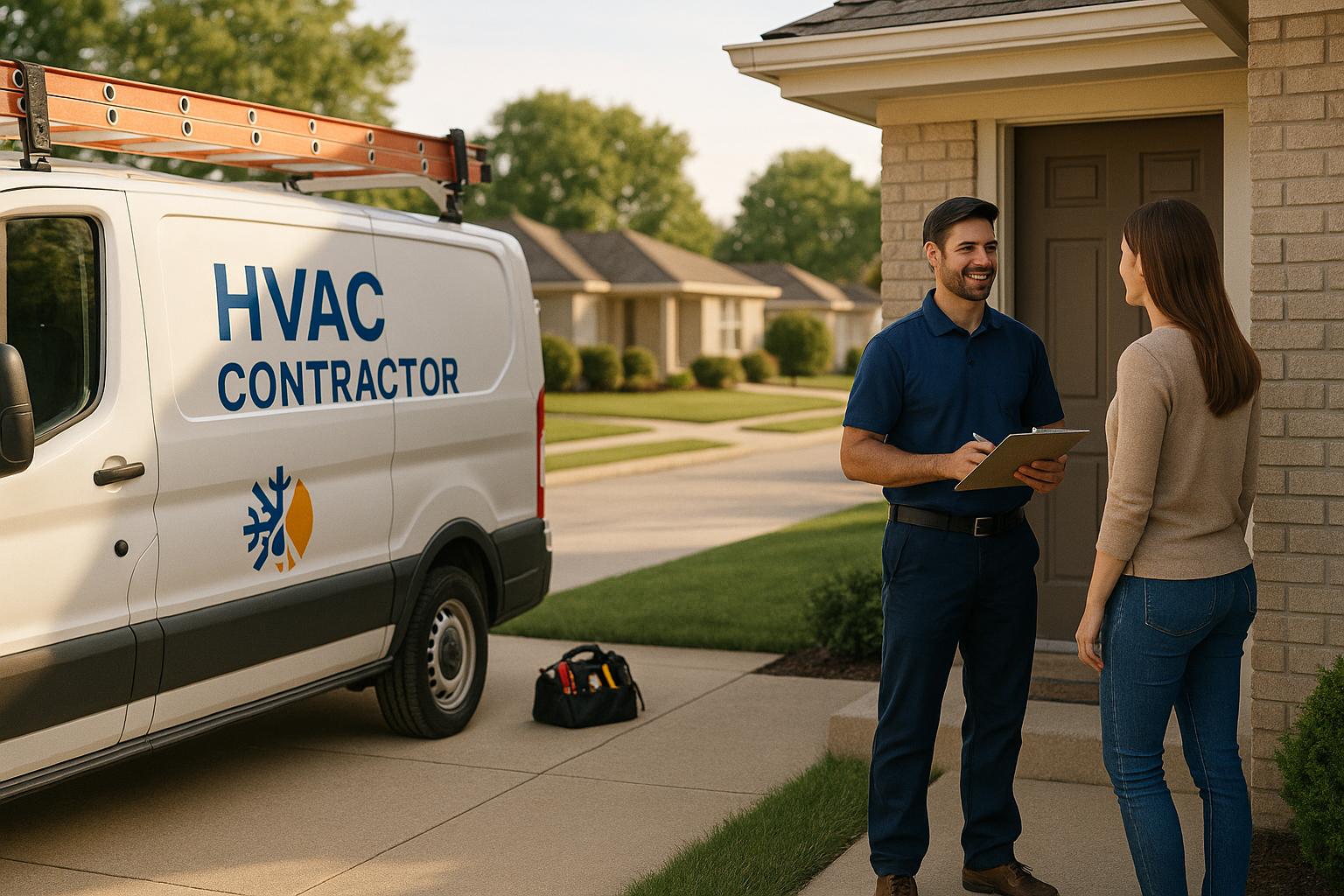
If your HVAC business isn’t visible in local search results, you’re losing customers to competitors. Local SEO ensures your company shows up when people search for services like "AC repair near me" or "emergency furnace repair." With 97% of consumers searching online for local services and 78% of local mobile searches leading to a purchase within 24 hours, local SEO is essential for driving calls, bookings, and revenue.
Here’s what you need to know to get started:
- Optimize Your Google Business Profile: Verify your business, ensure consistent name, address, and phone number (NAP) details, and add photos and service descriptions. Businesses that do this often see a 35–60% boost in calls and map views.
- Target Local Keywords: Focus on service + location combinations like "heater repair in Denver" and seasonal terms like "AC maintenance in summer."
- Use Schema Markup: Add structured data like business details and geocoordinates to help search engines display your information accurately.
- Create Location-Specific Pages: Build dedicated pages for each city or neighborhood you serve, optimized with local keywords and customer reviews.
- Track Results: Monitor rankings, calls, and conversions to measure ROI. For every $1 spent on SEO, businesses typically see a 678% return over three years.
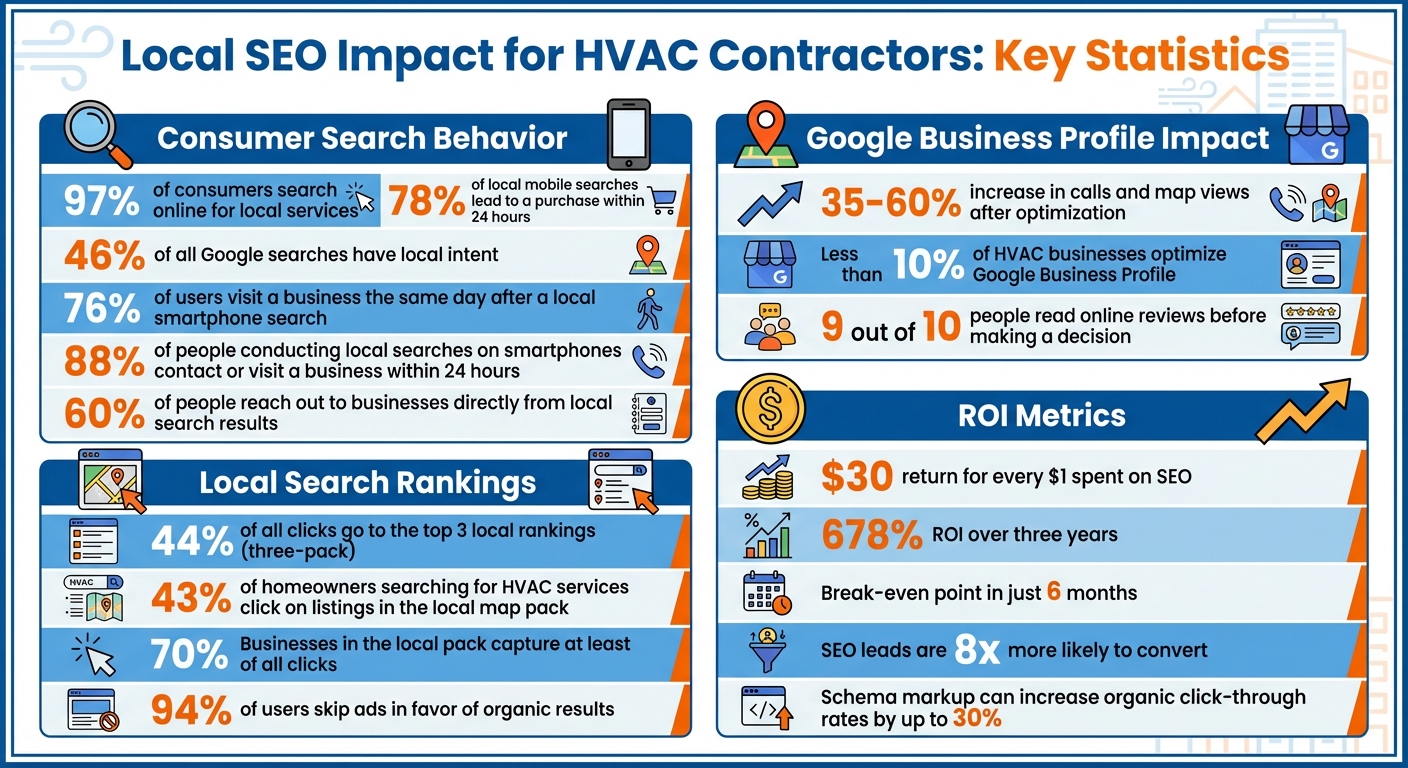
Local SEO Statistics and ROI for HVAC Contractors
SEO for HVAC: Complete Local SEO Strategy
How to Optimize Your Google Business Profile

Think of your Google Business Profile as your online storefront. When someone searches for "emergency furnace repair" or "AC installation near me", your profile determines whether they choose your business or someone else’s. Optimizing this profile is a key part of your local SEO strategy and can directly affect your search rankings and the number of leads you get. Here’s an eye-opener: less than 10% of HVAC businesses take the time to optimize their Google Business Profile. That means you have a real opportunity to stand out.
Verify and Complete Your Profile Information
The first step is to claim and verify your profile. Without verification, your business won’t appear in local searches or on Google Maps. Google will guide you through the process, sending a verification code by mail, phone, or email. Once verified, make sure to fill out every field in your profile. Accuracy is key – your business name, address, and phone number (NAP) should match exactly across your website, social media, and other directories. Even small inconsistencies, like using "Street" in one place and "St." in another, can hurt your rankings.
Don’t forget to include your business hours, holiday schedules, and emergency availability. Specify the cities and ZIP codes you serve. Write a clear, keyword-rich description of your services, using terms like "HVAC repair", "AC installation", and "heating maintenance". Choose "HVAC Contractor" as your primary category, and add secondary categories like "Air Conditioning Repair Service" or "Heating Contractor" to cover all your bases.
Add Photos and Service Details
Photos are a game-changer for engagement. Businesses that optimize their profiles often see a 35–60% increase in map views and calls within just 90 days. Upload photos of your team in action, branded trucks, equipment, and completed jobs. Before-and-after shots are especially effective in showcasing the quality of your work.
Use descriptive filenames like hvac-installation-phoenix.jpg and add captions that include location details. Keep your gallery fresh by uploading seasonal or recent project photos regularly. Also, list your services with detailed descriptions and price ranges whenever possible. For instance: "Furnace Installation: Energy-efficient models with free estimates" or "Air Conditioning Repair: 24/7 emergency service available". Highlight attributes like "24/7 Service", "Emergency Service", or "Family-Owned" to make your profile more appealing.
"The more information you provide, the easier it is for Google to match you with high-intent searches." – SEO for Home Service
Manage Reviews and Customer Responses
Reviews are critical – they influence both your visibility and your ability to convert leads into customers. 9 out of 10 people read online reviews before making a decision. Google rewards businesses with frequent, high-quality reviews. Responding to reviews within 24–48 hours shows potential customers that you’re engaged and professional.
Ask for reviews right after completing a job – whether in person, through automated follow-ups, or even via QR codes on invoices, business cards, or truck wraps that link directly to your review page. One HVAC company saw its reviews skyrocket from 46 to over 600 in just two years by automating requests. Always thank customers for positive feedback, and handle negative reviews by offering solutions instead of making excuses. Your responses demonstrate your commitment to quality and your willingness to address issues.
"Reviews play a dual role: they increase your profile’s visibility and help convert potential customers. Google favors businesses with frequent, high-quality reviews, especially those that include photos and detailed feedback." – Relentless Digital
Once your Google Business Profile is fully optimized, you’ll be ready to dive into HVAC-specific keyword research to boost your local visibility even further.
HVAC-Specific Local Keyword Research
Figuring out the keywords your potential customers use to find HVAC services is a crucial step in shaping your local SEO strategy. Why? Because 60% of people reach out to businesses directly from local search results. By focusing on the right keywords, you can turn those searches into phone calls and service bookings. Start with service-specific terms that attract qualified, local traffic.
Target Service-Specific Keywords
Once your profile is optimized, shift your attention to precise service and location combinations like "AC repair in Phoenix" or "emergency heating repair Savannah, GA." These phrases are designed to connect you with customers who are actively searching for help.
Pay close attention to search intent. Keywords with commercial intent, such as "HVAC service cost per hour", often indicate that a customer is ready to make a decision, making them more likely to convert compared to general informational searches. Don’t underestimate long-tail keywords like "emergency HVAC repair in Savannah, GA." While they might have lower search volumes, they tend to face less competition and attract customers with very specific needs.
Your sales team can also offer valuable insights. If they frequently hear questions like "How much does AC unit repair cost?" or "What’s the difference between a heat pump and a furnace?" consider turning those queries into targeted content. Dedicate a specific page to each keyword group to establish authority on those topics. After identifying potential keywords, validate their performance with research tools.
Use Keyword Research Tools
To find high-performing keywords and better understand what your customers are searching for, start with tools like Google Keyword Planner. It’s free and offers insights into search volumes and related terms. For a more in-depth look, tools like SEMrush and Ahrefs can help you analyze competitor strategies and uncover gaps in your own approach.
Google’s built-in features can also be incredibly useful. For instance, type a seed keyword like "AC repair near" into the search bar to see autocomplete suggestions based on real local searches. The People Also Ask section highlights common questions, which can serve as inspiration for new content. And don’t forget about Google Trends – it’s great for spotting seasonal search trends.
"The more quality content related to what you sell, the more likely Google will show your website for those related searches." – Tim Brown
Focus on keywords that strike a balance between decent search volumes, lower competition, and strong commercial intent. Avoid overloading your content with keywords – Google already understands your location from your business address, so using natural language is key.
"Keyword optimization is more about intent (in this case, a business address near the searcher’s location) than exact words, so use natural keywords everytime." – LokalHQ
Add Seasonal Keywords to Your Strategy
The demand for HVAC services changes with the seasons, so your keyword strategy should adapt as well. During summer, focus on terms like "AC maintenance" and "air conditioning repair." In winter, shift to keywords like "heater repair" and "furnace inspection." Seasonal SEO means regularly updating your website content, keywords, and calls-to-action to align with what customers are searching for at different times of the year.
You can take this a step further by factoring in real-time weather patterns. For example, a heatwave often leads to a surge in searches for "emergency AC repair", while sudden cold snaps might trigger keywords like "furnace not working". Keep an eye on these trends and adjust your content calendar accordingly. For instance, you could publish a blog post on "preparing your AC for summer" in early spring or share "furnace winterization tips" as fall approaches.
How to Add Local Business Schema Markup
Schema markup is a type of structured data that helps search engines understand your HVAC business details more effectively. Implementing it properly can increase your organic click-through rates by up to 30%. However, statistics reveal that only 36% of schema implementations are entirely valid and error-free. This means many HVAC contractors miss out on these potential benefits due to technical mistakes. To avoid this, consider using JSON-LD for a streamlined implementation of your business information.
"Schema markup isn’t just a technical detail – it’s a visibility booster, and it’s more important than ever now that AI search is involved. If you’re not testing and validating it, you’re leaving clicks and citings on the table." – Ian Naylor, Founder, 3Way Social
Use JSON-LD for Business Information
JSON-LD is the preferred method for schema markup because it’s straightforward to use and maintain compared to older formats like Microdata. This code is embedded within a <script> tag on your webpage, ensuring it doesn’t interfere with your site’s design. Start by adding the LocalBusiness schema (and HVACService schema if applicable) to provide search engines with key details such as your business name, address, phone number, operating hours, and service areas. Tools like Google’s Structured Data Markup Helper can simplify this process by allowing you to map out the relevant sections of your page and generate the corresponding HTML.
Include GeoCoordinates and Service Types
Enhance your schema by including GeoCoordinates, which specify your business’s exact latitude and longitude. This step can improve your visibility in "near me" searches. Additionally, list the specific services you offer (e.g., "AC repair", "furnace installation") to better match local search queries. These details can also improve your appearance in knowledge panels and local pack results. Be cautious not to overload your schema with irrelevant data, as this could lead to penalties from search engines. Focusing on accurate and relevant information ensures your schema is both useful and compliant.
Validate Your Schema Markup
Before going live, always test your schema markup using tools like Google’s Rich Results Test or the Schema Markup Validator. These free tools can identify common errors, such as missing required fields (like "name" or "description"), syntax issues, or incorrect data types. After making any necessary corrections, retest your markup to confirm its accuracy. Once your schema is live, regularly monitor its performance in Google Search Console to catch and resolve any new issues quickly. Properly validated schema markup not only improves your visibility in local search results but also strengthens your overall SEO efforts for HVAC services.
"Broken schema is invisible schema. You can have the best content in the world, but if your markup’s invalid, Google won’t use it and LLMs won’t find it." – Becky Halls, Strategist, 3Way Social
Creating Service Pages for Each Location
Once you’ve nailed down your keyword research and schema strategies, the next step is creating dedicated service pages for each location you serve. These pages are crucial for improving your local SEO. Why? Because they allow you to directly target geographic-specific searches like "furnace repair in Aurora" or "AC installation near Cherry Creek." With 88% of people conducting local searches on their smartphones contacting or visiting a business within 24 hours, having these pages can make a big difference. Instead of relying on generic templates, customize each page to reflect the unique aspects of the local market.
Use Local Keywords in Your Pages
To make these pages effective, weave city or neighborhood-specific keywords into key areas of your content. This includes your page titles, meta descriptions, H1s, H2s, and even image alt texts. For instance, a title tag like "Air Conditioning Repair in Phoenix" can help attract more clicks from users searching in that area. Be strategic – assign a unique service keyword to each page to avoid overlap and confusion. Make your content resonate with local homeowners by addressing climate-specific concerns, such as humidity control for warmer areas or heating solutions for colder regions.
Include Local Landmarks and Customer Reviews
Adding references to nearby landmarks can make your content more relatable and help Google understand the geographic focus of your page. For example, a business serving neighborhoods around Denver, like Cherry Creek or Aurora, could include directions from well-known landmarks such as the Cherry Creek Shopping Center. THAT Agency emphasized in August 2025 that including these details, along with local customer reviews, can significantly enhance your pages’ effectiveness. Displaying testimonials from local clients and showcasing before-and-after photos from projects in the area can also build trust and authenticity.
Embed Google Maps on Service Pages

Adding a Google Maps widget to show your local office or service area is another smart move. It not only helps customers quickly locate your business but also signals trustworthiness. Make sure your Name, Address, and Phone number (NAP) details are consistent across your website and your Google Business Profile.
"Every city deserves its own optimized page to boost local relevance." – Abstrakt Marketing Group
These location-specific pages lay the groundwork for tracking your SEO performance and measuring your return on investment.
Tracking Local SEO Performance and ROI
Once you’ve launched your local pages and fine-tuned your Google Business Profile, tracking performance becomes essential. Why? Because relying on guesswork won’t cut it. According to data, every $1 spent on SEO can yield $30 in return, with a staggering 678% ROI over three years and a break-even point in just six months. Consistent tracking connects all your local SEO efforts, showing you exactly what drives calls, appointments, and revenue.
Monitor Your Local Search Rankings
Your visibility isn’t limited to your main city – it extends to every neighborhood you serve, and rankings can vary significantly between areas. Keeping an eye on rankings in each location helps you spot these differences. During busy times, like summer heat waves or winter freezes, daily checks are a good idea since search volumes can spike. During quieter periods, weekly monitoring should suffice.
Here’s why this matters: 44% of all clicks go to the top three local rankings (the "three-pack"). For example, a Miami-based HVAC company found that 65% of their service calls came directly from Google Business Profile clicks, generating over $120,000 in monthly revenue from organic search visibility. Once you’ve got a handle on rankings, shift your focus to tracking the actions that directly impact your revenue.
Track Key Local SEO Metrics
Rankings are just the beginning. To understand the bigger picture, track metrics tied directly to revenue. Start by setting up conversion tracking in Google Analytics for actions like "Contact us", "Get callback", and phone calls. Call tracking tools can help you capture data on phone leads. For example, if 50 quote requests result in 20 hires at $1,000 each, your average lead is worth $400.
Don’t forget to monitor actions on your Google Business Profile, such as site visits, phone calls, and requests for directions. To calculate your ROI, use this formula:
100 x (Dollar Value of Conversions – Total SEO Investment) / Total SEO Investment
Remember to factor in all costs, including agency fees, tool subscriptions, and in-house staff time.
Analyze Conversions from Location Pages
Beyond general metrics, dive deeper into the performance of individual location pages. This helps you uncover regional opportunities. Tag your Google Business Profile URLs with UTM parameters to track local traffic sources in Google Analytics. You can also monitor form submissions and appointment bookings for each page to compare how they perform.
For instance, if your Aurora, Colorado page generates twice as many leads as your Denver page, it’s a clear sign to prioritize optimization efforts in Aurora. Tools like SearchX make it easier to track these metrics consistently and adjust strategies based on the data. Considering that 88% of HVAC searches lead to a service call within 24 hours, your tracking system needs to be sharp enough to capture these quick-turnaround opportunities.
Conclusion
Local SEO plays a critical role for HVAC contractors. With 46% of all Google searches having local intent and 76% of users visiting a business the same day they conduct a local search on their smartphone, your online visibility directly impacts the number of service calls you receive. The strategies outlined in this guide – ranging from optimizing your Google Business Profile to using schema markup and tracking performance – work together to connect your business with customers at the exact moment they need your services. These methods not only improve visibility but also translate into measurable results.
The numbers speak for themselves. Nearly 43% of homeowners searching for HVAC services click on listings in the local map pack, and businesses that secure a spot there capture at least 70% of all clicks. This can significantly increase booked appointments while reducing missed opportunities. For instance, Hiller PHCE in Nashville optimized its landing page to attract an estimated 2,500 organic visits each month, saving around $37,000 in Google Ads costs for just one keyword.
The benefits extend even further. SEO leads are eight times more likely to convert, and 94% of users skip ads in favor of organic results. This means your SEO investment not only drives traffic but also builds trust and authority that paid ads simply can’t match.
To get started, focus on optimizing your Google Business Profile, targeting local keywords, and creating location-specific pages. Incorporate schema markup and monitor performance to refine your efforts. These practical steps reinforce the core takeaway: precision-focused actions lead to growth. Success comes from being visible exactly when and where your customers are searching.
FAQs
What are the best ways to optimize my Google Business Profile for local SEO?
To get the most out of your Google Business Profile for local SEO, the first step is to claim and verify your listing. Make sure your Name, Address, and Phone number (NAP) are consistent everywhere online. This consistency builds trust with both users and search engines. Take the time to complete every section of your profile, adding a detailed business description that includes relevant keywords. Also, pick the most accurate categories for your business, such as HVAC contractor, and clearly specify your service areas to connect with local customers.
Include high-quality photos that highlight your team, equipment, and completed projects to make your profile stand out. Positive reviews can make a big difference, so encourage satisfied customers to share their experiences and respond to all reviews in a professional manner. Don’t forget to use the Google Posts feature to share updates, promotions, or news regularly. These efforts will boost your visibility in local searches, attract more leads, and help grow your HVAC business.
How can HVAC contractors effectively target local keywords for SEO?
To effectively reach local customers, make use of location-specific phrases like “HVAC repair in [city]” and seamlessly weave geographic terms into your website’s content, meta descriptions, and headers. Prioritize long-tail keywords that match what people in your area are searching for, such as “emergency AC repair near me” or “furnace installation in [city].”
Another effective approach is to develop dedicated landing pages for each service area you cover. These pages can significantly improve your visibility in local search results. Also, ensure your Google Business Profile is fully updated with accurate service details, operating hours, and relevant local keywords. These steps can help you connect with more customers actively looking for HVAC services nearby.
How can I track and measure the ROI of my local SEO strategy for HVAC services?
To figure out the ROI of your local SEO efforts, start by comparing the revenue generated from local search to your SEO expenses. Here’s the formula to use: ROI = [(Revenue from local search – SEO costs) / SEO costs] × 100%.
Keep an eye on key metrics like website traffic, lead conversions, customer actions (such as calls or form submissions), and offline sales directly linked to your campaigns. Tools like Google Analytics, call tracking systems, and Google Business Profile insights can help you tie these actions back to your local SEO strategy. By reviewing this data on a monthly or quarterly basis, you’ll get a clear sense of how well your efforts are working and where you can make adjustments for even better outcomes.