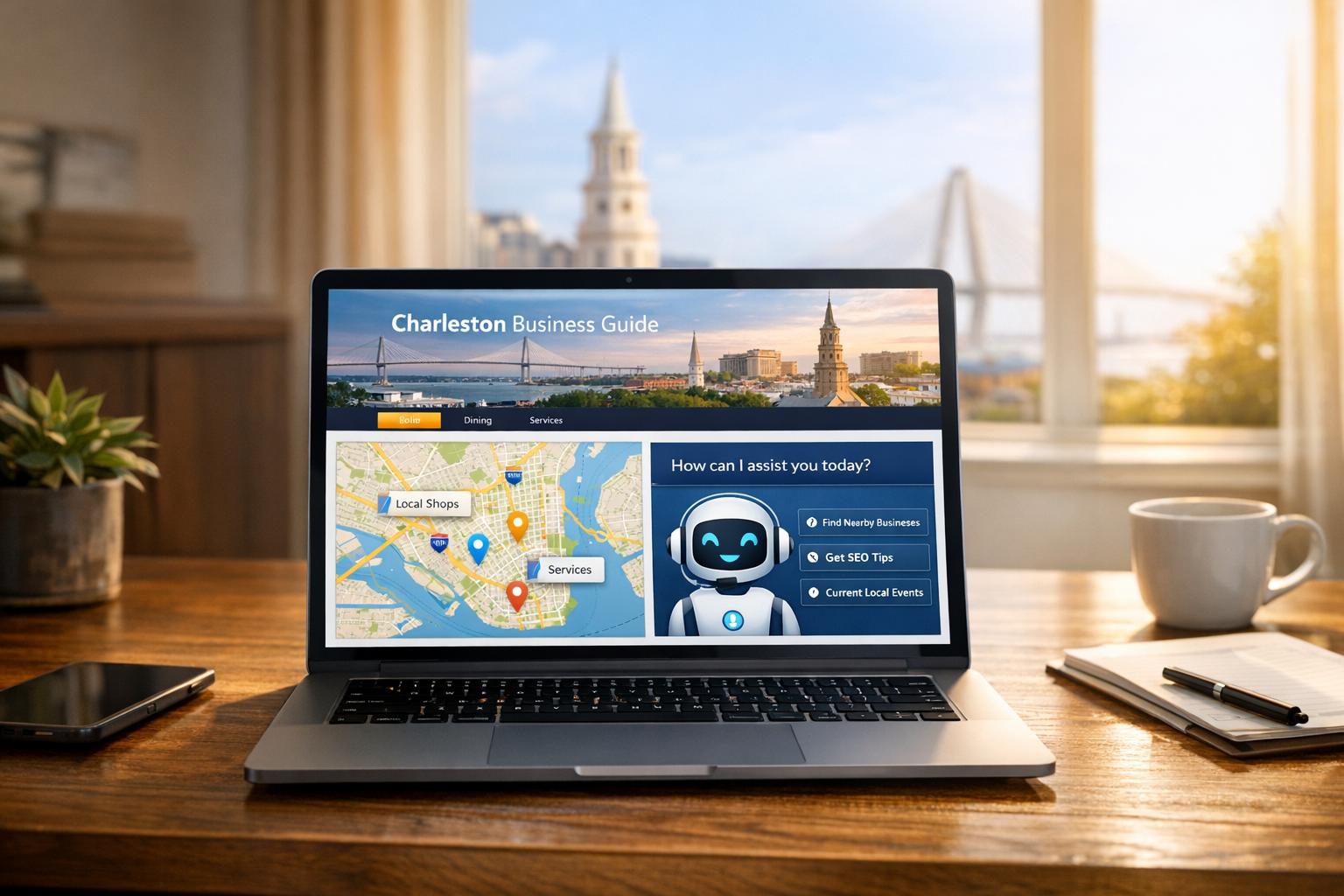
- Search is changing: AI tools like ChatGPT and Google’s AI Mode now provide direct answers, pulling data from trusted sources instead of just listing websites. Over 700 million people use ChatGPT weekly, and 40% of U.S. adults rely on voice assistants for local searches.
- Why it matters: AI-driven answers are 4.4x more valuable for businesses than traditional search traffic. However, only 62% of Google’s rankings overlap with AI-driven results. To succeed, your site must be AI-friendly.
- What to do:
- Add structured data (like schema markup) to help AI understand your business details.
- Research Charleston-focused keywords to match conversational queries.
- Write local, answer-focused content that highlights Charleston neighborhoods and landmarks.
- Fix technical SEO issues like slow load times, mobile compatibility, and crawler access.
Key Takeaway:
AI search engines prioritize clear, accurate, and local information. By using structured data, optimizing content for local queries, and ensuring strong technical performance, Charleston businesses can thrive in the AI-driven search era.
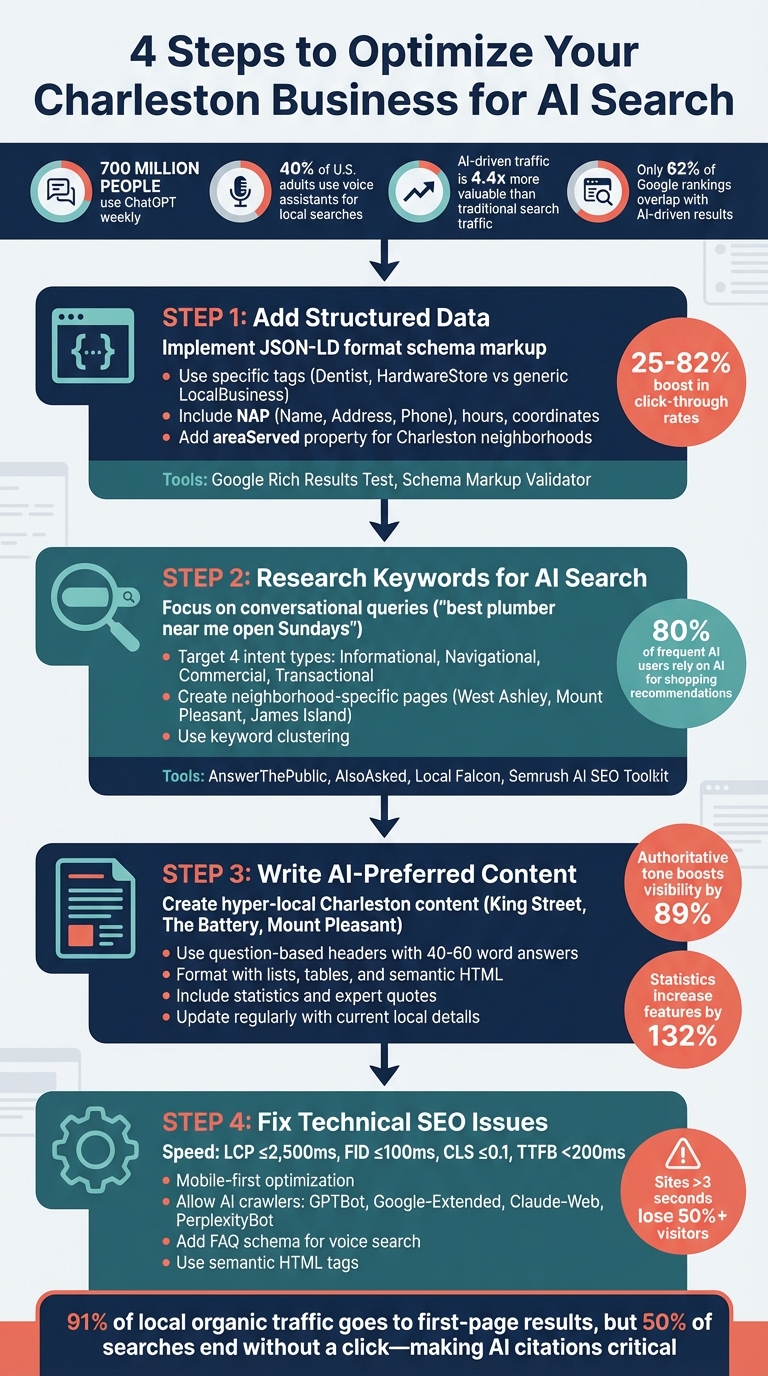
4-Step Guide to Optimize Charleston Business Websites for AI-Powered Search
Step 1: Add Structured Data to Your Website
What Structured Data Does
Structured data is a specific type of code you add to your website’s HTML to help AI understand your business and its offerings. Think of it as a digital business card that clearly communicates what your site is about. Without it, AI systems might misinterpret or completely miss your content, which can hurt your visibility online.
Brands that use schema markup often see a significant boost in click-through rates, ranging from 25% to 82%. For instance, Nestlé found that pages appearing as rich results had an 82% higher click-through rate compared to standard pages in 2025. Similarly, The Food Network revamped 80% of its pages with structured data for search features and saw a 35% increase in visits.
"Schema markup for local business turns your website into structured facts AI can read, trust, and summarize accurately." – Joey Pedras, TrueFuture Media
For businesses in Charleston, structured data helps AI identify your site as a specific local business rather than just another generic webpage. This clarity is essential because platforms like ChatGPT and Google’s AI Mode depend on structured data to summarize, cite, and accurately represent your content. For example, when someone asks, "What’s the best restaurant in Charleston?", AI will prioritize sites with clear and structured information.
How to Add Local Business Schema Markup
To take advantage of structured data, start by implementing schema designed for local businesses. Use the JSON-LD format, which Google recommends, and embed it in your website’s code using a simple script tag. Be specific with your tags. For example, instead of using the generic LocalBusiness tag, opt for something more precise like Dentist for a Charleston dental practice or HardwareStore for a Mount Pleasant hardware shop. This specificity ensures AI categorizes your business correctly.
Your schema should include essential details like your business name, full address, phone number, hours of operation, and geographic coordinates. If your Charleston business serves specific neighborhoods, use the areaServed property to specify areas like West Ashley, James Island, or the greater metro area.
Consistency is key when it comes to your NAP (Name, Address, Phone number). Ensure the information in your schema matches exactly what appears on your Google Business Profile and website. Even small discrepancies, like "St." versus "Street", can confuse AI and reduce your visibility.
If your business has multiple locations, create a dedicated page for each one and use unique LocalBusiness schema for each page instead of a global tag. You can also include the aggregateRating property to showcase star ratings in search results – especially important since 90% of consumers check reviews before making decisions. Adding sameAs links to your official social media profiles can further validate your business.
Need help generating schema? Tools like ChatGPT can create schema code if you provide your business details, but always double-check the output before using it. For WordPress users, plugins like Yoast Local SEO, Rank Math, and Schema Pro can simplify the process.
Tools for Testing Your Structured Data
Once your schema is in place, test it to ensure everything works as intended. Use Google’s Rich Results Test at search.google.com/test/rich-results. This tool lets you see which enhanced features – like star ratings, price ranges, and hours of operation – Google can extract from your page.
For compatibility with AI systems beyond Google, try the Schema Markup Validator at validator.schema.org. This tool ensures your code meets global standards and works seamlessly with platforms like Perplexity and Claude. If you’re building schema from scratch, Google’s Structured Data Markup Helper can guide you through tagging elements on your site (like addresses and phone numbers) to create clean JSON-LD code.
"Structured data can help AI-powered platforms – like ChatGPT and Google’s AI Mode – better interpret and summarize your website content." – Alex Lindley, Managing Editor, Semrush
For businesses managing multiple pages, tools like Semrush Site Audit, Ahrefs, and Screaming Frog can scan your entire site to identify pages with missing or incorrect structured data. Make sure to revalidate your schema whenever you update details like your hours, phone number, or address.
Step 2: Research Keywords for AI Search
How AI Interprets Keywords and User Intent
AI search engines don’t just match keywords – they analyze the meaning and context behind a query. For example, when someone in Charleston searches for "best brunch spot open now", AI understands the user is looking for a restaurant currently serving food, not just any brunch spot.
AI organizes searches into four main intent categories:
- Informational: Queries like "how to winterize a boat" reflect a need for knowledge.
- Navigational: These searches aim to locate something specific, such as a business or website.
- Commercial: Users compare options, like "top HVAC companies in Charleston."
- Transactional: These indicate readiness to make a purchase or book a service.
Recognizing these intents allows you to create content that aligns with what users are actually seeking.
The rise of conversational queries has also changed how people search. Instead of typing short, robotic phrases like "Charleston plumber", users now phrase searches more naturally, such as, "Who’s the best plumber near me open on Sundays?".
"AI search isn’t just a new interface, but an entirely new decision-maker. Instead of pointing people toward a list of pages, it decides which facts, quotes, and images to lift into the spotlight." – Rio SEO
Interestingly, only 62% of traditional Google rankings align with generative systems like ChatGPT Search. This means ranking well on Google doesn’t guarantee your Charleston business will appear in AI-generated answers. AI operates on a deeper semantic level, interpreting multiple query variations and pulling answers from a variety of sources.
Let’s dive into how you can pinpoint the exact keywords Charleston locals are using.
Finding Location-Specific Keywords for Charleston
Start by identifying the questions Charleston residents are asking. Tools like AnswerThePublic, AlsoAsked, and ChatGPT can help uncover queries like "best seafood restaurant near Waterfront Park" or "emergency AC repair in Mount Pleasant". These natural-language phrases are what AI systems prioritize.
Rather than focusing on single keywords, group related terms into clusters. For example, if you’re a dentist, you might target phrases like "family dentist Charleston SC", "teeth whitening downtown", and "pediatric dental care James Island". This helps AI understand your business in a more comprehensive way.
Consider creating dedicated landing pages for specific Charleston neighborhoods, such as West Ashley, Mount Pleasant, James Island, and Daniel Island. Include hyperlocal details, like nearby landmarks or customer reviews from each area. This kind of specificity strengthens your connection to a location when users search.
To prioritize your efforts, use tools like Local Falcon and its Weighted Yield Number (WYN) metric. WYN evaluates localized search volume, ranking difficulty, commercial intent, and seasonality to identify high-value keywords. For instance, "hurricane shutter installation Charleston" might not have massive search volume, but its commercial intent skyrockets during storm season.
If you’re unsure where to start, services like SearchX’s keyword research can analyze what Charleston customers are searching for and how AI interprets those queries.
Once you’ve built a solid keyword list, the next step is to monitor and refine your strategy for better AI visibility.
How to Monitor and Adjust Your Keywords
Keeping an eye on how AI systems reference your business is key. Tools like the Semrush AI SEO Toolkit allow you to track brand mentions in ChatGPT and Google AI Overviews, showing exactly how and when AI highlights your business. Similarly, STAT can pinpoint which keywords trigger AI Overviews in the top 10 search results.
AI visibility metrics are another critical area to monitor. Visitors who find your business through AI-generated answers are 4.4 times more likely to convert than those coming from traditional search. With over 700 million people using ChatGPT weekly, ensuring your business appears in these answers is essential.
For a more localized view, use Local Falcon’s geo-grid scans to see how your Charleston business ranks across neighborhoods. For example, you might perform well in downtown Charleston but struggle to appear in searches for Mount Pleasant.
Review your keyword performance monthly to stay on top of local trends. If AI consistently highlights your content for some queries but skips others, double down on what’s working and tweak the underperforming areas. Semrush’s Narrative Drivers report can help by showing the specific prompts and questions that mention your brand.
It’s also worth noting that 80% of frequent AI tool users rely on these platforms for shopping recommendations. If your Charleston business isn’t showing up in those AI-generated suggestions, you’re missing out on a huge opportunity to connect with ready-to-buy customers.
Step 3: Write Content That AI Search Prefers
Create Content About Charleston Topics
If you want to attract local Charleston interest, focus on hyper-local topics. AI search engines prioritize content that’s specifically tied to local landmarks, neighborhoods, and community details, giving you a natural edge when you zero in on Charleston-specific subjects like King Street, The Battery, Mount Pleasant, or James Island.
For instance, instead of a generic "hurricane preparation guide", craft something like "Preparing Charleston Gardens for Hurricane Season." Include details about the area’s unique weather patterns and neighborhood-specific concerns. This kind of content not only resonates with locals but also helps you stand out from broader, less tailored resources.
Building topical authority is key. Create pillar pages that cover broader topics and then drill down into focused local subtopics.
"Ranking in Google doesn’t guarantee you’ll show up in AI tools. SEO is still table stakes. But generative engines don’t just lift the top results. They scan at a semantic level, fan queries out into dozens of variants, and stitch together answers from multiple sources." – Leigh McKenzie, Head of SEO, Backlinko
Answer the types of questions Charleston residents are actually asking, like "Where can I find a mechanic to replace brakes in Charleston?" or "What’s open late on King Street?". Include practical details such as operating hours, seasonal changes, and neighborhood-specific services. This level of detail makes your content harder for competitors outside Charleston to replicate.
Once you’ve created hyper-local content, refine its structure to maximize visibility in AI-driven search results.
Format Content for Featured Snippets
AI search engines favor content that’s easy to extract and summarize. To increase your chances of being featured, structure your content with question-based headers and provide concise answers immediately after.
Use standalone sentences that AI can easily quote. For example, embed your business name into factual statements like, "Charleston Plumbing Co. offers 24-hour emergency service in Mount Pleasant".
Here are some formatting tactics that work well:
| Formatting Tactic | Why It Works |
|---|---|
| Question Headers | Aligns with user intent by using phrases like "How to…" or "What is…" in H2/H3 tags |
| 40–60 Word Summaries | Ideal length for snippets that appear directly after headers |
| Lists and Tables | Helps AI parse steps, comparisons, or rankings more effectively |
| Semantic HTML | Highlights key terms for AI using <strong> tags |
Maintain an authoritative tone throughout your writing. Research shows this approach can boost your visibility in AI-generated answers by up to 89%. Additionally, including specific statistics and citing reputable sources can increase your chances of being featured by as much as 132%.
Once your content is optimized for snippet extraction, take it a step further by using AI tools to refine and enhance it.
Use AI Tools to Create and Improve Content
AI tools can be incredibly helpful in fine-tuning your content for better search performance. For example, Semrush’s SEO Writing Assistant can help you adjust tone and readability, while ChatGPT can assist in generating schema markup for your local business details.
Incorporate precise data and expert quotes to strengthen your content. For instance, instead of vague statements like "many customers prefer", back up your claims with clear, data-driven insights based on your own metrics. This approach can improve visibility in AI-generated answers by 30–40%.
Keep your language simple and clear. Breaking down complex sentences can improve how AI models perceive your content’s quality by 15–30%. Avoid keyword stuffing – modern AI understands context and synonyms, so overloading your content with keywords can actually hurt its value.
Regular updates are vital. AI tools favor content that reflects current local details. For time-sensitive Charleston topics like hurricane preparation or festival schedules, ensure your content is always up to date.
Finally, don’t overlook visuals. Use descriptive file names and keyword-rich alt text for images and videos. With AI now analyzing multimodal content, high-quality visuals can significantly improve your chances of appearing in rich AI responses.
AI SEO: How I Rank First on ChatGPT (real examples)
Step 4: Fix Technical SEO Issues
Once your content is optimized, it’s time to tackle technical SEO issues. These behind-the-scenes elements ensure that AI engines can fully access and process your Charleston-focused website. Even the most well-crafted content can go unnoticed if search engines face hurdles like slow load times, mobile incompatibility, or blocked crawlers.
Speed Up Your Site and Optimize for Mobile
Fast, mobile-friendly websites are a priority for AI search engines. If your site takes more than three seconds to load, you risk losing over half of your visitors. Google’s mobile-first indexing means the mobile version of your site is the primary one used for ranking in both traditional and AI-driven search. To provide a smooth user experience, aim for these Core Web Vitals benchmarks:
| Metric | Good Threshold | Poor Threshold |
|---|---|---|
| Largest Contentful Paint (LCP) | ≤ 2,500ms | > 4,000ms |
| First Input Delay (FID) | ≤ 100ms | > 300ms |
| Cumulative Layout Shift (CLS) | ≤ 0.1 | > 0.25 |
| Time to First Byte (TTFB) | < 200ms | > 600ms |
To improve these metrics, compress and resize images, and use modern formats like WebP or AVIF. Implement browser caching and a Content Delivery Network (CDN) to serve static files closer to Charleston-based users.
Minify and combine CSS and JavaScript files to reduce HTTP requests, and use the async attribute on scripts to prevent them from delaying page loads. If your hosting plan results in slow server response times, consider switching to a VPS or dedicated hosting for better TTFB performance.
Here’s an example: In April 2025, Haarshop adopted Prerender.io for its JavaScript-heavy site, enabling server-side rendering for search crawlers. This change boosted their Google PageSpeed score to 99 and increased traffic by 50%.
AI crawlers like GPTBot and ClaudeBot often struggle with JavaScript. Server-side rendering ensures your content is visible and loads efficiently for these bots. Technical performance also impacts "citation likelihood", or the chance that AI engines will credit your Charleston business as a source in their answers.
Prepare Your Site for Voice Search
AI-powered voice search is transforming how people find information. Instead of typing "Charleston HVAC", users might ask, "Who’s the best HVAC repair service near me for emergencies?". Your website needs to adapt to these conversational, question-based queries.
Structure your content to directly answer questions like "Who", "What", "Where", and "How". Use a conversational tone and clear headers that mimic natural speech patterns.
Add FAQ schema markup to help AI engines extract question-and-answer pairs from your content. This structured data reduces ambiguity and increases your chances of appearing in voice search results.
Since voice search users often interact with results on mobile devices, ensure touch elements like buttons and links are at least 44 pixels tall and wide to avoid accidental taps. Mobile usability is key to performing well in voice-driven searches.
Make Sure AI Can Crawl Your Website
For AI-powered search engines to find and rank your content, their crawlers must have access to your site. Key bots include GPTBot (OpenAI), Google-Extended (Google AI), Claude-Web (Anthropic), and PerplexityBot. If these are blocked, your content won’t appear in AI-generated results.
Check your robots.txt file to ensure you’re not unintentionally blocking these crawlers. Add "Allow" directives specifically for these user agents. If you’re unsure how to configure this file, consult technical SEO services or check out this robots.txt guide.
Whitelist AI crawlers in your security settings to avoid 403 errors.
"If search or generative engines can’t crawl, verify freshness, or trust your site, your content won’t be considered – no matter how authoritative it is." – Lauren Busby, Co-Founder, Trebletree
Use semantic HTML with tags like <header>, <article>, and <main>, and maintain a proper heading structure (<h1>–<h3>) instead of relying on <div> tags. This helps large language models identify the most important parts of your content.
Include visible "Last Updated" dates on your pages and use the <lastmod> tag in your XML sitemaps. AI engines prioritize up-to-date information, and these signals ensure your Charleston site remains relevant in AI-generated results.
Lastly, ensure your business’s Name, Address, and Phone number (NAP) are in crawlable HTML text, not embedded in an image. AI needs this information to connect your site to your Charleston location.
Avoid full-screen pop-ups and "Read More" buttons, as AI crawlers typically don’t interact with these elements to uncover hidden text.
Conclusion
AI-powered search is reshaping how local businesses are discovered online. The days of simply ranking in a list of blue links are fading. Now, appearing in AI-generated summaries as a trusted source is the new benchmark. For this, traditional SEO alone won’t cut it. Your website needs structured data, conversational content, technical precision, and local entity recognition to stay visible in search results. Charleston businesses must act quickly to adapt to these changes.
The pressure is real. First-page results still dominate, capturing 91% of local organic traffic, yet 50% of searches now end without a click. This makes securing featured snippets and AI citations more critical than ever. In Charleston’s competitive digital space, sticking to outdated strategies risks your business becoming invisible as AI-driven overviews claim more space on search engine results pages (SERPs).
"Search visibility isn’t a feature you add later. It’s an infrastructure decision that compounds with every page you publish." – Saiful Islam Shaon, CEO, W3 Solved
Adapting to AI search trends can drive higher-value traffic to your site. By using LocalBusiness schema, optimizing for voice search, crafting answer-focused content, and ensuring AI crawlers can easily access your site, you can position your Charleston business for success in this evolving landscape.
For expert help, SearchX offers tailored SEO solutions starting at $500 per site. Their AI-driven methods promise results three times faster than traditional approaches. Whether you need technical SEO services, DIY local SEO tools, or in-depth keyword research, partnering with the right team can turn AI search into a powerful advantage for your Charleston business.
FAQs
How does using structured data help Charleston businesses rank better in AI-powered searches?
Structured data allows AI-powered search engines to easily interpret and showcase essential details about your business – like your name, address, hours of operation, and services – in a format they can process efficiently. This can boost your chances of appearing in rich snippets or as direct answers, making your Charleston business stand out in search results.
By using structured data, you provide search engines with the context they need to accurately display your business information to potential customers. This enhances your visibility and relevance in local AI-driven search results.
What are the best ways to optimize your website for AI-driven local searches?
To make your website stand out in AI-driven local searches, focus on creating content that’s clear, relevant, and easy for AI systems to process. Start by implementing structured data like the LocalBusiness schema. This helps provide accurate business details, including your name, address, phone number (NAP), operating hours, and service areas. Adding visual elements like photos, videos, and logos, along with social proof such as reviews and testimonials, can further boost your credibility and visibility.
Write concise, natural-language content that addresses common local queries like, "Where can I find the best coffee in Charleston?" Use location-specific keywords and phrases like "near me." You might also consider creating separate pages for cities or neighborhoods you serve. Keep your site fresh with real-time updates, including hours, events, and holiday schedules, as AI systems prioritize the most current information.
Make sure your website is mobile-friendly and optimized for speed, as most local searches happen on smartphones. Include voice-friendly phrasing and a clear Q&A section to align with how users naturally ask questions. Lastly, maintain an updated Google Business Profile and encourage authentic customer reviews to enhance your local visibility. By combining these steps, your Charleston business can shine in AI-enhanced local search results.
How can I prepare my website for AI-powered search engines?
To get your website ready for AI-driven search, it’s crucial to focus on a strong technical setup and align with AI-specific needs.
Start by boosting your site’s speed and performance. Compress images, enable caching, and use a CDN to keep loading times quick. Add structured data using JSON-LD for types like LocalBusiness or FAQPage, and validate it with tools to ensure accuracy. Organize your content with clear headings and well-structured sections to make it easier for AI to understand the context. If your site relies heavily on JavaScript, consider server-side rendering or prerendered snapshots to make sure all content is visible to crawlers. Also, clean up your technical profile by fixing broken links, updating sitemaps, and addressing duplicate content issues. These steps will position your site to perform well in both traditional and AI-enhanced search environments.