When homeowners need urgent HVAC services, they search online for local solutions. If your heating and cooling business isn’t optimized for search engines, you’re missing out on calls, clicks, and appointments. On-page SEO ensures your business ranks higher in local search results, helping you attract more customers when they need you most.
Here’s a quick breakdown of key strategies covered in the article:
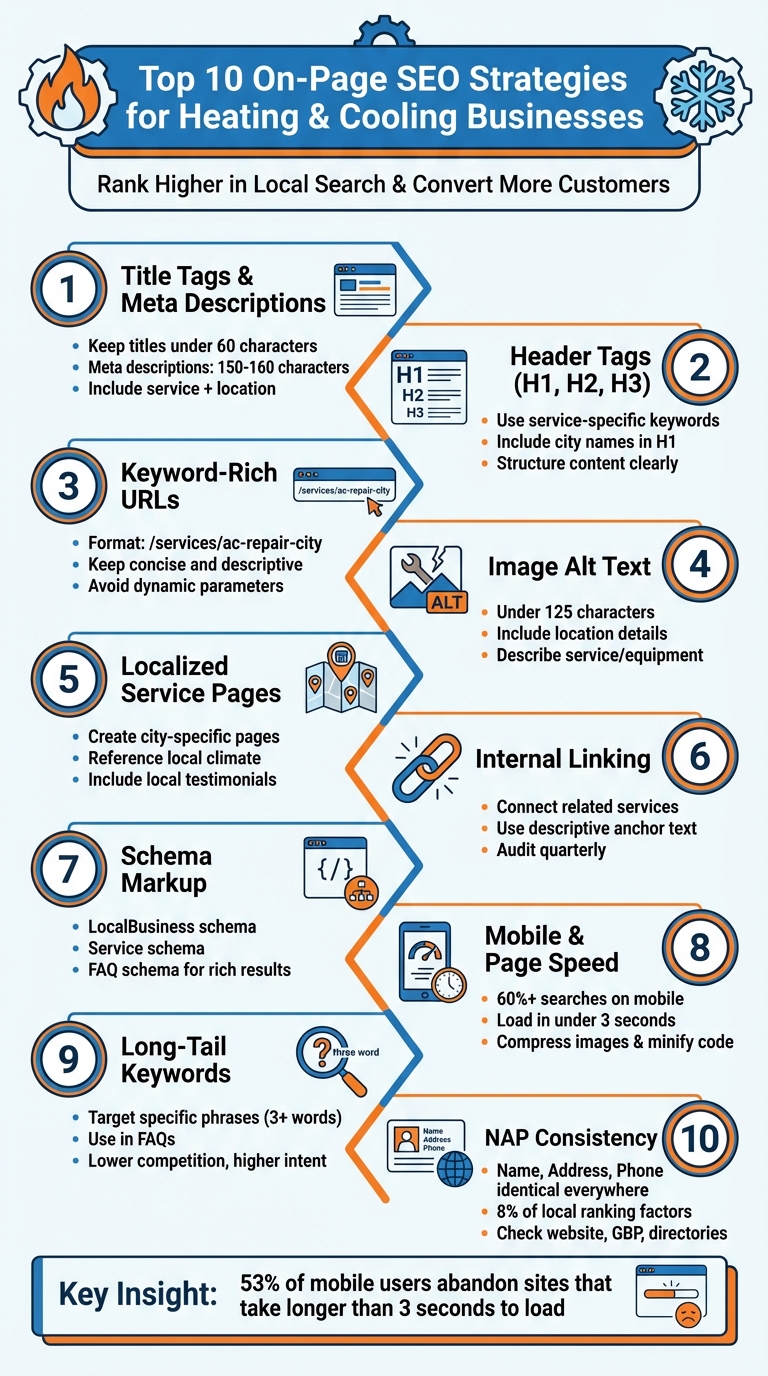
- Title Tags & Meta Descriptions: Include services and locations to grab attention in search results.
- Header Tags: Use clear, service-specific keywords to improve readability and SEO.
- Keyword-Rich URLs: Structure URLs to reflect services and locations for better rankings.
- Alt Text for Images: Add descriptive, location-specific alt text to help search engines and users.
- Localized Content: Create service pages tailored to specific cities or neighborhoods.
- Internal Linking: Link related pages to improve site navigation and search engine crawling.
- Schema Markup: Use structured data to enhance search result visibility with rich snippets.
- Mobile Optimization: Ensure fast-loading, mobile-friendly pages to retain visitors.
- Long-Tail Keywords: Target specific search phrases to attract ready-to-act customers.
- NAP Consistency: Keep your business name, address, and phone number consistent everywhere.
These steps help HVAC businesses rank higher, attract local customers, and convert web traffic into real appointments. Let’s dive into the details.
10 Essential On-Page SEO Strategies for HVAC Businesses
HVAC SEO Strategies: How to Rank at the TOP
1. Optimize Title Tags and Meta Descriptions for Local HVAC Services
Think of title tags and meta descriptions as your virtual storefront on Google. Title tags play a role in Google’s ranking algorithms, while meta descriptions directly impact whether users click on your site. Here’s how to make these elements work for your HVAC business.
Title Tags
Keep title tags under 60 characters to avoid truncation in search results. Place your core service and location right at the beginning. For example, "AC Repair in Phoenix | Same-Day Service" is far more effective than burying key details. Include your brand name at the end to highlight the service first, leaving brand recognition as a secondary focus.
Meta Descriptions
Aim for 150–160 characters in your meta descriptions, and always include a clear call to action. Something like, "Need emergency furnace repair in Denver? We offer 24/7 service with upfront pricing. Call now for a free estimate!" is far more compelling than a vague overview. Incorporate relevant keywords naturally, but prioritize readability – Google’s algorithms are smart enough to value helpful content over keyword stuffing.
Tips for Refining Titles and Descriptions
- Be Specific and Action-Oriented
Use city names, neighborhoods, or ZIP codes instead of generic terms like "near me". Google already understands location-based searches, so specificity is key. Action modifiers like "Book Online", "Open Late", "Same-Day", or "Emergency" align with how customers search when they need HVAC services urgently. - Unique Titles for Every Page
Each page on your site should have its own unique title tag that reflects its content and purpose. For businesses with multiple locations, use a scalable format like "[Primary Service] in [City] | [Neighborhood or ZIP] – [Brand]." This ensures each page targets its specific audience without competing with other pages on your site.
"Your meta titles and descriptions are what potential customers see in Google search results, so it’s important to include local terms here too. This not only helps with SEO but also makes it clear that you’re a local business ready to help people in your community."
– BrightLocal
2. Use Header Tags with Service-Specific Keywords
After optimizing your title tags and meta descriptions, the next step is to focus on your header tags. These tags play a dual role: they guide search engines in understanding your content and help visitors easily navigate your page. Think of them as a roadmap that breaks down your content into clear, organized sections. Start with a single H1 tag that includes your primary keyword and a local identifier. For example, an effective H1 on an AC repair page might be "Reliable HVAC Repair in Phoenix" or "Expert Furnace Installation Services in Dallas."
Your H2 and H3 tags should naturally incorporate related secondary keywords. If your H1 is something like "AC Repair", follow it with H2s such as "Common AC Problems" or "Emergency Service Areas." This approach not only helps Google grasp the range of your services but also makes your content easier for customers to skim. Avoid overloading your headers with repetitive keywords – Google is smart enough to understand synonyms and context. For instance, using a phrase like "AC servicing tips" can be just as effective as repeatedly saying "air conditioner maintenance." A well-structured page improves both SEO performance and user experience.
"Utilizing strong H1 tags with the city name alongside high-performing search keywords will help your site make significant improvements."
– Nolen Walker, Founder and CEO, HVAC Webmasters
Including a location in your H1 tag, such as "Air Conditioning Repair Service Minnesota" or "Trusted AC & Heating Services for the Dallas Metro Area," signals your service area to both Google and potential customers. If your business serves multiple neighborhoods, create dedicated pages with headers like "Furnace Repair in Downtown Seattle" or "AC Installation in Brooklyn Heights."
Keep your headers concise and direct. Instead of using technical jargon, choose terms that match what people actually search for. Homeowners are more likely to look for "AC repair" or "furnace service" rather than "HVAC system diagnostics." Use your H2 and H3 tags to target specific problems, such as "Hot Water Heater Leak Repair" or "Carrier Furnace Maintenance." This approach allows you to address customer needs while boosting your SEO performance.
3. Create Keyword-Rich URL Structures
A well-structured URL does more than just guide visitors – it also helps search engines understand your page content. Think of it as a roadmap for both users and search engines. For example, a URL like yourcompany.com/services/ac-repair-houston immediately conveys the purpose of the page. On the other hand, something like yourcompany.com/product.aspx?ID=11526 is vague and unhelpful, not to mention unprofessional.
When crafting URLs, aim for clarity by including both the service and the location. For instance, use /services/ac-installation-dallas for an AC installation page in Dallas instead of a generic /services/page2. Similarly, a URL like /services/furnace-maintenance-phoenix makes it clear that the page focuses on furnace maintenance in Phoenix, which is great for local SEO. These well-thought-out URLs, combined with optimized headers and meta descriptions, highlight your expertise in specific areas.
"If you’re just starting out with SEO, there’s these things called service area pages. If you’re in a specific city, but you also service maybe 10 or 20 other cities around you, you can create service area pages for each city that you serve."
– Phil Risher, Phlash Consulting
For businesses that serve multiple locations or offer a range of services, create a unique page – and URL – for each combination. For example, if you provide heating and cooling services across different neighborhoods, URLs like /services/heating-repair-brooklyn and /services/ac-repair-manhattan ensure your pages target specific keywords without competing against one another. This approach strengthens your visibility for localized searches.
Avoid cluttering URLs with unnecessary keywords or dynamic parameters. Keep them concise, easy to read, and focused. A URL like /services/hvac-repair-dallas is far more effective than a long, overloaded structure. Clear and simple URLs not only improve SEO but also make it easier for users to understand your offerings at a glance.
4. Add Descriptive Alt Text to HVAC Images
Alt text serves a dual purpose for your HVAC website – it helps visually impaired users understand your images via screen readers and signals to search engines what each image represents. Without it, your images are essentially invisible to Google, meaning you could miss out on traffic from image searches and lose chances to highlight your local expertise.
When crafting alt text, aim for specific, detailed descriptions that include location information. For example, instead of writing something generic like "technician working", go for "Certified technician performing Trane IntelliPak maintenance in Dallas." This naturally incorporates your service area, the equipment you handle, and your expertise, all without overloading keywords. If it’s a customer service photo, you might say, "Customer service representative assisting HVAC clients in Houston, TX." These details not only help search engines connect your images to relevant local searches but also provide real value to users.
Keep alt text concise – under 125 characters – since most screen readers cut off anything beyond that. Place the most critical details, like location or service type, at the beginning of the description. Avoid unnecessary phrases like "Image of…" or "Picture of…" as screen readers already indicate the presence of an image. For decorative images like background patterns or design accents, use an empty alt attribute (alt="") to ensure screen readers skip them.
Before uploading, rename your image files to something descriptive. For instance, replace "IMG_1234.jpg" with "furnace-repair-service.jpg." This not only supports your SEO efforts but also makes file management easier. Additionally, compress your images to reduce file size without sacrificing quality. Faster-loading pages improve user experience and can boost your search rankings.
Regularly review your alt text strategy to ensure it stays effective. Tools like Google Search Console, Screaming Frog, or accessibility checkers can help you identify missing or poorly written alt text. For HVAC businesses, well-written alt text can even showcase your expertise with specific equipment brands, potentially attracting partnerships with suppliers and manufacturers.
5. Create Localized Service Page Content
Broad, generic service pages can weaken your local SEO efforts. Instead, focus on creating dedicated pages tailored to each city, suburb, or neighborhood you serve. This approach strengthens your on-page SEO by complementing your optimized meta tags, headers, and URLs with highly specific, local content.
Dive into details that resonate with your audience by referencing local climate conditions and common HVAC challenges. For instance, highlight how Phoenix’s scorching 115°F summers can overwork air conditioning systems, making regular coolant checks essential. Or, discuss how sub-zero winters in Minneapolis can affect furnace reliability and why tankless water heaters are a practical choice for freezing temperatures. These localized insights not only enhance your content but also work alongside technical SEO to improve your relevance in local searches.
Add a personal touch by incorporating elements like photos of familiar landmarks, mentions of local awards, or examples of community involvement. When potential customers see their neighborhoods reflected in your content, it builds trust. For example, an HVAC company in Texas could emphasize its expertise in cooling systems by addressing the state’s extreme heat – a detail that resonates strongly with local searchers.
"Nothing builds trust faster than hearing from nearby homeowners. Include local case studies, reviews, or before-and-after photos from customers in that specific city. When searchers recognize their own neighborhoods or suburbs, your credibility and conversion rates rise sharply." – Macro Digital Media
To further boost credibility, include local testimonials, your branch address, phone number, and even the names of technicians serving that area. Support this with before-and-after photos to showcase your work. Make sure each page contains 40–70% unique content to avoid duplication issues. Reviews that mention familiar street names or nearby landmarks can have a significant impact, with studies showing that even a handful of reviews can increase purchase likelihood by up to 270%.
6. Use Internal Linking Between Heating and Cooling Pages
Internal links are a simple yet powerful way to connect different pages on your website. For example, linking an "AC Installation" page to a "Furnace Repair" page not only helps search engines understand the relationship between your services but also improves how well your site is indexed. When paired with strong on-page optimization, internal linking leverages your existing content to strengthen your site’s overall authority.
One of the biggest advantages of internal linking is how it distributes authority from high-performing pages to newer or less visible ones. This approach can boost your entire site’s ranking, not just the homepage. A well-thought-out internal linking structure also makes it easier for Google to crawl your site and helps establish your expertise in HVAC services.
"Internal linking isn’t just about user-friendly navigation, it’s a powerful SEO strategy." – Rank Math
When adding internal links, use anchor text that includes targeted keywords. Avoid vague phrases like "click here." Instead, opt for descriptive text such as "AC repair services" or "furnace installation in Denver." This gives search engines a clear understanding of the linked page’s content. Naturally connect related services; for instance, link your "AC Installation" page to "Furnace Repair" or "Emergency HVAC Services" pages where appropriate. Similarly, tie blog posts to relevant service pages or city-specific landing pages to strengthen your site’s authority and encourage bookings. This strategy complements local SEO efforts and guides visitors toward taking action.
Make it a habit to audit your internal links every quarter to uncover new opportunities. Revisit older blog posts, FAQs, and landing pages to add links pointing to your highest-converting pages. Tools like Google Search Console can help you track internal links and identify pages that could benefit from more connections. Just ensure that every link is contextually relevant – irrelevant links can do more harm than good.
7. Add Schema Markup for Local Business and Services
Schema markup is a type of code that helps search engines better understand your content. It allows you to highlight details like your services, location, and customer reviews, making it easier for potential customers to find you. For heating and cooling businesses, this means your contact details, service areas, and even customer feedback can show up directly in search results, giving your business a competitive edge.
"Implementing schema markup improves your search listings with rich results, increasing visibility and click-through rates by explicitly telling search engines what your content means and how to display it." – CinchLocal
Here are the most useful schema types for HVAC businesses:
- LocalBusiness: Displays essential details like your business name, address, phone number, and operating hours in Google’s Knowledge Panel.
- Service: Highlights specific services, such as "AC Repair" or "Furnace Installation", making it clear what you offer.
- FAQ: Allows frequently asked questions to appear directly in search results, taking up more space and providing quick answers to potential customers.
A great example of this in action is E.Smith Heating and Air, which used schema markup on key navigation pages to enhance their online presence.
When implementing schema markup, it’s best to use the JSON-LD format, as recommended by Google. Tools like Google’s Structured Data Markup Helper can help you create JSON-LD code, which you can then test using the Rich Results Test. Stick to relevant schema types – adding unnecessary ones could hurt your rankings instead of helping.
To track how your structured data is performing, use Google Search Console. This will give you insights into how your schema markup is impacting your local search visibility. Incorporating schema-powered features like star ratings and FAQs can significantly increase click-through rates and improve your overall search performance.
8. Optimize Content for Mobile and Page Speed
Did you know that over 60% of online searches now happen on mobile devices? With Google’s mobile-first indexing in play, your mobile site’s performance is directly tied to your search rankings. For heating and cooling businesses, a slow-loading website doesn’t just hurt your SEO – it can also drive away potential customers. Here’s a striking stat: 53% of mobile users will abandon a site if it takes longer than three seconds to load. And if your page takes more than four seconds, one in four visitors will leave.
The stakes are high, especially when it comes to conversions. A 2024 study by Portent revealed that a webpage loading in just one second had a conversion rate 2.5 times higher than one taking five seconds. Imagine someone’s furnace breaking down in the dead of winter – they’re not going to wait around for a sluggish page to load. They want answers, fast. That’s why optimizing your site for mobile speed is non-negotiable.
Here are some actionable steps to improve your mobile performance:
- Compress images: Convert your images to WebP or AVIF formats and enable lazy loading. Tools like TinyPNG or Squoosh can shrink file sizes without losing quality.
- Minify code: Streamline your CSS, JavaScript, and HTML by removing unnecessary whitespace and comments. Tools like Terser (for JavaScript) and cssnano (for CSS) make this process easy.
- Enable browser caching: This ensures returning visitors load fewer resources, speeding up their experience.
- Use a CDN: A Content Delivery Network, like Cloudflare, delivers content from servers closer to your users, cutting down load times.
To ensure your site is running smoothly, test its performance with tools like Google PageSpeed Insights and Google’s Mobile-Friendly Test. Aim for a load time of three seconds or less. Also, prioritize above-the-fold content by inlining critical CSS directly into your HTML. This ensures visitors can quickly access key information, like your contact details and services, without delay.
Fast, mobile-friendly pages aren’t just a nice-to-have – they’re essential for keeping customers engaged and converting.
9. Include Long-Tail Keywords in FAQs and Descriptions
Once you’ve optimized your on-page elements, the next step is integrating long-tail keywords into your content. These are longer, more specific phrases – three or more words – that help you connect with customers searching for precise services. Think about it: when someone’s furnace breaks at 2 a.m., they’re not typing "HVAC services." Instead, they’re searching for phrases like "emergency furnace repair near me" or "why is my furnace leaking water." These keywords not only reduce competition but also attract users who are ready to take action immediately.
Here’s some perspective: A general term like "AC repair" gets about 40,500 monthly searches in the U.S. but comes with a hefty 68% keyword difficulty, meaning you’d need around 71 backlinks to rank. On the other hand, a more specific term like "Los Angeles AC repair" only gets 140 monthly searches but has a much lower keyword difficulty of 23%, making it easier to rank with quality content alone.
As fisicx from LocalSearchForum.com shared in October 2025:
"It’s been long known that long tail can be far more lucrative than general search terms. I had one very highly specific keyword phrase that brought in about 2 leads each month. These specific keywords generate fewer but higher-quality leads (I was one of the very few people who ranked for this search)."
To make the most of this strategy, use the language your customers actually use. For example, instead of just "HVAC", consider terms like "AC", "heating system", or "boiler service". Focus on specific problems like "hot water heater leak repair" or brand-specific services such as "Carrier furnace maintenance". Carrot.com highlighted in June 2025 how targeting phrases like "emergency furnace repair in <city>" can lead to higher conversions because it addresses an urgent need. A great example is Thomas J. Fannon & Sons, an HVAC business in Virginia, which ranks highly for "why is my furnace leaking water" by publishing a detailed article answering this question and linking to their service pages.
To discover these long-tail keywords, use tools like Google’s autocomplete or the "People Also Ask" feature. These tools reveal exactly what potential customers are searching for, helping you craft content that not only ranks but also provides the answers they need.
10. Maintain NAP Consistency Across On-Page Elements
For local HVAC businesses aiming to climb search rankings, keeping your NAP (Name, Address, Phone Number) consistent across all platforms is essential. This consistency isn’t just about looking professional – it’s a direct ranking factor for local search and Google’s Local 3-Pack. Did you know citations make up 8% of local SEO ranking factors? Plus, "near me" searches have skyrocketed by 900% in recent years. A consistent NAP builds trust with both search engines and potential customers.
Google checks your business’s legitimacy by comparing your NAP across your website, Google Business Profile, Yelp, Angi, Bing Places, and other directories. If the details match perfectly, you’ll be rewarded with better rankings. On the flip side, even small discrepancies – like using "Street" in one place and "St." in another – can confuse search engines and hurt your visibility.
"Even small differences (like ‘St.’ vs. ‘Street’) can hurt rankings, so double-check everything" – Housecall Pro
Inconsistent NAP details don’t just harm rankings; they can also lead to duplicate listings, which might cost you leads.
"Your company name, address, and phone number need to match exactly on every listing, or search engines get confused about which business is real" – Helium SEO
To avoid these pitfalls, take these steps:
- Audit your NAP on key areas of your website, like the footer, contact page, service area pages, and schema markup.
- Cross-check it against your Google Business Profile and all directory listings.
- Stick to one consistent format across all platforms, including punctuation, abbreviations, and spacing. For instance, if your website lists "ABC Heating & Cooling", don’t use "ABC Heating and Cooling" anywhere else.
Conclusion
On-page SEO is not a one-and-done task – it’s an ongoing effort that keeps paying off long after the initial work is done. The techniques we’ve discussed, from fine-tuning title tags and meta descriptions to ensuring NAP (Name, Address, Phone) consistency, all contribute to boosting your HVAC business’s visibility in local search results.
Consistency is the key. Search engines reward websites that regularly update and optimize their content, meaning that keeping your information fresh and relevant will help drive organic traffic over time. Local SEO isn’t just about short-term wins; it offers long-term benefits and a steady return on investment, ensuring your heating and cooling business remains competitive. This steady focus sets the stage for both immediate gains and lasting success.
Start with foundational elements like your Google Business Profile, mobile optimization, and improving page speed for quick results. These steps not only enhance rankings but also reduce bounce rates and build trust with potential customers. Once the basics are in place, you can dive into more advanced tactics like schema markup, internal linking, and creating localized service pages.
The HVAC businesses that embrace these strategies today will be the ones leading local search results tomorrow, attracting qualified leads while others struggle to understand why their phones aren’t ringing. Take action now, monitor your progress, and refine your approach as needed – your bottom line will reflect the effort.
FAQs
How can I make sure my HVAC business’s name, address, and phone number (NAP) are consistent everywhere online?
To maintain consistency in your HVAC business’s NAP (Name, Address, Phone number), start with regular audits of all your online listings. Double-check that the same details and formatting are used across your website, Google Business Profile, social media pages, and online directories. Take the time to claim and verify your profiles on every platform where your business is listed, and quickly update any outdated or incorrect information. Keeping these details uniform not only boosts your local SEO but also strengthens trust with potential customers.
How can schema markup improve local SEO for HVAC businesses?
Using schema markup allows search engines to grasp important details about your HVAC business, including the services you offer, your location, and customer reviews. This can improve your local search presence by displaying rich snippets – like ratings, reviews, and business hours – right in the search results.
Making this information more visible and engaging to potential customers can increase your click-through rates. Plus, it can give your local SEO rankings a boost, helping your business shine in a crowded marketplace.
Why is mobile optimization important for HVAC business websites?
Mobile optimization is a must-have for HVAC business websites, especially since most people use their smartphones to browse the internet these days. A mobile-friendly site makes it simple for potential customers to navigate your website, find the information they need, schedule services, or reach out to your business – whether they’re at home or on the move.
On top of that, search engines like Google give preference to mobile-friendly websites when ranking search results. This means that by optimizing your site for mobile devices, you can boost your visibility in local searches, bringing in more traffic and increasing the chances of converting visitors into customers.