
Local SEO is critical for Charleston businesses aiming to attract both local customers and tourists. Here’s why it matters and how you can get started:
- Why Local SEO Matters: With over 76% of local searches leading to a visit within 24 hours, businesses in Charleston can’t afford to ignore the power of being visible in local search results. From targeting specific neighborhoods like Mount Pleasant or West Ashley to ensuring your business appears near landmarks like King Street, local SEO helps drive ready-to-buy customers your way.
- Key Steps for Success:
- Optimize Your Google Business Profile: Claim and verify your profile, add Charleston-specific details, upload photos, and encourage reviews.
- Use Local Keywords: Focus on precise search terms like "seafood near Waterfront Park" or "emergency AC repair Mount Pleasant."
- Add Schema Markup: Implement structured data to help search engines better understand your business location, services, and hours.
- Build Citations and Reviews: Ensure consistent business details across directories and actively manage customer feedback.
- Focus on Mobile and AI Search: Optimize your website for mobile users and voice search to capture on-the-go customers.
Local SEO isn’t just about showing up in search results – it’s about turning those searches into real visits and revenue. By following these steps, Charleston businesses can stand out in a competitive market.
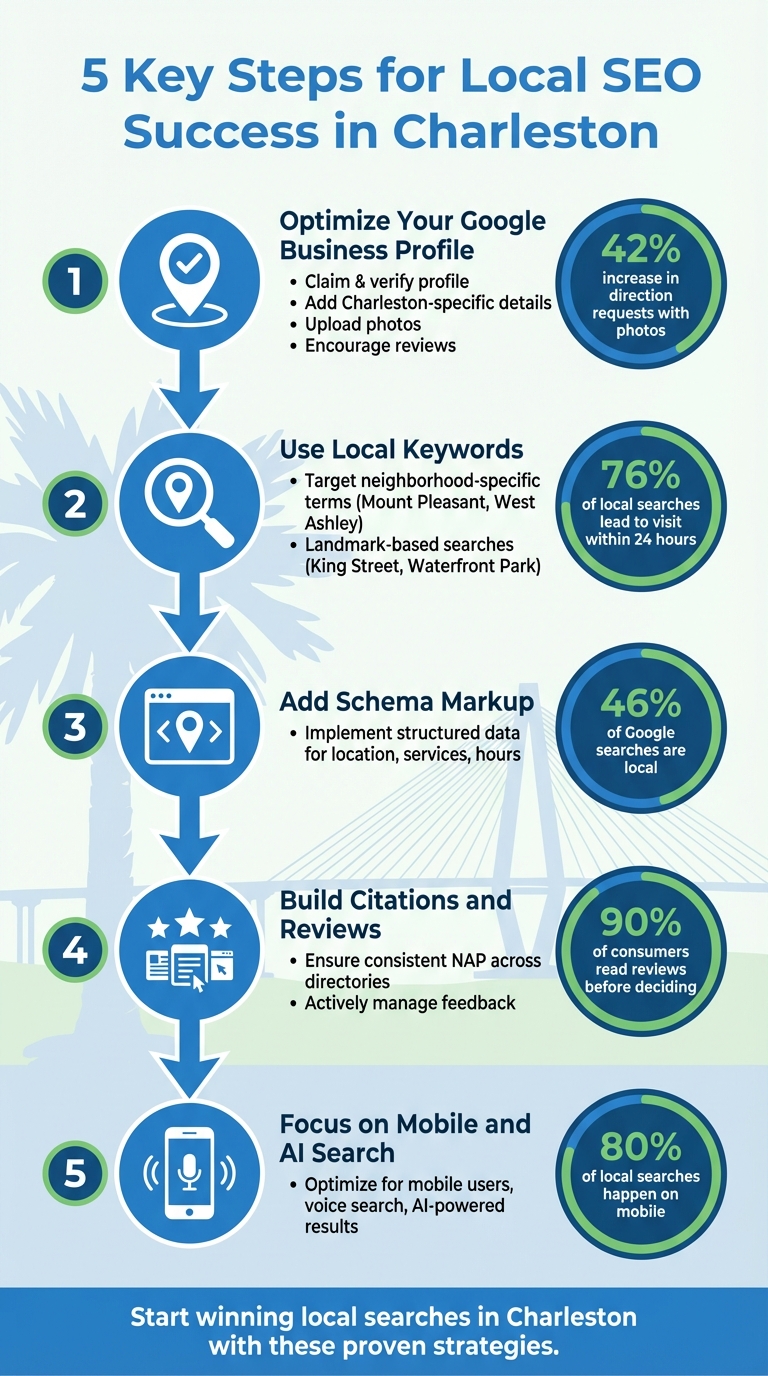
5 Key Steps for Local SEO Success in Charleston
How to Build a Local SEO Strategy in 2026 (Full Blueprint!)
How to Optimize Your Google Business Profile for Charleston
Your free Google Business Profile acts as your online storefront, showing up when people search for local services. Optimizing this profile can be the key to appearing in the local map pack and attracting customers ready to visit. Here’s how you can claim, verify, and fine-tune your profile specifically for Charleston’s market.
Claim and Verify Your Business Profile
Start by searching for your business on Google Maps. Click "Claim this business" and then "Manage now". To verify ownership, Google will guide you through a process that may involve phone or video verification, which can take up to seven days. Without completing this step, your business won’t appear in Google Search or Maps.
For service-area businesses like mobile locksmiths or landscaping companies without a physical storefront, you can set your service area to include specific Charleston neighborhoods – such as Mount Pleasant, Summerville, or North Charleston – and choose to hide your physical address. This ensures your profile stays relevant to the areas you serve.
Add Charleston-Specific Information and Photos
Make sure your business name, address, and phone number (NAP) are consistent with what’s on your storefront and other online listings. Choose a primary category that’s as specific as possible – "Seafood Restaurant" is better than just "Restaurant" for improving your local search ranking. You can also add up to nine secondary categories to highlight additional services.
In your business description, include Charleston-specific details. Mention things like locally sourced products, proximity to well-known spots like King Street or Rainbow Row, or any ties to the community. Practical details, such as parking availability or free Wi-Fi, can also make your profile more helpful to potential customers.
Photos are a powerful tool. Businesses that upload photos see a 42% increase in requests for directions and a 35% boost in website clicks. Add a mix of tagged photos showing your storefront, interior, team, or even local events. Weekly Google Posts are another great way to stay active – share updates about events like Charleston Restaurant Week to connect with the community. Don’t forget to update your hours for holidays or seasonal changes, especially if you’re in a bustling area like downtown Charleston.
Get More Reviews and Ratings
Reviews play a huge role in improving your local rankings. However, Google strictly prohibits offering discounts, gifts, or money in exchange for reviews, and violating this rule could result in restrictions on your profile.
"Positive reviews and helpful replies can help your business stand out." – Google Business Profile Help
Make it easy for customers to leave reviews. Use your Google Business Profile dashboard to generate a direct review link or QR code. Share this link in thank-you emails, print it on receipts, or include it in customer service interactions. Keep in mind that customers need a Google Account to leave a review, but they can create one using any email address.
When responding to reviews, add personal touches that reference Charleston. For example, say, "We’re thrilled you enjoyed your visit after exploring the Battery!". Be aware that some reviews might take time to appear due to Google’s spam filters. A little patience is normal.
How to Find Local Keywords for Charleston Searches
To connect with both Charleston locals and tourists, it’s important to understand how they search for services. Locals often use detailed phrases like "emergency AC repair Mount Pleasant", while tourists might look for terms like "seafood near Waterfront Park." By focusing on these specific, localized terms, you can better reach potential customers when they’re ready to make a purchase. This approach sets the stage for using tools and strategies to pinpoint the most effective local keywords.
Use Keyword Research Tools for Local Discovery
Keyword research tools like Semrush, Moz Keyword Explorer, and Ubersuggest can help you uncover Charleston-specific search terms. For example, you might discover that "walk-in dentist Charleston" has high search volume, or that "affordable movers West Ashley" faces less competition. These insights can guide your efforts to target the right audience.
Browser extensions such as GMBSpy and GMBEverywhere are also useful for checking out competitors’ Google Business Profile categories. They can reveal keyword opportunities you might not have considered. Additionally, AI tools like ChatGPT can generate long-tail keyword ideas, such as "best brunch spot near Charleston City Market."
Don’t overlook free tools like Google Autocomplete and the "Place Topics" feature on Google Business Profiles. Autocomplete provides real-time suggestions as you type queries like "best [your service] in Charleston", while "Place Topics" highlights keywords frequently mentioned in customer reviews, such as "outdoor dining" or "competitive pricing."
Target "Near Me" and Location-Specific Phrases
Local intent is critical – 76% of people who search for something "near me" on their smartphone visit a related business within a day. Terms like "Charleston bakery near me" or "coffee shop near Rainbow Row" are perfect for capturing users who are ready to visit a business.
To refine your strategy, focus on specific neighborhoods such as West Ashley, Mount Pleasant, North Charleston, Summerville, or the French Quarter. For example, "seafood restaurant King Street" is more precise than "seafood restaurant Charleston" and often signals that the searcher is already nearby. Tourists, in particular, respond well to searches tied to landmarks, like "near Waterfront Park" or "close to Charleston City Market."
Make sure your mobile site is fast-loading and displays contact information prominently to convert these searches into visits.
Analyze What Keywords Your Charleston Competitors Use
Start by searching for your service alongside "Charleston" to see which businesses dominate the Map Pack. Pay attention to competitors’ business titles – if a competitor uses a name like "Charleston’s Premier Coffee Shop", it may give them an edge in rankings. Also, review the snippets Google displays, which often include keywords from reviews, menus, or website content.
Use SEO tools to compare your website with competitors and identify keywords they rank for that you don’t. This keyword gap analysis can help you find opportunities to improve your strategy. Additionally, dive into competitor reviews using the "Place Topics" feature to uncover recurring themes like "outdoor dining" or "live music." Incorporating these terms into your content can make it more relevant to local audiences.
Finally, monitor businesses that appear in AI Overviews or ChatGPT results for Charleston-related queries. These platforms can provide additional insights into the keywords and content that resonate with users. Armed with this information, you’ll be ready to integrate data-backed keywords into your local SEO strategy effectively.
How to Add Local Business Schema Markup
What Schema Markup Is and Why It Matters
Local business schema is a type of structured data that you add to your website to help search engines understand key details about your business – like your name, location, operating hours, and customer ratings. Essentially, it translates your business information into a format that search engines can easily process. Instead of trying to interpret your site, search engines can quickly access your business’s details, such as your address, phone number, and even your star ratings.
Why does this matter? Because 46% of all Google searches are focused on finding local information. For example, if someone searches for "bakery Charleston", schema markup makes it easier for search engines to connect your business to that query, even if the exact keywords aren’t prominently displayed on your site. By adding this structured data, you improve your chances of appearing in rich search results, which can lead to higher click-through rates and better visibility in AI or voice search.
"LocalBusiness schema is the star of local SEO. It tells search engines ‘where’ you are and ‘when’ customers can find you." – Lorenz Esposito, Founder, SearchX
Web pages with schema markup are also more likely to show up in AI-generated summaries and voice assistant responses to "near me" searches.
Add Local Business Schema for Your Charleston Location
The first step is to choose the most specific business category available on Schema.org. Instead of sticking with the generic "LocalBusiness" type, opt for a more precise category like Restaurant, Dentist, AutoRepair, or IceCreamShop. You can use free tools like Google’s Structured Data Markup Helper to generate the necessary code.
When crafting schema for your Charleston location, make sure to include these key details:
- Business name
- Full physical address (including the neighborhood, such as King Street or West Ashley)
- Main phone number
- Operating hours
- Website URL
- Storefront image
- Latitude and longitude coordinates (using the
geoproperty)
Adding this detailed information ensures consistency with your Google Business Profile, helping your business appear accurately across various platforms.
If your business serves multiple neighborhoods, use the areaServed property to specify areas like West Ashley, Mount Pleasant, North Charleston, or Summerville. For businesses with multiple locations, create a separate page for each branch. Each page should include unique schema data that reflects that specific location’s address, phone number, and hours.
Once your schema is ready, place the JSON-LD code in the <head> section of your homepage, contact page, or location-specific landing pages. If you’re using WordPress, plugins like Rank Math, Schema Pro, or Yoast Local SEO can simplify this process, letting you add schema without manually editing code. Don’t forget to include your aggregateRating if you have customer reviews – 90% of consumers read reviews before making a decision.
Test and Validate Your Schema Code
After implementation, testing is crucial to ensure your schema works as intended. Begin by using Google’s Rich Results Test to preview how features like star ratings or operating hours will appear in search results.
Next, run your code through the Schema Markup Validator to check for syntax errors or warnings. Always test the live URL of your site to confirm that everything is functioning correctly.
"Proper validation is critical for ensuring your structured data qualifies for rich results." – Search Engine Journal
Set up Google Search Console to monitor your structured data continuously. Its Enhancement Reports will flag any errors or warnings, helping you address issues promptly. If you manage multiple Charleston locations, validate each page individually to ensure the address and geo-coordinates are correctly recognized. Staying on top of these details will help maintain strong local search performance.
Build Citations and Reviews for Charleston
Once you’ve optimized your profile and fine-tuned your keywords, the next step is to focus on building accurate citations and managing reviews. These two elements go hand in hand to boost your business’s credibility with both search engines and potential customers. A citation is any online mention of your business’s name, address, and phone number (NAP) – whether it appears on directories, social media, or local websites. With 63% of consumers stating they would avoid a local business with incorrect details, ensuring accuracy is a must for Charleston businesses looking to attract both locals and tourists. When done right, precise citations and authentic reviews can significantly enhance your local SEO performance in Charleston.
Create and Maintain Local Directory Listings
Start by submitting your business information to data aggregators like Infogroup, Neustar Localeze, Foursquare, and Factual. These services distribute your details to platforms such as Apple Maps, Yelp, Bing, and Google, ensuring your business appears consistently across the web. Keep your NAP information uniform everywhere, down to the smallest details – like whether you use "St." or "Street" and "Suite 100" or "#100."
Don’t stop at the major platforms – list your business on Charleston-specific directories too. Consider sites like the Charleston Area Convention & Visitors Bureau, Charleston Regional Business Journal, and neighborhood-specific platforms for areas like King Street, West Ashley, or Mount Pleasant. If your business operates in a specific industry, make sure you’re on relevant directories as well: restaurants should be on OpenTable and TripAdvisor, while contractors should appear on Angie’s List or HomeAdvisor. With 97% of consumers searching online for local businesses – and 12% doing so daily – these listings are key to staying visible.
Ask Customers for Reviews on Local Platforms
Encourage customers to leave reviews right after their experience with your business. Train your team to mention reviews during checkout, or follow up with an email within 24 hours that includes direct links to your Yelp page or other local review platforms.
Timing is especially critical for Charleston businesses that cater to tourists. Ask visitors to leave reviews before they leave town, as they may forget once they return home. Reviews don’t just build trust – they can directly impact your bottom line. For example, a one-star increase in a Yelp rating can boost revenue by up to 9%. Once you’ve collected reviews, maintain your reputation by responding promptly to customer feedback.
Monitor and Respond to Negative Reviews
Did you know that half of all customers only consider businesses with a four-star rating or higher? To stay competitive, set up Google Alerts or use review monitoring tools to get notified as soon as new reviews are posted. If you encounter a negative review, respond within 24–48 hours. Acknowledge the issue, apologize, and offer a solution.
Take a proactive approach with dissatisfied customers. Reach out directly – 64% of customers will update a negative review after receiving a remedy. Whether it’s offering a refund, replacement, or complimentary service, listening to their concerns can turn things around. In fact, 70% of customers who edited a negative review said their opinion changed after a second, positive experience with attentive staff.
Keep an eye out for review spam by setting up alerts and report suspicious entries through platforms like your Google Business Profile or Yelp’s reporting tools. Avoid "review gating" – a practice where only positive experiences are encouraged to leave reviews – as it violates platform rules and could lead to profile removal. Instead, create opportunities for all customers to share feedback privately via in-store signage or email. This gives you a chance to address concerns before they turn into public complaints.
Optimize for Mobile and AI-Powered Search
Did you know that over 80% of local searches happen on mobile devices? For Charleston businesses, this means mobile optimization isn’t just a nice-to-have – it’s a must. Whether it’s a tourist exploring King Street or a local searching for "restaurants near Waterfront Park", people expect quick, seamless results on their phones. A slow-loading site or one that requires constant pinching and zooming will likely send them straight to your competitor. Prioritizing mobile-first strategies complements earlier efforts like profile and citation optimization, ensuring stronger local search visibility.
Make Your Website Mobile-Friendly
Your NAP (Name, Address, Phone number) details should be in crawlable HTML – not embedded in images – so search engines and voice assistants can easily read them. Place your most important calls-to-action, like "Call Now" or "Book a Table", above the fold for immediate visibility on mobile screens. Features like clickable phone numbers, "Get Directions" buttons, and simple booking forms can reduce friction and improve the user experience.
Another tip: use interactive Google Maps on your location pages instead of static images. This not only helps search engines better associate your business with its physical location but also boosts your visibility. If your business serves multiple Charleston neighborhoods – like West Ashley, Mount Pleasant, or James Island – be sure to include these areas in your title tags, H1 headers, and meta descriptions to strengthen your local presence.
Optimize Your Content for Voice Search
Voice searches are more conversational compared to typed queries. While someone might type "bakery Charleston", they’re more likely to ask their phone, "Where’s the best bakery near me in Charleston?" To capture this traffic, your content should use a natural, conversational tone that answers these kinds of questions directly. For instance: "Find us at 123 King Street, Charleston, SC – right across from Marion Square."
Adding an FAQ section can also help you snag voice search traffic. Pair this with structured data like LocalBusiness and FAQPage schema to make it easier for AI and voice assistants to understand and recommend your business. By tailoring your content for voice queries, you’ll be better positioned to take advantage of AI-driven search advancements.
Prepare for AI-Powered Search Results
Once your mobile and voice search strategies are in place, the next step is gearing up for AI-powered search results. Search engines are shifting from simply listing links to providing curated summaries and direct answers. For example, a Charleston home services business saw a 220% boost in local impressions and a 40% increase in organic conversions after implementing location-based schema and a structured topical map. Shanzaib from Charleston SEO Company explains:
"Local businesses must embrace semantic optimization and structured data to thrive in an AI-driven search landscape."
Consistency is key when it comes to your Google Business Profile. Posting updates 2–3 times per week can increase your chances of showing up in AI-generated search summaries. Keep your content fresh by regularly updating photos, videos, and even community involvement highlights. AI systems prioritize pages that display recent updates and verify credentials like licenses or certifications. With 53% of consumers now experimenting with or actively using generative AI – up from 38% the year before – adapting to AI-powered search is no longer optional. It’s the next big step in staying competitive.
How SearchX Helps Charleston Businesses with Local SEO
Once you’ve implemented local SEO strategies, the next step is making them scalable without spending hours on manual tasks. That’s where SearchX steps in. We provide Charleston businesses with local SEO solutions that combine cutting-edge tools and expert support to help you climb the rankings and attract more local customers. Let’s dive into how SearchX turns these strategies into automated, scalable solutions for Charleston businesses.
SearchX Tools for Charleston Keyword Research
Choosing the right keywords is the cornerstone of a strong local SEO plan. SearchX’s Keyword Strategy service digs deep into local search volumes, competitor tactics, and conversion opportunities. For Charleston businesses, this means uncovering seasonal trends tied to events like the Spoleto Festival or Charleston Restaurant Week.
Our Local Tracking tool keeps an eye on your map pack rankings for Charleston-specific searches. Meanwhile, our competitor SERP ranking comparison tools reveal gaps in your current keyword strategy compared to other local players. You can even set up automated alerts to track shifts in rankings for high-intent keywords, such as "near me" searches, ensuring you stay ahead of the competition.
Local Listing Management Services
SearchX’s Citation Tools simplify the process of keeping your business’s NAP (Name, Address, Phone number) consistent across directories. This includes Charleston-specific listings like the Charleston Chamber of Commerce, as well as national platforms. Our Review Management Tools allow you to monitor and respond to customer feedback across various platforms – all from one centralized dashboard.
If you operate multiple locations in Charleston, you can manage them effortlessly with unified location groups. Automated reporting consolidates business profile data, keyword rankings, and analytics in real time, so you can track your performance without juggling multiple tools.
Custom SEO Plans for Charleston Businesses
Beyond automation, SearchX offers tailored SEO plans to fine-tune every part of your local strategy. Whether you’re a small business or a larger operation, we’ve got flexible options to suit your needs:
- Starter Plan ($3,000/month): Includes local listing management across 50+ directories, monthly keyword tracking, and Google Business Profile optimization.
- Growth Plan ($6,000/month): Adds technical SEO audits and competitor analysis for a more robust approach.
- Enterprise Plan ($12,000+/month): Features AI visibility tracking to monitor how your brand appears in AI-driven search results.
Every plan includes custom content creation and ongoing optimization tailored to Charleston’s market. Need help with technical SEO, link building, or local business schema markup? SearchX has the tools and expertise to help you dominate local search results in Charleston.
Conclusion: Start Winning Local Searches in Charleston
The digital landscape in Charleston is changing fast, and standing out in AI summaries, map packs, and social platforms has never been more important. For example, in March 2025, 4% fewer U.S. Google users clicked on organic search results compared to the year prior, while nearly 3% more searches ended without a click. This trend shows that businesses need to be visible across multiple search formats to connect with potential customers.
Taking action on these strategies can significantly improve your online presence. Brands that actively manage their information across a broad publisher network experience a 186% jump in clicks from Google. For Charleston businesses aiming to attract both tourists and locals, this level of visibility can mean the difference between being a top choice or being overlooked entirely. These steps provide a solid foundation for growing your local presence in Charleston.
You can start implementing these tactics with our DIY local SEO resources or let SearchX handle the heavy lifting with full-service support. By adopting the strategies outlined here, you’ll position your business to succeed in Charleston’s competitive market. Now’s the time to embrace AI-driven search and voice queries to stay ahead.
Keep track of your progress with our guides on SEO metrics that matter and measuring ROI from organic growth. Your Charleston customers are already searching – make sure they find you first.
FAQs
How can businesses in Charleston use local keywords to attract more customers?
To draw in more local customers, businesses in Charleston should make smart use of location-specific keywords that align with how both locals and visitors search online. For example, phrases like “Charleston seafood restaurant,” “West Ashley urgent care,” or “restaurants near Rainbow Row” can be woven into your website’s title tags, meta descriptions, headings, and content. This approach helps search engines understand your connection to local search queries.
Another effective tactic is creating hyper-local content that focuses on specific areas, such as Mount Pleasant, North Charleston, or downtown Charleston. Naturally incorporate these neighborhood names into your text, image alt tags, and internal links. Additionally, using structured data (like local business schema) and ensuring your NAP (Name, Address, Phone) details are consistent across platforms can further establish your local presence.
Make sure your Google Business Profile is fully optimized too. Select accurate categories, include location-specific terms in your business description, and share updates about local happenings or seasonal specials. This consistent emphasis on Charleston-related terms lets search engines know that your business is highly relevant to local searches, helping you increase visibility and attract more customers.
How can adding local business schema markup benefit businesses in Charleston?
Adding LocalBusiness schema markup is a game-changer for businesses in Charleston looking to shine in local search results. This structured data acts like a translator for Google, helping it grasp key details about your business – such as your location, operating hours, and services. The result? Features like review stars, photos, and pricing pop up in search results and on Google Maps, making your business more noticeable and enticing to potential customers. These visual perks can lead to higher click-through rates and, ultimately, more foot traffic or inquiries.
Beyond aesthetics, schema markup fine-tunes how search engines understand your content. This makes it easier for AI-powered algorithms to connect your business with "near me" searches or queries with clear intent. For instance, after adding schema, a Charleston plumbing company reported a 202% surge in calls and a significant revenue increase. Simply put, LocalBusiness schema not only boosts your online visibility but also builds trust and helps drive tangible growth for businesses in Charleston.
How do reviews and citations improve local SEO for Charleston businesses?
Reviews and citations are essential for improving local SEO for businesses in Charleston. Positive and recent reviews not only build trust with potential customers but also send strong signals to search engines like Google. These reviews can boost your visibility in local search results, particularly in the coveted Local 3-Pack. By actively encouraging reviews, responding to them promptly, and addressing any issues raised, businesses can enhance their credibility and see increased engagement, such as more website visits and requests for directions.
Citations are another critical factor. These are consistent listings of your business’s Name, Address, and Phone number (NAP) across various directories and local platforms. Consistency in your NAP data helps Google confirm your business’s presence in Charleston, reinforcing your legitimacy. Mentions from reputable sources like local chambers of commerce or neighborhood guides further solidify your authority and improve rankings. When combined, strong reviews and accurate citations can boost your online visibility, attract more local customers, and drive real business growth.