
When someone’s heating or cooling system fails, they need help fast. That’s why emergency HVAC keywords like "24-hour AC repair near me" or "emergency furnace repair" are so powerful – they connect you with customers ready to book immediately. But ranking for these terms can be challenging. This guide breaks down how HVAC companies can dominate local search results for urgent services:
- Focus on High-Intent Keywords: Use tools like Google Keyword Planner or Ahrefs to identify terms customers search during emergencies (e.g., "same-day HVAC repair").
- Optimize Your Google Business Profile (GBP): Add 24/7 availability, service areas, and encourage reviews mentioning fast response times.
- Create Dedicated Emergency Service Pages: Target specific services like "Emergency AC Repair in [City]" with clear calls to action and mobile-friendly design.
- Track and Adjust: Use tools like Google Analytics and call tracking to monitor keyword performance and refine your strategy.
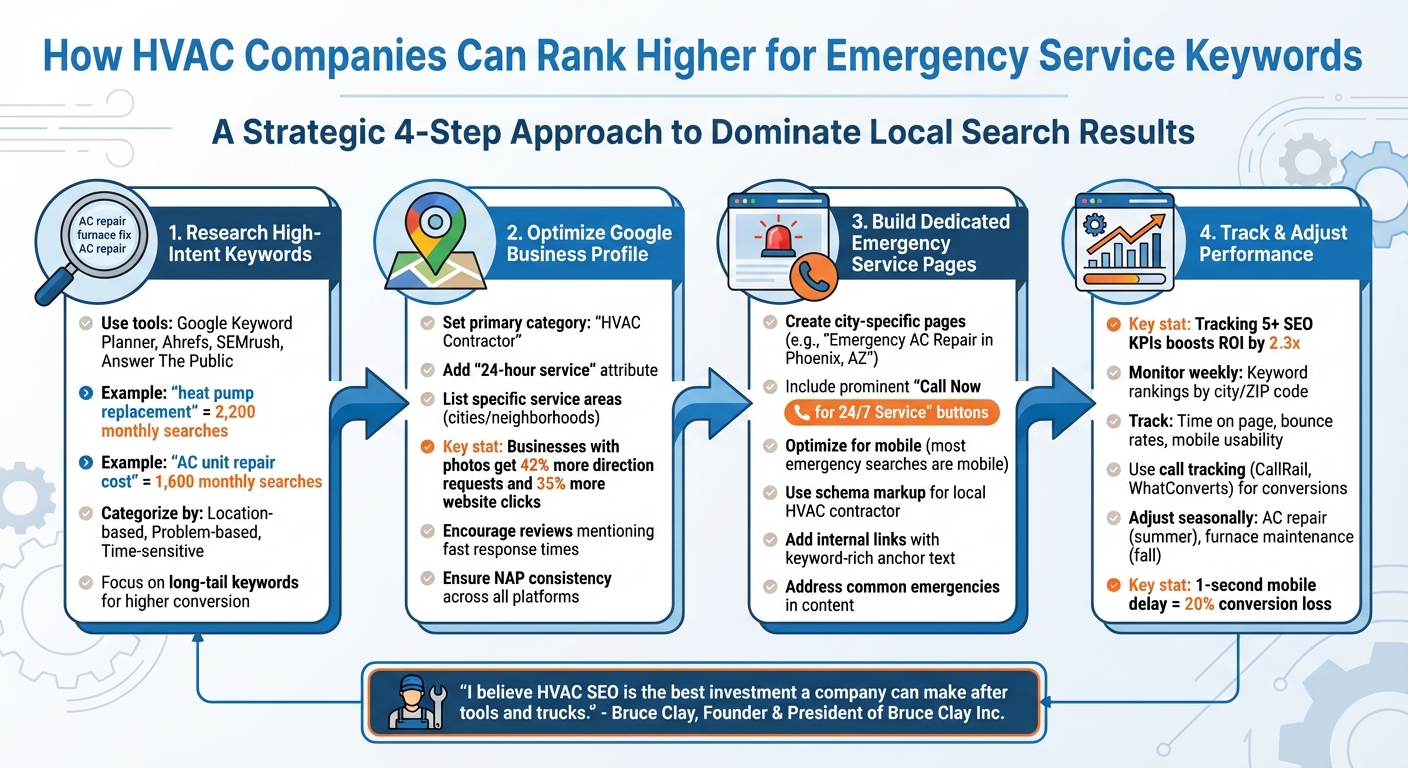
4-Step Process to Rank Higher for Emergency HVAC Keywords
HVAC SEO Strategies: How to Rank at the TOP
How to Research High-Intent Emergency Keywords
When customers are in a bind, their search behavior reflects their urgency. To uncover high-intent emergency keywords, start by analyzing what people type into search engines during these moments. Tools like Ahrefs and SEMrush are excellent for uncovering competitor keywords. For example, Hook Agency used Ahrefs to analyze Bueller Air and Plumbing’s website and discovered that the term "heat pump replacement" had 2,200 monthly searches – making it a valuable target keyword. This highlights the importance of combining competitor research with keyword tools to zero in on terms that matter. Similarly, Answer The Public reveals that "AC unit repair" leads to queries like "How much does AC unit repair cost?" – a phrase with 1,600 monthly searches.
Don’t overlook resources like Google Search Console and direct customer feedback, which can help surface additional high-intent keywords specific to your business.
"The more quality content related to what you sell, the more likely Google will show your website for those related searches."
- Tim Brown, Founder of Hook Agency
For a more structured approach, services like SearchX can help you identify high-intent keywords tailored to emergency HVAC services by blending data-driven insights with strategic analysis.
Tools for Finding Emergency Keywords
If you’re just starting, Google Keyword Planner is a free and straightforward tool for exploring search volumes and competition for emergency-related terms in your area. For deeper analysis, platforms like Ahrefs and SEMrush allow you to track competitor keywords, revealing which phrases they rank for and where your strategy might need improvement. If you’re on a budget, Ubersuggest is another useful option.
Google Trends is especially helpful for identifying seasonal patterns. For instance, searches for "air conditioning replacement near me" typically spike in the summer, allowing you to time your efforts for maximum visibility. Tools like Answer The Public organize common questions and phrases into easy-to-digest visuals, offering a snapshot of what people are searching for in your market. Additionally, Google’s own features – like "People Also Ask" sections and autocomplete suggestions – can provide real-time insights into what potential customers are asking.
Once you’ve compiled a list of emergency keywords, the next step is to sort them by intent and assign them to the most relevant pages on your website.
How to Categorize Emergency Keywords
After gathering your keywords, the key is to organize them by intent and specificity. This ensures they align with the right pages on your site. Start with location-based terms like "emergency HVAC repair Dallas" or "24 hour AC service Tampa" to capture local customers ready to act. Next, focus on problem-based keywords such as "AC not cooling" or "furnace won’t turn on", which target users actively troubleshooting issues. Finally, group time-sensitive terms like "same day HVAC service" or "24 hour furnace repair" to address queries signaling immediate needs.
Understanding user intent is essential here. For example, transactional keywords like "Emergency AC repair in Tampa" indicate a readiness to hire, while informational keywords such as "how to fix an air conditioner" attract users seeking knowledge. Long-tail keywords, like "24-hour emergency AC repair in Tampa", often have less competition but higher conversion rates because they align closely with specific searcher needs.
Once categorized, these keywords should be strategically assigned to the right pages on your site.
Assigning Keywords to Specific Pages
With your keywords organized, the next step is assigning them to the most relevant pages. Emergency service pages should target high-intent phrases like "24/7 HVAC repair" or "emergency AC service." These pages need clear calls to action and easy-to-find contact details to encourage quick customer action. For local reach, create city-specific landing pages targeting terms like "HVAC repair [city]."
For informational and problem-based keywords, blog posts work best. Articles answering questions like "AC not cooling" or "furnace making noise" not only educate but also position your business as the go-to expert when DIY solutions fail. Lastly, ensure your Google Business Profile includes navigational and local emergency terms to improve visibility in local search results.
"Keywords only matter within their intended context. For example, attracting a bunch of people looking for car AC repair will leave them disappointed when they come across your website."
Accurate keyword assignments ensure you’re attracting the right audience – those who genuinely need your services. Misaligned keywords can lead to irrelevant traffic, which benefits no one.
How to Optimize Google Business Profile for Emergency Services
Your Google Business Profile (GBP) is often the first impression potential customers get when they search for emergency HVAC services. Google prioritizes listings that are complete and look professional.
Setting Up Your GBP for Emergency Keywords
To attract emergency service searches, fine-tune your GBP listing with the right details. Start by choosing "HVAC Contractor" as your primary category, and add secondary categories like "Emergency HVAC Service" to cover urgent needs. Make sure your business hours reflect 24/7 availability and include attributes like "24-hour service" to emphasize your readiness. Also, list the specific cities and neighborhoods you serve to show up in local searches such as "emergency furnace repair near me."
RS Gonzales offers a tool called LeadConnector, an HVAC CRM that integrates directly with your Google Business Profile. This allows customers to request estimates, schedule maintenance, or book emergency repairs right from your profile.
Using GBP Features to Improve Rankings
Boost your visibility by encouraging reviews that mention your quick response times, posting updates about your emergency services, and uploading clear, relevant photos. Customer reviews that highlight fast responses help Google recognize your business as a top choice for emergency-related searches. Plus, businesses with photos see 42% more requests for directions and 35% more clicks to their websites.
Consistency is key – ensure your Name, Address, and Phone Number (NAP) are identical across all online platforms. Any discrepancies can confuse Google and hurt your local rankings. Regularly monitor your profile’s performance to confirm these updates are driving customer engagement.
How to Track GBP Performance
To measure the success of your emergency service strategy, use GBP Insights. This tool lets you track customer interactions and fine-tune your approach. Check your data weekly to monitor actions like website clicks, direction requests, and direct calls – all of which reflect real interest in your services.
Pay close attention to the search terms people use to find your business. For example, if "24-hour AC repair" is a common search but you’re not ranking well for it, adjust your profile description and posts to feature that term more prominently. If you notice fewer views or calls, consider refreshing your keywords, updating photos, or posting new content to re-engage potential customers.
Building Emergency HVAC Service Pages
When it comes to urgent HVAC needs, having dedicated pages on your website for each emergency service is a must. A single, general "emergency services" page won’t cut it. Instead, create specific pages like "Emergency AC Repair in Phoenix, AZ" or "24-Hour Furnace Repair in Scottsdale." These targeted pages align better with search trends and can significantly improve your rankings.
Creating Dedicated Emergency Service Pages
Each page should focus on just one emergency service. Imagine someone searching "emergency furnace repair near me" at 2 a.m. because their heater broke down – they need clear, immediate answers. Your page should provide exactly that.
Keep the content laser-focused on the emergency service being offered. Make sure these pages are mobile-friendly and include prominent "Call Now for 24/7 Service" buttons in the header and as sticky elements. Use headings packed with keywords, like "24/7 Emergency Furnace Repair in [Your City]," and ensure the content is easy to skim. Highlight essential details such as the services provided, the areas you serve, and the key benefits of choosing your company. This approach not only improves user experience but also lays the groundwork for effective on-page SEO.
On-Page SEO for Emergency Keywords
Once your pages are set, fine-tune them for search engines. Incorporate city names and ZIP codes into headings and the opening paragraphs to enhance local relevance. Use schema markup to clearly signal to search engines that you’re an HVAC contractor offering emergency services – this can help you appear in rich search results.
Additionally, address common HVAC emergencies like broken furnaces or malfunctioning AC units. Explain how your team tackles these issues quickly and effectively. This not only reassures potential customers but also helps search engines match your content to relevant queries.
Using Internal Links to Strengthen Emergency Pages
Internal linking is a powerful way to boost the performance of your emergency service pages. Strategically connect these pages with other parts of your site to create a cohesive structure. For instance, link your homepage to your most critical emergency pages. Blog posts can also serve as opportunities to direct traffic – if you write a post like "5 Signs You Need Furnace Repair," include a link to your "Emergency Furnace Repair" page.
Make the anchor text descriptive and keyword-rich. Phrases like "schedule your emergency AC repair service" are far more effective than generic terms like "click here." If you cover multiple cities, ensure your general location pages (e.g., "HVAC Services in Phoenix") link to their corresponding emergency service pages. This not only improves navigation but also helps search engines understand your site’s structure, transferring authority from high-traffic pages to your emergency pages, which can boost their rankings.
Tracking and Improving Emergency Keyword Performance
Once your emergency service pages are live and optimized, the next step is tracking their performance. Keeping an eye on key metrics can significantly improve your return on investment (ROI) – in fact, tracking over five SEO KPIs has been shown to boost ROI by 2.3x.
Monitoring Rankings and User Behavior
Keep tabs on how your emergency keywords rank, checking weekly by city or ZIP code (e.g., "emergency AC repair Phoenix" or "24-hour furnace repair 85001"). Export this data monthly and use dashboards to visualize trends over time.
Beyond rankings, pay close attention to how users interact with your emergency pages. Google Analytics 4 can help you track metrics like time spent on the page, bounce rates, and navigation paths. If visitors leave your page within seconds, it could signal issues like slow load times or content that doesn’t meet their needs. Since most emergency searches happen on mobile devices, mobile usability scores are especially critical. These insights can help fine-tune your pages before you lose potential customers.
The next step is to connect this traffic to actual conversions.
Measuring Conversions from Emergency Pages
Turning rankings into revenue requires tracking how visits lead to calls and bookings. Dynamic Number Insertion (DNI) tools like CallRail or WhatConverts can track phone calls, click-to-call actions, and form submissions, allowing you to attribute each lead to specific keywords or locations. Additionally, monitor actions on your Google Business Profile to see which emergency pages are driving the most business.
For a complete picture, integrate call tracking data with your CRM. This way, you can follow leads from the first click all the way to a completed job. This end-to-end view reveals the true ROI of your efforts and helps guide further optimization.
With this foundation in place, it’s time to factor in seasonal changes.
Adjusting Keywords by Season
Seasonal demand can greatly influence which keywords matter most. For instance, focus on "AC repair" during summer, "furnace maintenance" in fall, and "air duct cleaning" in spring. Regularly review performance and publish seasonal content ahead of peak times to stay ahead of demand.
You can also tweak your Google Business Profile categories to match seasonal priorities. Highlight heating services during winter and cooling services in summer. If searches for "emergency heater repair" spike, update your homepage and Google Business Profile to emphasize 24/7 furnace services. This forward-thinking strategy ensures your business is front and center when customers need help most, instead of playing catch-up after demand surges.
Conclusion
To rank for emergency HVAC keywords, focus on four key strategies: targeted keyword research, an optimized Google Business Profile, dedicated service pages, and ongoing performance tracking. These strategies work together to ensure your business is visible and ready to convert customers when they need help the most.
Start by refining your Google Business Profile. Fill out every section, upload photos, and encourage reviews that emphasize your quick response times. Adjust your business categories seasonally – highlight heating services in winter and cooling in summer to align with customer searches.
Next, create dedicated emergency service pages using location-specific keywords. Include clear calls-to-action and ensure your site is mobile-friendly. Fast mobile load times are critical; even a one-second delay can reduce conversions by 20%. Adding local business schema markup can also help search engines better understand your services, boosting your local search visibility.
Keep refining your efforts by tracking performance metrics. Use tools like Google Analytics 4 to analyze user behavior, monitor keyword rankings by city, and implement call tracking to tie website traffic directly to revenue. These insights will help you fine-tune your strategy over time. As Bruce Clay, Founder & President of Bruce Clay Inc., says:
"I believe HVAC SEO is the best investment a company can make after tools and trucks."
- Bruce Clay, Founder & President of Bruce Clay Inc.
When emergencies strike, these strategies ensure your business is easy to find, trustworthy, and ready to help. By staying consistent and adapting to seasonal demand, you can position your business as the go-to solution when every second matters.
FAQs
How can I find the best emergency HVAC keywords to boost my rankings?
To find high-intent emergency HVAC keywords, start by leveraging tools like Google Trends, Ahrefs, or Answer The Public. These platforms can help you gauge search volume, spot seasonal trends, and uncover related terms. Look for phrases like “emergency HVAC repair,” “24/7 HVAC service,” or location-specific searches such as “HVAC repair near me.” Choose keywords with solid search demand that aren’t overly competitive.
Once you’ve pinpointed the right keywords, weave them into your website content, Google Business Profile, and key on-page elements like titles, meta descriptions, and headers. This approach can enhance your visibility for urgent, time-sensitive searches.
How can I optimize my Google Business Profile to attract emergency HVAC service customers?
To make your Google Business Profile work for emergency HVAC services, start by claiming and verifying it – this gives you full control over the information displayed. Make sure all your business details are accurate, especially your hours of operation. If you’re available 24/7, highlight that clearly. Adding high-quality photos of your team, equipment, and completed jobs can help build trust with potential customers.
Encourage happy customers to leave reviews and take the time to respond to feedback – this shows you’re engaged and dependable. Use the Q&A section to answer common questions about emergency services, and include important keywords like "emergency HVAC repair" or "24-hour AC service." These steps can help your profile stand out and boost your visibility in local search results.
Why should my HVAC website have a dedicated page for emergency services?
Having a dedicated page for emergency services on your HVAC website can make a big difference in local SEO and attracting high-intent traffic. These pages let you target urgent search terms like "emergency AC repair near me," ensuring your business shows up when customers are searching for immediate help.
Beyond visibility, these pages help establish trust and reliability by clearly outlining details about your emergency services – things like availability, response times, and how to get in touch. This not only boosts your chances of landing in Google’s local three-pack but also draws in more serious leads who are ready to act fast.