
Combining hreflang tags and schema markup is key to improving your site’s multilingual SEO. Hreflang ensures users land on the right language or regional version of your site, while schema markup adds structured data that helps search engines display rich snippets like ratings or prices. Together, they solve common issues like duplicate content and improve search visibility.
Key Points:
- Hreflang tags: Direct users to the correct language/region version of your site. Example: U.S. visitors see the English (U.S.) version, while U.K. users see the British version.
- Schema markup: Adds context to your content for richer search results. Example: Product prices, star ratings, or event dates.
- Use the
inLanguageproperty in schema to reinforce hreflang signals and improve categorization. - Proper implementation avoids errors like broken links, missing self-references, or incorrect codes.
- Example: A SaaS company reduced hreflang errors by auditing their multilingual SEO and using XML sitemaps, boosting international traffic by 109% in 90 days.
Quick Tips:
- Use absolute URLs in hreflang tags (e.g.,
https://example.com/en/). - Include self-referencing hreflang tags (each page links to itself and alternates).
- Match
inLanguagein schema with hreflang values (e.g.,"inLanguage": "en-US"forhreflang="en-US"). - Test hreflang with Google Search Console and validate schema with Rich Results Test.
Combining these tools ensures search engines serve the right content to the right audience, improving user experience and rankings.
How to add, test and validate Hreflang Tags: An Hreflang Implementation Guide for Success
Why You Should Combine Hreflang and Schema Markup
Hreflang tags let search engines know which language or region your content targets, while schema markup provides context about your content type. When used together, these tools create a powerful combination for precise and localized SEO strategies. For more analytics-driven growth tips, explore our latest insights.
This pairing not only enhances user engagement but also helps maintain your search rankings. Schema markup can generate localized rich snippets, knowledge panels, and FAQs, all of which improve user interaction. Meanwhile, hreflang – especially when supported by the inLanguage property – avoids duplicate content issues, ensuring your rankings remain intact.
Take UNIQLO, for example. After revamping its international SEO strategy, the brand saw a 109% increase in organic traffic and a 141% jump in revenue. Similarly, Saxo Bank experienced a 179% boost in monthly organic traffic.
"Hreflang isn’t a minor technical detail; it determines whether your localization efforts reach target markets." – Insight Engine, Search Engine Land
What You Need Before You Start
To make sure search engines can properly index and display your content, every language or regional version of your site needs its own unique, crawlable URL.
URL structure is key. Subdirectories like example.com/en/ or example.com/es/ are a practical option for most businesses. They keep all link equity on one domain and are easy to scale. Country-code top-level domains (ccTLDs), such as example.de, send a strong signal about geographic targeting but can be more expensive and split your link equity across multiple domains. Subdomains like es.example.com can also work, especially if you need separate hosting, but search engines may treat them as separate websites.
Avoid using IP-based redirects to force users to specific language versions. These redirects can block search engine bots, which often crawl from a single location, from accessing your international content. Instead, use hreflang tags to indicate the correct language or regional version. Make sure hreflang tags point only to canonical URLs, and every page in a hreflang group must link to all alternate versions, including itself.
Site Structure and URL Requirements
Each language or regional version must have its own unique URL. Don’t rely on cookies, JavaScript, or IP detection to show different content.
Ensure that pages link back and forth between language versions with self-referencing hreflang tags. For example, if your English page at example.com/en/ links to your Spanish page at example.com/es/, the Spanish page must also link back to the English one. Studies show that over 65% of international websites have major hreflang errors, and 16% lack these crucial self-referencing tags.
Language and Region Code Best Practices
Use the correct codes for languages and regions. Follow the ISO 639-1 standard for languages and the ISO 3166-1 Alpha 2 standard for regions in the format hreflang="language-region". Always use absolute URLs, like https://example.com/es/.
Avoid common errors, such as using uk instead of gb for the United Kingdom. Remember, language codes and country codes are not interchangeable – ja stands for the Japanese language, while jp incorrectly refers to the country. While you can use a language code alone (e.g., hreflang="en"), a region code must always be paired with a language code.
Include an x-default tag as a fallback for users whose language or region doesn’t match any of your specified versions. This tag usually points to a global homepage or a language selector page.
Baseline Schema Types
Your primary site version should include essential schema markup. Use Organization schema to define your brand and add content-specific types like Article (for blog posts) or Product (for eCommerce pages).
Incorporate the inLanguage property in your schema markup to indicate the main language of your content. This pairs well with hreflang tags. For example, an eCommerce site’s Product schema should include details like price, priceCurrency, and availability. Similarly, content-heavy sites should ensure their Article schema includes properties like headline, author, and datePublished.
Once your site structure, language codes, and schema markup are set up, you’re ready to confidently implement hreflang and schema for better international SEO.
How to Combine Hreflang and Schema Markup
Once your site’s structure and basic schema are in place, it’s time to integrate hreflang tags with schema markup. This involves three key steps: correctly implementing hreflang tags, adding the inLanguage property to your schema, and tailoring schema types for each region. These steps are designed to enhance your international SEO efforts and ensure everything works seamlessly.
Adding Hreflang Tags
You have three main ways to add hreflang tags: HTML <link> tags in the <head> section, XML sitemaps, or HTTP headers.
- HTML tags are great for smaller sites with fewer than 100 pages because they’re simple to manage and easy to debug.
- XML sitemaps are better for larger sites with over 1,000 pages since they let you manage hreflang tags centrally without adding extra load to your HTML.
- HTTP headers are specifically for non-HTML files, like PDFs.
Whichever method you choose, make sure every page includes self-referencing and bidirectional links. For example, if your English page at https://example.com/en/ links to your Spanish page at https://example.com/es/, the Spanish page must also link back to the English one. As Google’s John Mueller points out, "hreflang is a signal, not a directive", meaning search engines might overlook errors, but it’s best to get it right from the start.
Always use absolute URLs with the full https:// protocol, and include an x-default tag as a fallback for users whose language or region isn’t specifically covered. Here’s a real-world example: in early 2026, a SaaS company with over 50,000 pages in 12 languages switched to using XML sitemaps for hreflang tags and added x-default tags. Within just 90 days, their hreflang errors in Google Search Console dropped from 34,000 to 12. This change boosted their correct language rankings by 109%, increasing international organic traffic from 1.2 million to 2.1 million visitors per month.
Adding inLanguage to Schema Markup
Once your hreflang tags are in place, the next step is to add language signals directly into your schema using the inLanguage property. This property should match the hreflang values. For instance:
- For an English page with
hreflang="en-US", include"inLanguage": "en-US"in your JSON-LD schema. - For a Spanish page with
hreflang="es-MX", use"inLanguage": "es-MX".
This property works across schema types like Article, Product, WebPage, or LocalBusiness. While the Schema.org property names (e.g., "headline", "price") remain in English, the content values should be in the target language. Adding inLanguage strengthens your language signals, making it easier for search engines to serve the correct version to users based on their location and browser settings.
Localizing Schema Types
Localization is more than just translation – it’s about adapting your schema to match regional conventions. This ensures accuracy and relevance for users in different locations. Here’s how to localize some common schema types:
- Product schema: Update the
priceCurrencyto reflect the region (e.g., USD for the United States, EUR for Europe). Use a period as the decimal separator (e.g., "99.99") and avoid using commas for digit grouping. Ruby Ross, Customer Enablement Manager at Schema App, explains:
"Using a comma (,) instead of a period (.) as a decimal separator results in errors in the Rich Results Test… This may go against grammar rules but is critical for being Rich Result eligible".
- Article schema: Translate the headline, description, and article body into the target language for each region.
- LocalBusiness schema: Adjust the business name, address, and phone number (NAP) to match local formats. Also, update
openingHoursto reflect the appropriate time zone. - BreadcrumbList schema: Translate navigation labels so they align naturally with the localized page content.
Each localized version of your schema should feel natural and intuitive to its audience, avoiding the impression of a simple word-for-word translation. This attention to detail ensures your structured data resonates with users and search engines alike.
Testing and Validation
Making sure your hreflang tags and schema markup work as intended is crucial. Testing helps catch errors early, and validation ensures search engines can interpret your international setup correctly.
Testing Hreflang Tags
Once you’ve implemented your hreflang tags, testing is the next step to ensure everything is functioning as it should. Start with Google Search Console. Use the International Targeting report (found under Legacy tools) to identify common issues like missing return tags or invalid language codes. Did you know that over 65% of international websites have hreflang errors? That’s a big reason to prioritize thorough testing.
For larger websites, Screaming Frog SEO Spider is a great tool. Activate the "Crawl Hreflang" option to uncover issues like non-200 status codes, unlinked URLs, or missing self-references. For example, it flagged 169 incorrect language-region codes on Google’s XML sitemap, catching errors such as using "fl" instead of "tl".
You can also manually check pages by viewing the page source. Look for complete, self-referencing, bidirectional hreflang tags in the <head> section. Here’s the rule: if Page A links to Page B, then Page B must link back to Page A. Without this mutual linking, search engines may ignore your hreflang tags entirely.
Testing your hreflang setup now can save you from major headaches later.
Validating Schema Markup
After verifying your hreflang tags, shift your attention to validating your schema markup. Use Google’s Rich Results Test to check your structured data. You can test live URLs or paste JSON-LD snippets directly into the tool. It will flag syntax errors, incorrect values, and even give you a "Detected Items" list to confirm properties like inLanguage are properly recognized.
Before you go live, make sure to remove any comments from JSON-LD blocks. While the Rich Results Test may overlook them, the JSON-LD standard doesn’t allow comments, and they can cause issues in production. Also, double-check that your inLanguage attributes follow the correct formats: ISO 639-1 for languages and ISO 3166-1 Alpha-2 for regions. For instance, use en-US, not eng-USA.
The Rich Results Test even saves your test results for about 90 days, making it easy to share findings with your team or revisit them later.
Common Mistakes and How to Fix Them
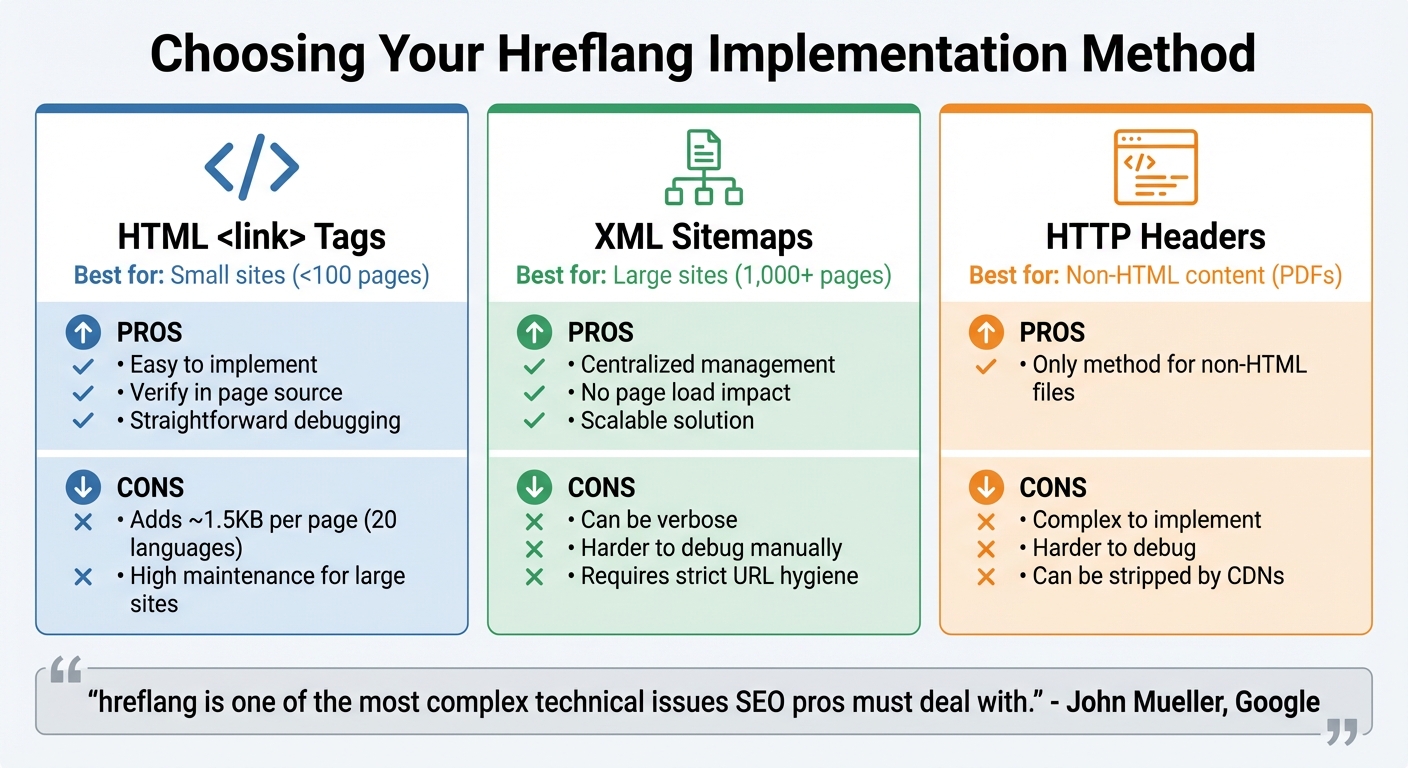
Hreflang Implementation Methods Comparison: HTML Tags vs XML Sitemaps vs HTTP Headers
Once your setup is validated, it’s time to tackle some common mistakes that can derail your hreflang implementation. Catching these early can save you a ton of frustration and prevent loss of search traffic.
Incorrect Codes and Missing Self-References
One frequent issue is using the wrong language or region codes. For instance, about 31% of international websites have conflicting hreflang tags, while 8.9% use invalid language or region codes. A common error is using en-uk instead of the proper en-gb for the United Kingdom, or writing en_US with an underscore instead of the correct en-us with a hyphen.
Another big oversight? Missing self-referencing tags. Around 16% of international sites fail to include these. Every page should reference itself as well as its alternate versions. Without this mutual linking, search engines might ignore your hreflang setup entirely.
Also, stick to full absolute URLs like https://example.com/es/page instead of relative paths. And double-check that all referenced URLs return a "200 OK" status. Broken links not only waste your crawl budget but can also disrupt your hreflang implementation.
Schema Markup Without inLanguage
Skipping the inLanguage property in schema markup is another common pitfall. While hreflang tells search engines which version of a page to display in search results, omitting inLanguage from schema types like WebPage or Article creates a disconnect. This could lead to the wrong language version being shown, frustrating users and increasing bounce rates.
The fix? Add the inLanguage property to all relevant schema types, using the same ISO codes as your hreflang tags. For example, for American English content, include "inLanguage": "en-us". This simple step ensures search engines fully understand the language context of your content.
Comparing Implementation Methods
Choosing the right hreflang implementation method depends on your site’s size and technical requirements. Here’s a quick comparison of the main options:
| Method | Best Use Case | Pros | Cons |
|---|---|---|---|
HTML <link> Tags |
Small sites (<100 pages) | Easy to implement and verify in the page source; straightforward debugging | Adds ~1.5KB per page with 20 language versions; high maintenance for large sites |
| XML Sitemaps | Large sites (1,000+ pages) | Centralized management; no impact on page load speed; scalable | Can be verbose; harder to debug manually; requires strict URL hygiene |
| HTTP Headers | Non-HTML content (e.g., PDFs) | The only method to target non-HTML files | Complex to implement; harder to debug; can be stripped by CDNs |
"hreflang is one of the most complex technical issues SEO pros must deal with." – John Mueller, Search Advocate, Google
Each method has its strengths and weaknesses. For large-scale websites, XML sitemaps are often the most efficient option. Smaller sites, however, may find HTML tags easier to manage. And for non-HTML content, HTTP headers are the only viable choice.
Addressing these common issues will help fine-tune your multilingual SEO efforts and improve your site’s visibility in search results.
Conclusion
Using hreflang tags and schema markup together ensures search engines serve the right multilingual content to the right audience. Hreflang tags define the relationship between language and regional versions, helping search engines match users with the most appropriate page for their location or language preference. On the other hand, schema markup provides clear, structured data, giving search engines and AI systems a better understanding of your content – whether it’s product details, prices, or reviews.
When implemented correctly, hreflang tags prevent duplicate content issues and clarify page relationships. Schema markup, meanwhile, enhances visibility with rich results, which can lead to higher engagement rates. Presenting content in a user’s native language, along with localized prices and dates, creates a smoother user experience and improves conversion rates.
However, many international websites struggle with hreflang errors. Research indicates that over 65% of sites face major issues, and 31% report conflicting directives. These mistakes waste valuable crawl budget, confuse search engines, and frustrate users. Such errors can derail even the best SEO strategies.
To avoid these pitfalls, validation is key. Test your hreflang setup regularly, ensure schema markup includes the inLanguage property with the correct ISO code, and use absolute URLs with reciprocal links. Don’t forget to include an x-default fallback to cover users whose language or region isn’t explicitly targeted. Proper implementation takes effort, but the payoff is worth it.
FAQs
Do hreflang tags and schema markup ever conflict?
Hreflang tags and schema markup can sometimes clash if they’re not applied properly. A common issue occurs when hreflang tags are paired incorrectly with canonical tags, which can confuse search engines by sending mixed signals.
To steer clear of these problems, make sure each tag is used for its specific purpose. Hreflang tags should clarify language and regional targeting, while canonical tags should identify the primary version of a page. By keeping their roles separate and implementing them thoughtfully, you can maintain clarity for search engines and improve your site’s performance.
When should I use HTML tags vs XML sitemaps for hreflang?
When implementing hreflang tags, you have a couple of options depending on your site’s structure and complexity:
- For individual pages or smaller sites, you can add hreflang directly in the HTML tags of each page. This works well when managing a few language versions manually.
- For larger websites with multiple language variations, using XML sitemaps is a smarter choice. This method simplifies the process by centralizing the management of hreflang tags, especially when dealing with a high volume of pages.
Pick the method that aligns best with your site’s needs and scalability.
How do I handle language switchers without IP redirects?
To handle language switchers without relying on IP redirects, you can use hreflang tags in the <head> section of your webpages. These tags should follow this format:
<link rel="alternate" hreflang="language-region" href="URL" />
Make sure to include bidirectional links (linking between both language versions) and use the correct ISO language and region codes. This approach helps search engines clearly understand your content’s language and regional targeting, improving how your site is presented to users in different locations.