
When patients search online for healthcare services like "pediatrician near me", your practice needs to show up – and location pages are the key. These pages connect local patients with your services by providing essential information like your address, phone number, hours, and services. They also improve your visibility in local search results and help convert visitors into booked appointments.
Key Takeaways:
- Each location needs its own page with accurate details: address, phone number, hours, and services.
- Include provider bios, patient reviews, and booking options to build trust and encourage action.
- Optimize for local search terms like "urgent care in [city]" to rank higher in search results.
- Mobile-friendly design, fast load times, and clear calls-to-action are critical for conversions.
Actionable Tips:
- Highlight essential info (address, phone, hours) at the top of the page.
- Use keywords tied to your city or neighborhood for better local SEO.
- Add patient reviews, provider profiles, and photos of your facility.
- Ensure mobile usability with click-to-call buttons and quick-loading pages.
- Track metrics like appointment bookings and bounce rates to improve results.
A well-structured location page can turn online searches into real appointments. Start by focusing on accuracy, patient needs, and local relevance to make your practice the first choice in your area.
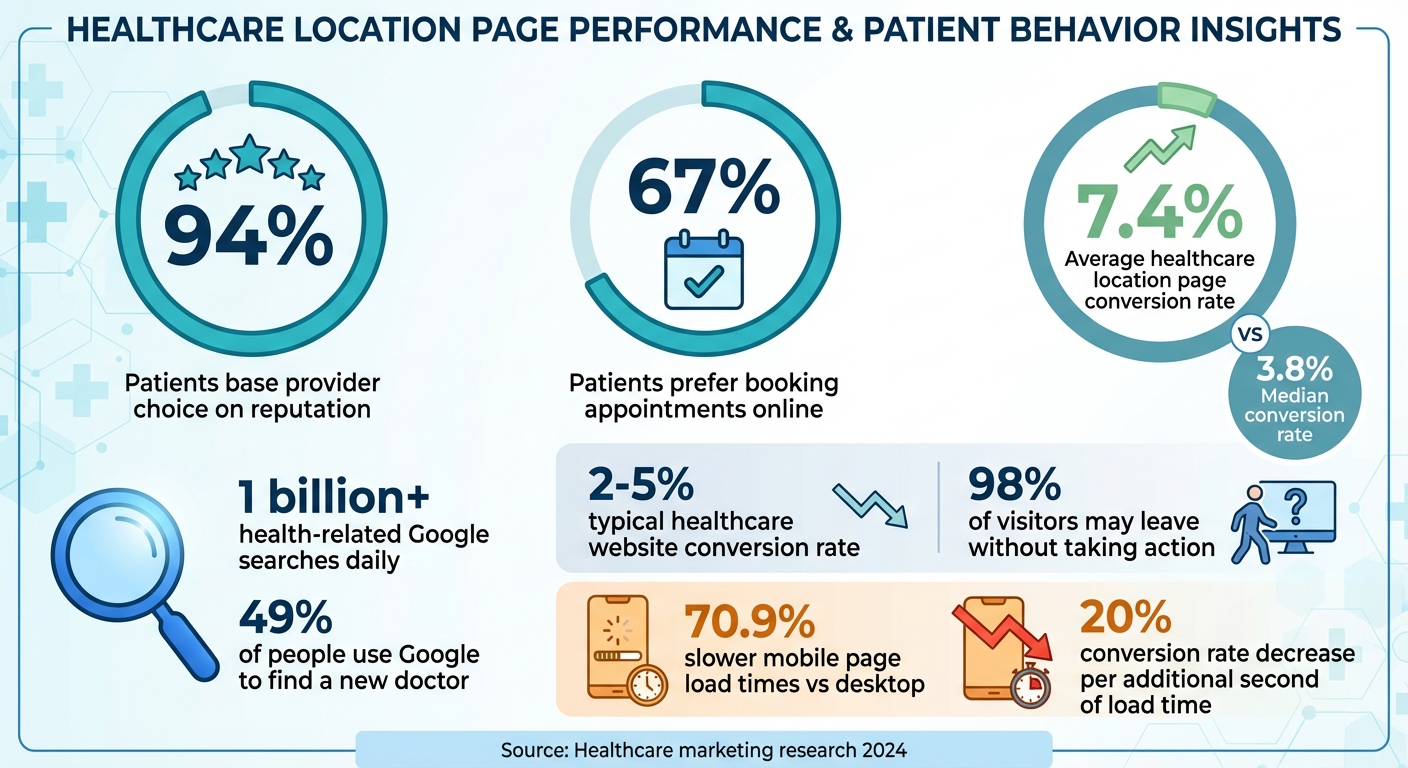
Healthcare Location Page Statistics: Conversion Rates and Patient Behavior
How to Create SEO Location Pages For Your Website (That Actually RANK!)
Planning Your Location Pages
Creating effective location pages involves more than just listing addresses. These pages should provide all the essential details patients need to book appointments while aligning with how people search online. Start by identifying which locations need individual pages, what content matters most to your audience, and how to match your information with the search terms patients are using.
Deciding Which Locations Need Their Own Page
Each physical address – whether it’s your main office, a satellite clinic, or another facility – should have its own dedicated page. This ensures patients can easily find the correct location without confusion.
Avoid grouping multiple locations on a single page. If your practice operates in several areas, each location deserves a unique landing page, especially if the services or staff differ. For instance, if one clinic specializes in emergency care while another focuses on primary care, these distinctions should be highlighted on separate pages. Tailoring each page to reflect the specific needs of its community helps patients feel more connected to your services.
In November 2024, Outliant showcased Ideal Dental as an example of a multi-location practice excelling in web design. Their site maintains brand consistency while addressing local needs by including details like hours, services, and dentist profiles for each clinic. This approach keeps the brand unified while offering a personalized experience for each location. [Source: A Comprehensive Guide to Multi-Location Healthcare Web Design]
What Patients Need to See First
When someone visits your location page, they’re looking for quick answers: Where are you? How can I contact you? What services do you offer? When are you open? Make sure the essentials – address, phone number, business hours, and a "Book Appointment" button – are front and center. Include information about insurance plans you accept and payment options to remove any guesswork.
Your pages should load quickly, work seamlessly on mobile devices, and include touch-friendly buttons for calling or getting directions. To build trust, add patient reviews, staff credentials, and photos of your facility. These elements can reassure visitors and make them more likely to choose your practice.
Matching Content to Local Search Terms
Think about how patients search for healthcare services in their area. Common phrases include "urgent care near me", "pediatrician in Austin", or "top orthopedic surgeon in Dallas." Your location pages should naturally include your city, neighborhood, and the services you provide to align with these searches.
Google prioritizes pages that clearly signal local relevance and service offerings. For example, phrases like "family medicine in [Your City]" or "dermatology services in [Neighborhood Name]" can help your pages rank higher and attract the right audience. By aligning your content with local search terms, you can boost visibility and create pages that effectively convert visitors into patients.
Building Pages That Convert Visitors to Patients
Once you’ve planned your content, the next step is to structure your location pages in a way that turns visitors into patients. How you present information, design for mobile users, and use visuals can make or break whether someone clicks "Schedule Appointment" or leaves your site. On average, healthcare location pages see a conversion rate of 7.4%, with a median of 3.8%. Even small tweaks to layout and usability can lead to noticeable increases in appointments.
What Every Location Page Should Include
A strong location page starts with a clear, specific headline like "Family Medicine in Downtown Austin." Place your contact details prominently at the top of the page, ensuring they align with your directory listings. Add a bold, easy-to-spot "Schedule an Appointment" button above the fold – this should be one of the first things visitors see.
Make sure to list the services offered at that location and introduce your providers with names, photos, credentials, and short bios. This helps patients feel confident about who they’ll meet. Booking appointments should be simple and obvious, whether through an embedded scheduler or a highly visible button. Since 67% of patients prefer booking online, having this option front and center is critical.
Once these essentials are in place, focus on creating a seamless mobile experience to keep conversions on track.
Optimizing for Mobile Users
Mobile usability plays a huge role in turning visitors into patients. With mobile pages loading 70.9% slower than desktop ones, optimizing for speed is non-negotiable. Use large, touch-friendly buttons for booking or calling, and add click-to-call functionality so patients can easily dial with one tap. Simplify forms to only ask for necessary details – typing on a small screen can be frustrating.
Place crucial information like your address, phone number, hours, and booking button at the top of the page to minimize scrolling. A sticky navigation bar can keep your call-to-action visible as users move through the page. To improve performance on slower connections, optimize images and reduce unnecessary elements for faster loading times.
Visual elements can further enhance engagement and build trust.
Adding Maps, Photos, and Visual Elements
Bring your page to life with visuals that guide and reassure visitors. Embedded maps make it easy for patients to find your location and feel more connected to your practice. Include professional photos of your facility – show the exterior, interior, waiting areas, and even your team. Authentic images of your actual practice are far more effective than generic stock photos in building trust.
Google’s AI evaluates photo and video content, so uploading fresh visuals can also boost your local search rankings. Short videos (30–90 seconds) answering common questions, like "What to expect during your first appointment", can make your site more engaging. Highlight certification badges, HIPAA compliance seals, and provider credentials to reassure visitors about the quality of care. For practices like cosmetic dentistry or plastic surgery, HIPAA-compliant before-and-after photos can showcase results effectively.
Writing Content That Connects with Patients
Your location page should address patient concerns in simple, straightforward language. With nearly half of people turning to Google to find a new doctor, they’re seeking clear, easy-to-understand answers – not complex medical terminology. Aim to write at a 6th-grade reading level, which means using short sentences, everyday words, and clear explanations.
Start by acknowledging the emotional aspect of healthcare decisions. Patients searching for care are often feeling anxious or overwhelmed, so it’s important to lead with empathy in your content. Instead of focusing on clinical details, highlight how your practice helps patients feel better, heal quickly, or manage their conditions with confidence. These strategies align with earlier design and functionality tips, helping to connect with patients on a more personal level. Next, let’s explore how to describe your services and showcase your team to build trust.
Writing Service Descriptions for Each Location
Every location needs unique content that reflects its community, nearby landmarks, or local health priorities. For example, a pediatric clinic near schools might emphasize "convenient after-school appointments for families in the Riverside district", while an orthopedic practice could mention "serving athletes and active adults throughout West County."
When describing treatments, use clear, relatable language. Instead of saying "comprehensive orthopedic interventions", opt for "treatment for broken bones, sports injuries, and joint pain." Address common patient concerns directly: What conditions do you treat? How long will an appointment take? Do you offer same-day visits? Providing this kind of practical information makes it easier for patients to decide if your location is the right fit.
Featuring Providers and Patient Reviews
In addition to clear service descriptions, showcasing your providers and patient reviews can help build trust. Provider profiles are especially effective in creating a connection. Include photos, credentials, bios, and specialties for each provider at the location. Use a mix of professional headshots and candid photos of providers interacting with patients or staff – these unposed images make your practice feel approachable and relatable.
"Testimonials offer emotional reassurance through real patient experiences, humanizing your brand and reducing anxiety. Both should be recent, relevant, and authentic to build trust in high-stakes healthcare decisions." – Eastern Standard
Patient reviews also play a key role in boosting search rankings and encouraging appointments. Make it easy for satisfied patients to leave reviews by sending a follow-up email with a direct link to review platforms after their visit. Highlight location-specific testimonials on each page, focusing on recent reviews tied to the services you provide. Always respond to reviews – both positive and negative – in a professional manner while staying HIPAA compliant by avoiding any mention of sensitive patient information.
Explaining What to Expect During a Visit
Help reduce patient anxiety by offering a clear explanation of what happens during a visit, from arrival to checkout. This not only reassures patients but also encourages them to book an appointment. Include a dedicated FAQ section that covers practical details like parking options, entrance directions, required documents for first-time visits, wheelchair accessibility, and language interpretation services.
Provide specifics about your check-in process, estimated wait times, and forms that need to be completed. Highlight any special features you offer, such as valet parking, children’s play areas, or extended evening hours. Adding high-quality photos of your waiting area, exam rooms, and parking lot can help patients visualize their visit and feel more at ease.
Maintaining Accurate and Compliant Information
After fine-tuning your design and conversion elements, the next step is to ensure your location pages are accurate and compliant.
Inconsistent or outdated information on your location pages can confuse patients and hurt your search rankings. Even small differences – like listing "Suite A" in one place and "Ste A" in another – can mislead search engines and frustrate potential patients, leading to lost leads and lower rankings. To avoid this, maintain consistent NAP (Name, Address, Phone Number) details across all platforms, including your website, Google Business Profile, and directories like Healthgrades and Zocdoc.
Keeping Contact Information Up to Date
Ensure your contact information is uniform across your website, footer, Google Business Profile, social media, and directories. For practices with multiple locations, each office should have its own Google Business Profile with a unique address and operating hours.
"You’ll just want to be sure that your Business Profile information is – above all else – accurate, and that it uses the same exact name as your practice".
Conduct monthly audits of your online listings to catch and fix outdated details. If your operating hours change, a new provider joins, someone leaves, or your services expand, update your location pages immediately. Adding local schema markup helps search engines better understand your business details, which can improve how your information appears in search results. These steps also lay the groundwork for providing clear insurance and payment details.
Displaying Insurance and Payment Options
Patients want to know upfront if their insurance is accepted. Clearly list the insurance plans you accept on each location page and your Google Business Profile. For example, you might include plans like "Medicare, Medicaid, Blue Cross Blue Shield, Aetna, United Healthcare." Use U.S. currency formatting for payment information, such as "$50 copay" or "Self-pay rates starting at $150." To avoid confusion, include a disclaimer reminding patients to confirm coverage with their insurance provider, as benefits and networks often change. Providing clear payment and insurance details helps build trust with your patients.
Making Pages Accessible to All Patients
Healthcare content falls under Google’s "Your Money or Your Life" (YMYL) classification, meaning your location pages must meet high standards for quality, accuracy, and trustworthiness. Beyond improving search rankings, accessibility ensures all patients – regardless of disabilities or language barriers – can easily use your website.
To make your pages accessible, use descriptive alt text for images, fonts that are at least 16px, and ensure good text-to-background contrast. Highlight accessibility features at your locations, like wheelchair-accessible entrances, elevators, exam rooms, and designated parking spaces. If your practice provides language interpretation services or has bilingual staff, specify the languages offered. Accessible and clear pages not only meet compliance standards but also help patients feel confident about booking appointments.
Measuring and Improving Appointment Rates
Once your location pages are live, it’s time to focus on tracking how well they convert visitors into patients. Understanding where users engage and where they drop off is key to making informed improvements that lead to more appointments. Without solid data, you could end up wasting both time and money.
Metrics to Track for Location Pages
Start by monitoring key conversion actions like appointment bookings. This includes tracking contact form submissions, phone clicks from your page, and bookings made through online schedulers. Engagement metrics, such as time spent on the page, bounce rates, and scroll depth, are also essential. Tools like Google Analytics and Google Search Console can help you monitor local website traffic and track rankings for location-specific keywords.
Additionally, Google Business Profile Insights can provide data on direction requests, phone calls, and website clicks. If you’re running paid campaigns, make sure to measure cost per call and cost per appointment to evaluate how efficiently your budget is being used. For example, one urgent care campaign using Carenet‘s Online Appointment Scheduling Solution achieved 438 conversions at a cost per acquisition of $2.30, with a 43% conversion rate over three months. Notably, in 2019, 34% of patients who scheduled through Carenet‘s platform were new to the health system.
"Only by analyzing these and the other metrics discussed later can a practitioner fully understand the effectiveness and benefits of a marketing campaign." – Kevin D StClergy, M.S., MedPB, LLC
Finding Where Patients Leave Without Booking
Healthcare websites typically convert only 2% to 5% of visitors, which means up to 98% of users may leave without taking any action. To identify where potential patients drop off, tools like Hotjar or Microsoft Clarity can offer insights. These platforms allow you to review user sessions and heat maps, showing where visitors click, scroll, or abandon the page.
Pay special attention to page load speed – it’s critical. Every additional second of load time can reduce conversion rates by around 20%. For instance, one client’s data revealed that mobile traffic for online appointment scheduling was double that of desktop traffic. If analytics show high bounce rates on certain sections or devices, it’s worth investigating. For example, if visitors frequently leave after viewing insurance details or service descriptions, those areas might need clearer language or better formatting. These insights can guide targeted updates to boost engagement and conversion rates.
Testing Changes to Improve Results
Once you’ve identified problem areas, it’s time to test changes that could improve your results. Here are a few strategies to consider:
- Simplify your contact forms by reducing the number of required fields. Shorter forms often lead to higher completion rates.
- Reorganize your content so critical elements, like appointment booking buttons and phone numbers, are easy to find at the top of the page.
- Update service descriptions to use more patient-friendly language instead of medical jargon.
- Use dynamic phone number tracking tools, like CallRail, to analyze which locations generate the most qualified calls and which marketing channels drive valuable appointments.
- Create campaign-specific landing pages. These pages can double or even triple conversion rates, especially when tailored to specific services or patient groups.
Make sure your online scheduling system is always functioning smoothly. Any technical hiccups can frustrate potential patients and hurt your conversion rates. Lastly, it’s crucial to ensure that all testing and optimization efforts comply with HIPAA regulations to protect patient trust and maintain legal compliance.
Conclusion
Creating location pages that effectively drive patient appointments isn’t about fancy designs or cutting-edge technology – it’s about getting the basics right. By combining accurate data with patient-centered content, you can turn visitors into scheduled appointments. The key? Focus on precise NAP (Name, Address, Phone) data, localized content, and well-optimized profiles to connect with your community.
Here’s the reality: 94% of potential patients base their choice of healthcare provider on reputation, and nearly half turn to Google when searching for a new doctor. With over 1 billion health-related searches happening on Google every day, your location pages need to stand out. Mobile-friendly designs, quick load times, genuine patient reviews, and clear calls-to-action are essential to capturing this traffic and converting it into appointments.
The numbers don’t lie. A well-optimized location page can deliver measurable results. Local SEO often comes down to two things: managing online reviews and keeping your Google Business Profile up-to-date. Encouraging patient feedback and responding quickly not only builds trust but also signals search engines that your practice is active and engaged with its community.
The healthcare industry is shifting rapidly. Most local searches now happen on mobile devices, and voice searches are growing in popularity. To stay ahead, you need to consistently test, adapt, and improve. Pay attention to your metrics, figure out where visitors drop off, and make small, targeted adjustments. Even simple changes – like simplifying contact forms or reorganizing your content – can lead to noticeable improvements in conversion rates.
Ready to get started? Launch your first location page today. Use these strategies, track your progress, and refine your approach based on the results. Patients in your area are already searching for healthcare services – make sure they find you first.
FAQs
What are the best ways to optimize location pages for local SEO?
To get the most out of your location pages for local SEO, start by keeping your Google Business Profile accurate and up-to-date. Make sure your name, address, phone number (NAP), business hours, and high-quality photos are all correct and current. Use localized keywords throughout your content, including titles and meta descriptions, to effectively target specific areas. For businesses with multiple locations, create separate pages for each one, featuring unique, patient-centered content that highlights services tailored to each community.
Add schema markup specific to healthcare organizations to help search engines better understand your site. Consistency is key – ensure your business details are the same across all online directories. Encourage patients to leave reviews and respond to them quickly, as reviews play a big role in local rankings. Lastly, make sure your website is mobile-friendly, loads quickly, and offers a smooth user experience to turn visitors into scheduled appointments.
What key features should a healthcare location page have to attract and convert patients?
Creating an effective healthcare location page involves focusing on local SEO strategies. This means including elements like schema markup, well-researched local keywords, and precise NAP (name, address, phone) details. It’s also crucial to display clear contact information, offer an interactive map or location finder, and provide online appointment scheduling with real-time availability to make the process seamless for patients.
To connect with potential patients, add location-specific details that resonate with the community, include patient-centric information, and highlight reviews or testimonials. Ensure the page is easy to navigate, secure, and fully compliant with HIPAA regulations. These steps help establish trust and make it easier for patients to book appointments.
How do patient reviews help location pages attract more appointments?
Patient reviews are a powerful tool for making location pages more impactful. They help establish trust, credibility, and social proof, all of which play a big part in influencing potential patients’ decisions. Beyond that, positive reviews can boost your local search rankings, making your practice easier to find and more attractive to prospective patients.
When reviews share real patient experiences, they create a relatable connection that motivates others to schedule appointments. Plus, taking the time to respond to reviews demonstrates professionalism and a genuine commitment to your patients. This not only strengthens confidence in your practice but also fosters a welcoming sense of community.