
Creating city and service pages is a proven way for HVAC businesses to rank higher in local searches and attract more leads. These pages target specific services in specific locations, such as "AC repair Dallas TX", ensuring your business appears when customers need help the most. Here’s why they’re important and how to build them:
- Why They Matter: 97% of consumers search online for local services, and 87% rely on Google to find and hire businesses. Without optimized pages, you’re missing out on high-intent local traffic.
- Key Objectives: Rank higher in local searches, attract mobile and voice search users, and convert visitors into customers with clear calls-to-action and trust signals.
- How to Build Them:
- Create separate pages for each service (e.g., AC repair, furnace installation) to avoid keyword overlap.
- Organize content by location, targeting cities, suburbs, or neighborhoods you serve.
- Use clean, descriptive URLs like
/ac-repair/dallas-tx/. - Include local keywords, customer reviews, and location-specific details to boost relevance.
- Technical Tips: Implement schema markup for local businesses, maintain consistent business information (NAP), and optimize for mobile and fast load times.
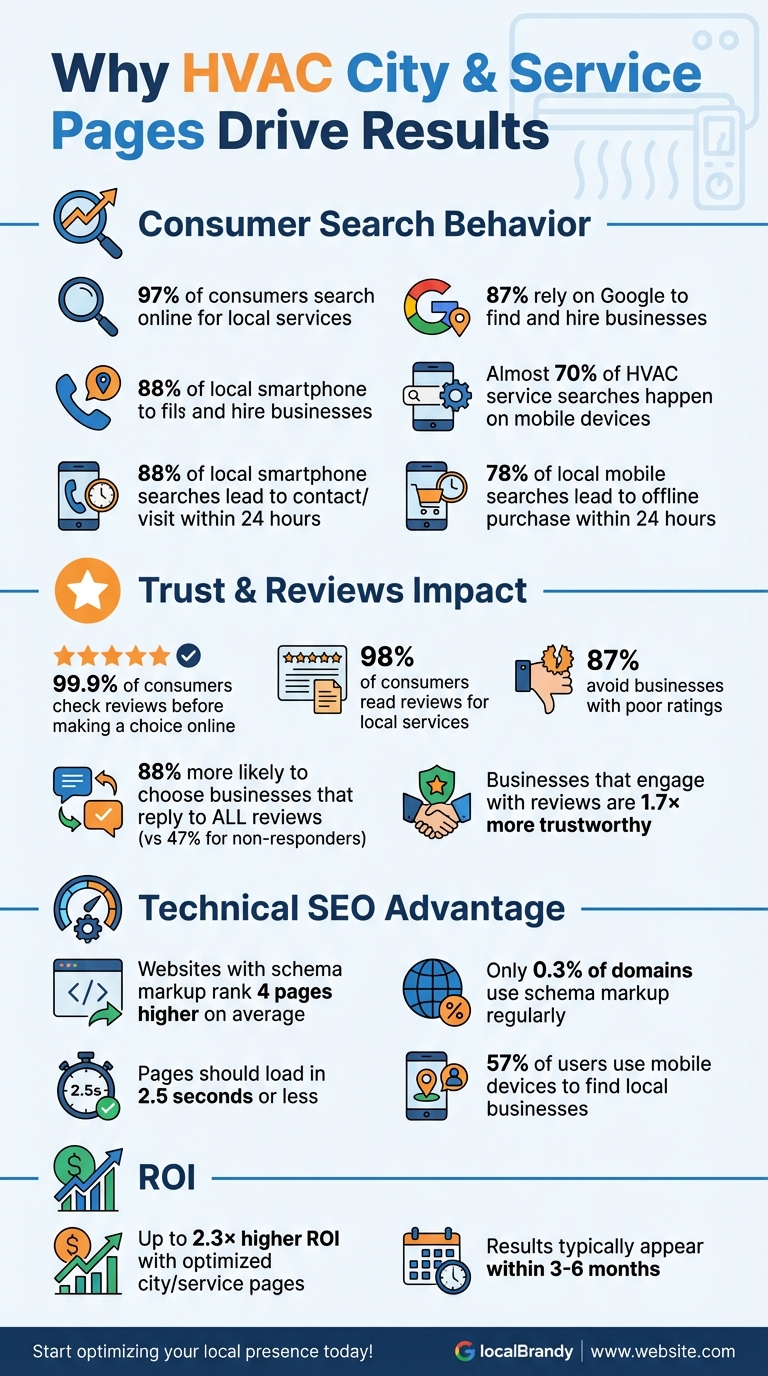
HVAC Local SEO Statistics: Why City and Service Pages Matter
Local SEO for Service Pages (How to Structure Your Local Landing Pages for Local SEO)
Planning Your City and Service Page Structure
Before diving into content creation, you need a solid plan. A well-organized page structure isn’t just helpful for search engines – it also lays the groundwork for scalable growth. One of the first steps is to ensure each service is paired with its own optimized page.
Mapping Services to Individual Pages
Every HVAC service you offer should have its own dedicated page. For example, services like AC repair, furnace installation, heat pump maintenance, duct cleaning, and HVAC maintenance plans all deserve separate pages. Why? This approach avoids keyword cannibalization and ensures each page has a clear ranking goal. Assigning specific keyword groups to individual pages also prevents your site from competing with itself.
A great example of this strategy is Strand Brothers. They use service-specific, geo-targeted headlines such as "heat pump service Austin", which help their pages rank higher for local searches. Each service page also includes localized content tailored to the specific needs of their area. This level of detail ensures that search engines and potential customers find exactly what they’re looking for.
Organizing City Pages by Location
Once your service pages are set, the next step is to organize your content by location. Dedicated location pages are crucial for HVAC companies that serve multiple cities or regions. These pages boost your visibility in local searches for every service area you cover. The key is deciding how specific to get – should you focus on whole cities, neighborhoods, or even ZIP codes?
Start by targeting major cities and suburbs in your service area. Avoid overloading your site with too many pages, as this can result in a Google penalty for doorway pages. For instance, if your business operates in the Dallas-Fort Worth area, you could create pages for major suburbs like Plano, Frisco, Arlington, and Irving.
Examples of effective practices include Guest Plumbing & Heating, which uses a service area map on their homepage to highlight the cities and communities they serve in the Toronto area. Similarly, Lozier Heating & Cooling provides a detailed list of their service areas, making it simple for visitors to confirm if their city is covered.
Creating Clean URL Structures
A clean, simple URL structure boosts your local SEO efforts and makes your site more user-friendly. Aim to keep URLs under 60 characters so they’re easy to read, remember, and share. Include both the service and location in your URLs, such as yourdomain.com/ac-repair/plano-tx/ or yourdomain.com/furnace-installation/dallas-tx/.
Consistency is key. Stick to a standard format like /service/location/ or /location/service/ across your site. Use hyphens to separate words, keep everything lowercase, and avoid special characters. For location pages, go for direct URLs like yourdomain.com/dallas/ instead of longer paths like yourdomain.com/locations/texas/dallas/. Keeping location pages directly under your main domain signals local relevance more clearly to search engines.
Finally, focus on one primary service and one primary city per page. This targeted approach improves your chances of ranking well in search results.
Conducting Keyword Research for HVAC Pages
Keyword research helps you uncover the exact terms potential customers use to find your services. The best place to start? Your own business data. Dive into phone logs, contact form submissions, and Google Business Profile insights to identify the phrases people use when searching for help. More often than not, customers describe specific problems like "furnace won’t turn on" or "AC blowing warm air" rather than using technical jargon. These phrases are gold. Here’s how to turn them into actionable insights.
Gathering Seed Keywords from Customer Data
Your existing customer interactions are a treasure trove of insights. Listen to call recordings, review intake forms, and analyze your Google Business Profile queries to spot recurring themes. These reveal the exact language customers use when they’re ready to act – which often differs from industry terminology. For instance, while HVAC pros might say "furnace repair", homeowners are more likely to search "heater not working." Both phrases are worth targeting with tailored content.
Adding Location Modifiers to Keywords
Once you’ve identified your core service keywords, enhance them with location-specific modifiers to capture local traffic. Terms like "AC repair Dallas TX", "furnace installation near me", or "24-hour HVAC Plano" make it easier for Google to connect your business with nearby customers. This is critical because 88% of people who perform local searches on their smartphones contact or visit a business within 24 hours. Include city names, suburbs, and neighborhood identifiers in your keywords. Don’t forget to reflect common search habits by incorporating phrases like "near me" alongside full location names.
Analyzing Search Volume and Competition
Keyword tools can help you pinpoint terms with solid search volume and manageable competition. For example, in December 2025, Hook Agency highlighted how "AC unit repair" saw 1,600 monthly searches, while "heat pump replacement" generated 2,200 searches. These numbers show how data can guide your keyword strategy. Long-tail keywords like "emergency HVAC repair in Savannah, GA" may attract fewer searches, but they often result in higher conversion rates.
"I’m not exaggerating when I say that without the right keywords, there’s no such thing as SEO".
Seasonal trends also play a major role – Google Trends data reveals that searches for "air conditioning replacement near me" spike during summer months. By aligning your content with these patterns, you can position your HVAC pages to meet demand at just the right time.
Structuring HVAC City and Service Pages That Convert
When someone lands on your page, they should immediately understand what you offer, where you operate, and how to reach you. The top section should be clear and direct, showcasing your service, location, and contact details. For example, a strong hero section might include a headline like "AC Repair in Phoenix, AZ – Same-Day Service Available," a prominent phone number, and a bold "Schedule Now" button. First impressions matter – your page design is a key factor in building trust. In fact, 95% of business executives believe organizations have a duty to foster trust. This trust starts with a well-thought-out design that aligns with the local SEO principles we’ve discussed earlier.
Designing Effective Page Layouts
Start with an above-the-fold section that highlights your core value proposition. This could include an engaging image or video of your team at work, paired with clear calls-to-action (CTAs) placed strategically throughout the page. A layout like this not only grabs attention but also helps establish credibility right away.
Adding Local Trust Signals
Customer reviews play a massive role in decision-making – an overwhelming 99.9% of consumers check reviews before making a choice online. Showcase localized testimonials to build trust with your audience. Add details like licenses, certifications, and insurance information prominently. Including photos of your local team and service vehicles can also create a sense of connection and familiarity. Responding to reviews is equally important: 88% of consumers are more likely to choose a business that replies to all its reviews, compared to just 47% who would pick one that doesn’t. Businesses that engage with feedback are perceived as 1.7 times more trustworthy than those that don’t. Once you’ve established trust, focus on making your content resonate with the local audience.
Customizing Content for Each Location
Tailor your content to reflect the unique aspects of each service area. For instance, mention how Phoenix’s scorching 110°F summers can push AC units to their limits, or how older homes in historic Dallas neighborhoods often require ductwork upgrades. Highlight local weather patterns, common housing styles, and seasonal HVAC challenges that are specific to the area. Include neighborhood-specific case studies and real photos from jobs you’ve completed in the community. This approach not only strengthens your connection with local customers but also supports your keyword strategy and city page structure, all while avoiding duplicate content issues across your site.
Implementing Local SEO and Technical Optimizations
Once your content is tailored for specific locations, technical tweaks and structured data can dramatically improve your visibility in local search results. Did you know that webpages using schema markup rank four pages higher on average compared to those that don’t? Yet, shockingly, only about 0.3% of registered domains use it regularly. This leaves a massive opportunity for HVAC businesses ready to adopt these technical upgrades. Let’s dive into how schema markup, consistent NAP (Name, Address, Phone) data, and other technical optimizations can work together to elevate your local rankings.
Using Schema Markup for Local Businesses
Schema markup is a type of code added to your website to help search engines better understand your content. For HVAC companies, this means emphasizing services, reviews, and business details that matter most to potential customers. The LocalBusiness schema is particularly crucial – it should include your business name, address, phone number, operating hours, and type of business (e.g., "HVAC Contractor"). Adding geolocation data, such as latitude and longitude, can further solidify your local presence.
You can also use the Service schema to highlight specific offerings like "AC Installation", "Heating Repair", or "Duct Cleaning." Each service should have its own entry, complete with descriptions that include relevant keywords and the areas you serve. If you offer pricing details, include ranges or "starting at" prices to provide clarity. For pages addressing customer inquiries, the FAQPage schema is a great fit. Google recommends using JSON-LD for structured data, and tools like Google’s Structured Data Markup Helper can simplify the process. Once you’ve added the markup to your website’s HTML, test it using Google’s Rich Results Test to ensure everything works perfectly before publishing.
Maintaining Consistent NAP Data
After setting up schema, the next step is ensuring your business information is consistent across all platforms. Your Name, Address, and Phone number (NAP) must match exactly on your website, Google Business Profile, and every online directory where you’re listed. Google sees consistent NAP data as a sign of legitimacy and trust. Even small inconsistencies can hurt your rankings, while larger discrepancies – like mismatched phone numbers – can confuse Google and prevent it from linking your listings to your business.
To standardize your NAP data, use the full legal version of your business name, follow U.S. Postal Service formatting for addresses (e.g., "St." for Street), and format phone numbers with hyphens, like 123-456-7890. Double-check your Google Business Profile and all major directories. To stay organized, keep a spreadsheet tracking all your listings, the exact NAP details used, update dates, and login credentials for each platform. Schedule audits every six months to catch and fix any inaccuracies, as third parties may create listings with incorrect information.
Optimizing Technical Foundations
To boost your HVAC site’s performance, focus on technical improvements that enhance both user experience and search rankings. Page speed and mobile-friendliness are key factors here. Slow-loading websites often lead to higher bounce rates, which can hurt your rankings. Aim for your pages to load in 2.5 seconds or less. Speed up your site by compressing images (tools like TinyPNG or Squoosh can help), enabling browser caching, and minimizing unnecessary code or plugins. Use efficient image formats like WebP and the srcset attribute in HTML to serve appropriately sized images for different screen sizes.
With 57% of users relying on mobile devices to find local businesses, your website must be mobile-friendly. Use responsive design to ensure your site looks great on any screen size. Simplify navigation with clear menus, make touch targets easy to click, and minimize the number of required fields in forms to reduce friction. Regularly test your site with tools like Google PageSpeed Insights and Google’s Mobile-Friendly Test to identify and address any issues. Finally, create clean and logical URL structures, such as /phoenix-az/ac-repair/, to help search engines index your site efficiently.
Conclusion
Summary of Optimization Strategies
To recap, creating effective HVAC city and service pages requires blending targeted strategies into a cohesive approach. Start with keyword research that zeroes in on local, high-intent terms like "AC repair Phoenix" or "furnace installation Denver." Use clean, descriptive URLs (e.g., /phoenix-az/ac-repair/) and develop unique, localized content that speaks directly to the needs of each community. Add trust signals such as localized reviews and consistent NAP (name, address, phone number) information to establish credibility. It’s worth noting that 98% of consumers read reviews for local services, and 87% avoid businesses with poor ratings.
Technical enhancements are just as important. Incorporate LocalBusiness schema markup to help search engines understand your business details and services. Prioritize mobile optimization since almost 70% of HVAC service searches happen on mobile devices. With 78% of local mobile searches leading to an offline purchase within 24 hours, even small delays in site speed can impact conversions.
While results typically appear within 3–6 months, tracking performance is essential. Use tools like Google Analytics 4 and Search Console to monitor rankings, traffic, leads, and conversions. Businesses that implement these strategies can see up to 2.3× higher ROI, proving the value of a data-driven approach.
By applying these strategies, you can improve local rankings and grow your HVAC business effectively.
How SearchX Can Help HVAC Businesses
Once your pages are optimized with targeted keywords, trust signals, and technical improvements, execution becomes the key to success. That’s where SearchX steps in. We specialize in building city and service pages designed to turn clicks into leads. From keyword research to technical SEO audits, our services ensure your pages perform at their best.
Our Growth and Enterprise plans include advanced features like schema markup implementation and custom content tailored to each service area. We also optimize your Google Business Profile and citations to boost visibility. Plus, we focus on tracking meaningful metrics – like lead generation and revenue growth – so you can see the impact of your investment clearly.
Get started with our free GMB or Website Audit Tool to uncover quick wins. From there, we’ll help you build a complete strategy that transforms your city and service pages into a powerful marketing engine for your HVAC business. Let SearchX guide you to measurable growth and success.
FAQs
How can city and service pages help HVAC businesses rank higher locally?
City and service pages are a game-changer for boosting local SEO in the HVAC industry. By zeroing in on specific locations and services, these pages help you target local keywords that align with what your potential customers are actively searching for. The result? Better visibility in local search results and a stronger presence in Google’s Map Pack.
These pages don’t just help search engines grasp your service areas – they also deliver localized content that connects with users on a more personal level. When crafted effectively, they enhance the user experience, boost relevance, and attract leads who are ready to take action. By focusing on a solid structure, integrating local business schema, and using well-researched keywords, your HVAC business can rise above the competition in local markets.
How can I create effective URLs for HVAC service pages?
When crafting URLs for HVAC service pages, aim for ones that are short, clear, and easy to understand. Incorporating relevant keywords – like the service offered and the location (such as a city name) – can boost SEO performance and make the page’s purpose obvious to visitors. Stick to hyphens to separate words, avoid including extra numbers or unnecessary parameters, and ensure your URL structure is consistent and well-organized across the site. A strong example of this would be: www.yourhvacwebsite.com/atlanta-heating-repair.
Why is schema markup essential for HVAC city and service pages?
Schema markup plays an important role in helping search engines grasp the content on your HVAC city and service pages. When implemented correctly, it can enhance your visibility in search results and even generate rich snippets, which make your listings more eye-catching for users.
With schema markup, you can emphasize key local details such as your business name, address, phone number, and the services you provide. This not only strengthens your local SEO but also makes your business more relevant to nearby customers. Plus, it can lead to higher click-through rates by making your pages more noticeable in search results.